Prices checked on · By Peter Murage
Linktree is still the biggest link in bio tool out there. Over 70 million creators use it, and it does what it promises.
But it isn’t cheap. To remove the Linktree logo and use your own design, you need the Pro plan. That costs $17 a month, or $14 a month billed yearly (Linktree pricing).
I first went looking for alternatives in 2019. An Instagram user was complaining that they could only add one link, that Linktree was expensive, and that Instagram sometimes flagged link tools as spam. So I started testing every Linktree alternative I could find.
Since then, I’ve tried over 15 link in bio tools. Here’s what I learned: most of them do the same thing. More options don’t help you. They just leave you comparing tabs.
So this 2026 update cuts the list to three. Each one wins a clear job: best overall, best all-in-one, and easiest to use.
TL;DR
- Short on time? Start with Many.bio. You can set up a clean link in bio page in under 3 minutes, from your phone, in your own colors.
- Many.bio’s free plan is packed. You get unlimited links, a contact form, free color themes and fonts, and four free domains to choose from.
- Many.bio Pro costs $5 a month for two pages. It unlocks over 1,500 Google Fonts, SEO settings, click and visitor analytics, and Google Analytics and Facebook Pixel.
- Best overall value: Taplink. Remove the branding, take payments, and use your own domain for $6 a month, billed yearly.
- Selling products or pitching brands? Pick Beacons. The store, email list, and media kit are free, with a 9% seller fee until you upgrade.
- Linktree charges $17 a month to remove its logo. All three alternatives start with a free-forever plan.
Quick picks: the 3 best Linktree alternatives in 2026
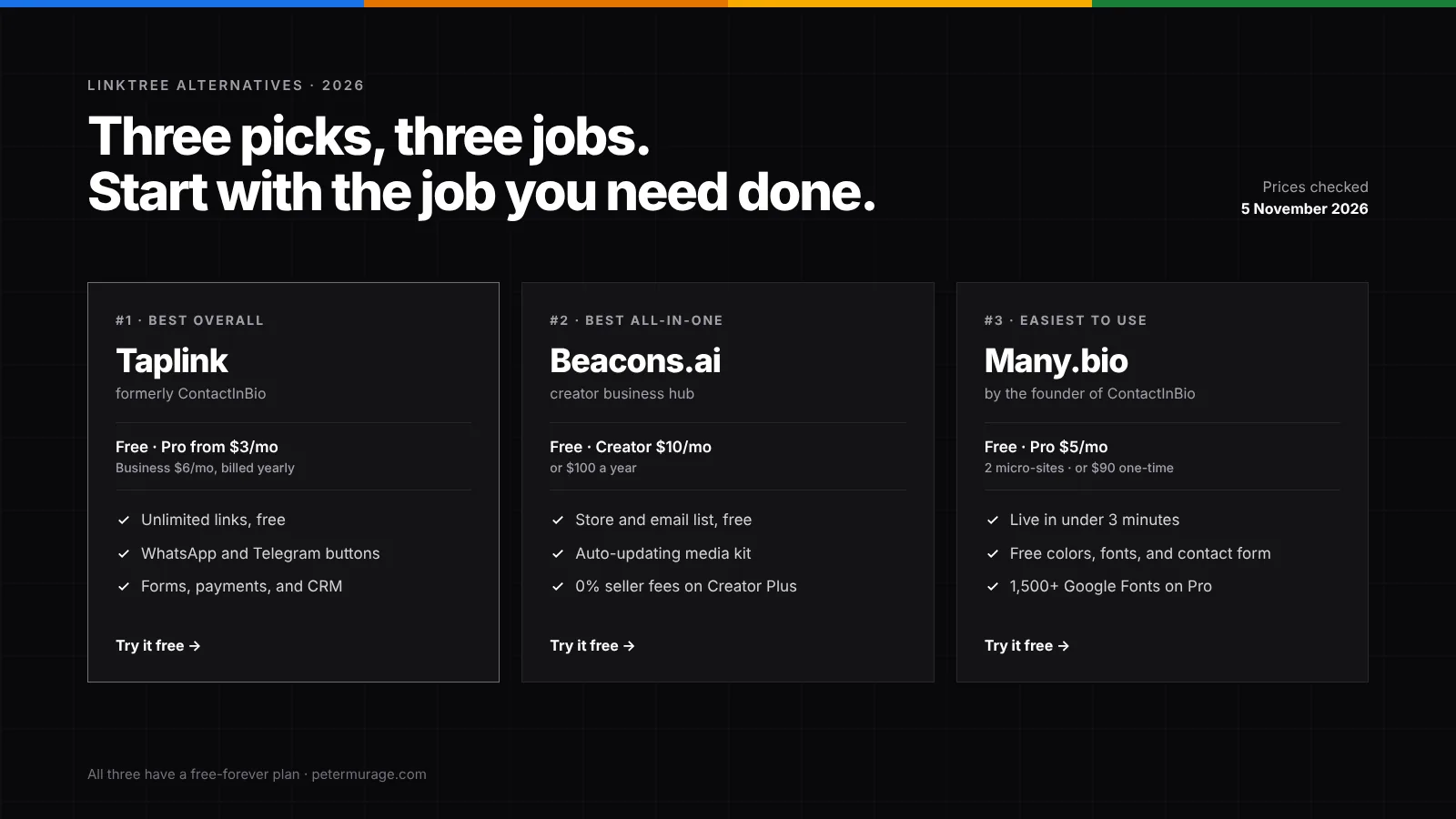
- Taplink (formerly ContactInBio) – best overall Linktree alternative. Free forever plan. Pro from $3 a month and Business from $6 a month, billed yearly.
- Beacons.ai – best all-in-one link in bio creator platform. Link in bio, store, media kit, and email in one place. Free, or from $10 a month.
- Many.bio – best easy-to-use, affordable Linktree alternative. Your page is live in under 3 minutes. Free, or $5 a month for Pro.
Why trust this guide?
I’ve written about link in bio tools since 2019. The first version of this guide held Google’s feature card for “linktree alternatives” by July 2019.
It also referred 6,868 sign-ups to ContactInBio and Taplink, and 178 of them became paying customers. That’s why every pick below names the plan worth paying for, not just the tool.
What Linktree alternative do I use in 2026?
For my own brand, I use a simple link in bio page on my website. Here’s a quick look. But that only makes sense if you already pay for a website and know your way around WordPress.
If you don’t, I recommend Taplink. It’s the tool I’ve recommended the longest, and it’s still the best value once you’re ready to pay. Want a free page up today? Start with Many.bio.
Wait, doesn’t Instagram allow multiple links now? Yes. Since April 2023, you can add up to five links to your Instagram bio. But only the first one shows. The rest hide behind a pop-up, and you can’t add a contact form, sell products, or track clicks. TikTok, YouTube, and Threads still need one good link, too.
How I picked these three
I judged every tool on six things:
- Free plan value: how much you get without paying a cent.
- Price to look professional: what it costs to use your own design and drop the tool’s branding.
- Setup time: how fast a beginner goes from sign-up to a live page.
- Selling and lead capture: payments, digital products, or email sign-ups.
- Analytics: whether you can see which links get clicked.
- Reliability: whether the company has been around long enough to trust with your bio.
I checked every plan and price again on 5 November 2026. The pricing screenshots below are from that day.
1. Taplink (formerly ContactInBio) – best overall Linktree alternative
Best for: coaches, service businesses, and small shops that sell through WhatsApp or DMs.
Taplink is an affordable, feature-rich Linktree alternative. It turns your bio link into a mini website in a few minutes. You don’t need a designer or a developer.
Here’s something most reviews miss: Taplink acquired ContactInBio in April 2021 (Crunchbase). ContactInBio was my #1 pick back in 2019. Taplink kept the same simple setup and added far more features. Over 8.9 million Taplinks have been created so far (Taplink).

Taplink key features
- A custom URL and unlimited links on the free plan. Many tools still charge for this.
- Pre-designed themes, professional templates, and a custom design editor for your brand colors and fonts.
- Messenger buttons that open WhatsApp, Telegram, and other messaging apps in one tap. Perfect if you sell in the DMs.
- Lead forms and payments on the Business plan, with a built-in CRM to track every lead and order.
- Internal pages and digital products when one page isn’t enough.
- Social media pixels for retargeting, plus click analytics on Pro.
- Your own domain (like links.yourname.com) with a free SSL certificate on Business.
Taplink plans and pricing
Taplink has a free-forever plan and two paid plans. You pay for the paid plans every 3, 6, or 12 months. There’s no month-to-month option.
Basic: free forever
- Pre-designed themes and custom design.
- Unlimited links.
- Text blocks and custom blocks.
- Messaging apps and social media links.
- Maps, page view stats, shared access, and a QR code.
Pro: from $3 a month, billed yearly ($36 a year)
- Everything in Basic.
- Professional templates.
- Images, videos, and music.
- Price lists and custom HTML.
- Social media pixel support.
- Scheduled display of blocks, great for campaigns.
- Click analytics.
Business: from $6 a month, billed yearly ($72 a year)
- Everything in Pro.
- Remove Taplink branding.
- Internal pages and digital products.
- Lead capture forms, payments, and a CRM.
- Automated emails, plus lead and payment notifications.
- A countdown timer and marketing add-ons.
- A custom domain with an SSL certificate.
| Billing | Pro | Business |
|---|---|---|
| 3 months | $18 ($6 a month) | $36 ($12 a month) |
| 6 months (30% off) | $25.20 ($4.20 a month) | $50.40 ($8.40 a month) |
| 12 months (50% off) | $36 ($3 a month) | $72 ($6 a month) |
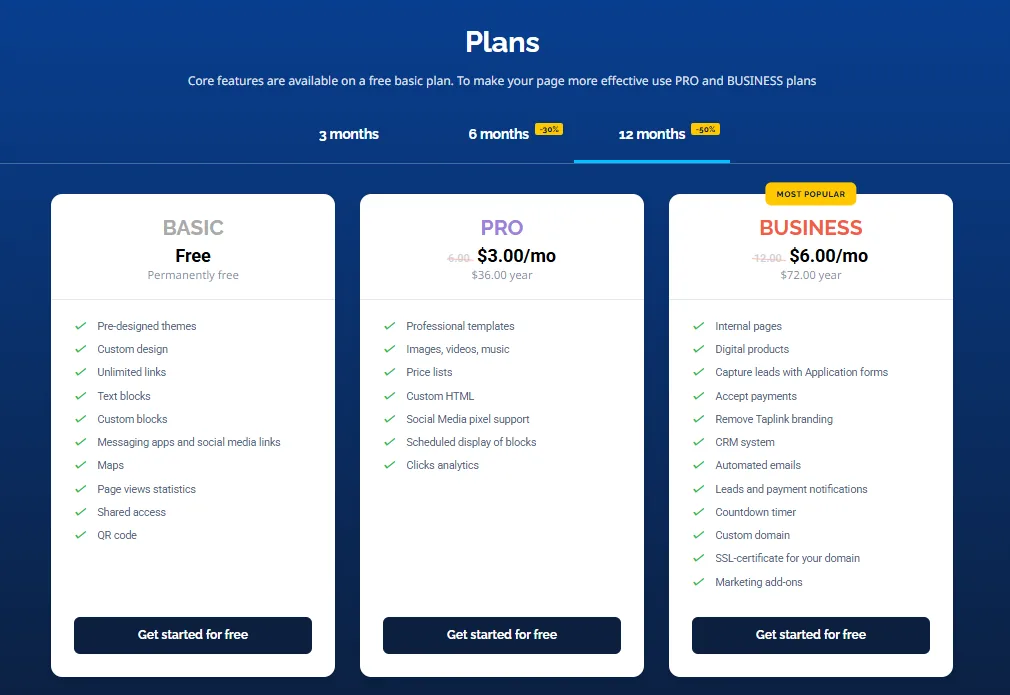
Tip: Pay for 12 months to get 50% off. The Business plan then costs $6 a month, about a third of Linktree Pro.
Drawback: Paid plans have a 3-month minimum, so you can’t pay month to month.
My verdict: Get the Taplink Business plan on yearly billing. For $72 a year, you get links, forms, payments, and a branded page on your own domain.
2. Beacons.ai – best all-in-one link in bio creator platform
Best for: TikTok, Instagram, and YouTube creators who sell digital products or pitch brands.
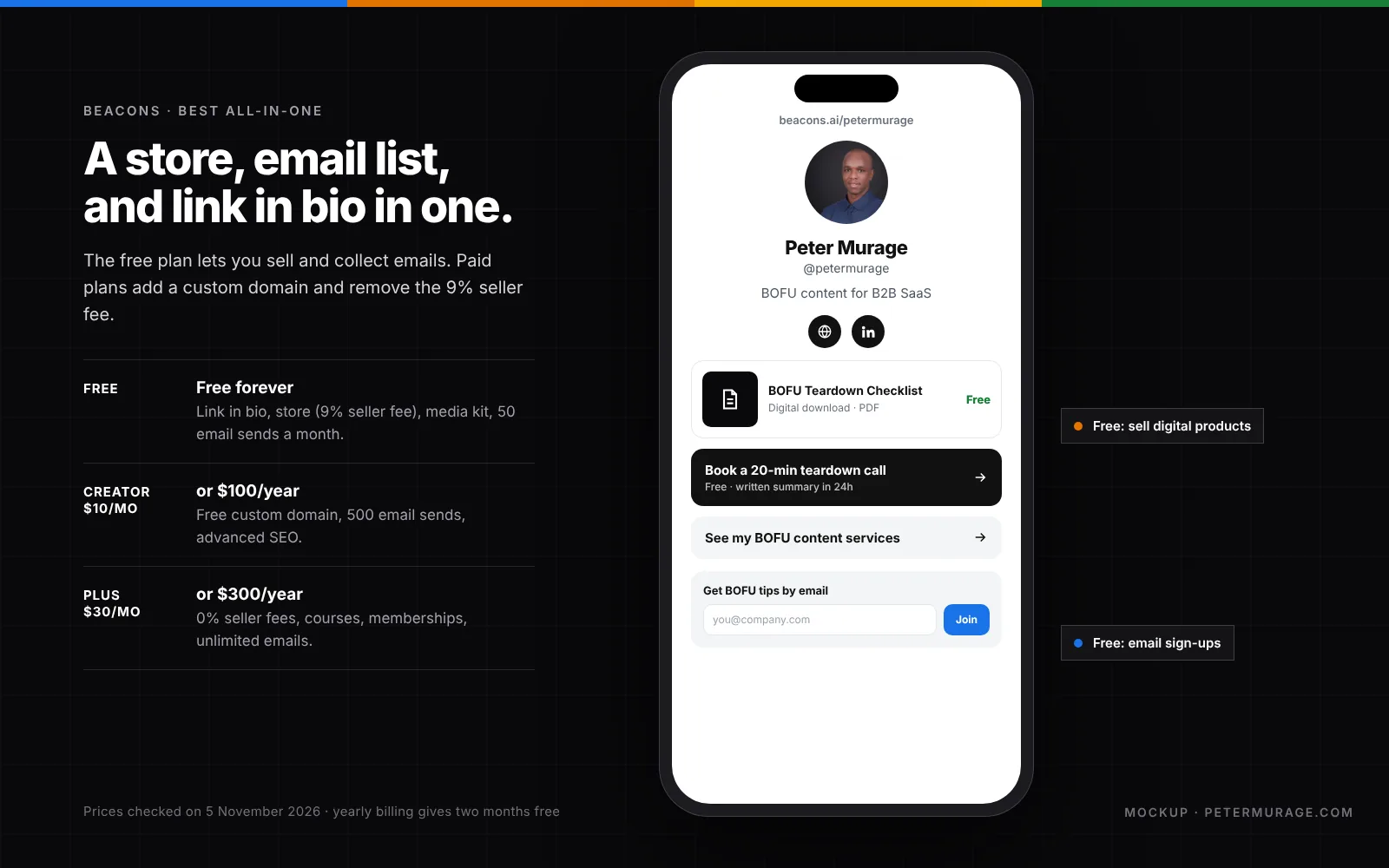
Beacons is more than a Linktree alternative. It’s a creator business hub: link in bio, online store, media kit, email marketing, and a built-in AI teammate, all behind one link.
Over 10 million creators use Beacons (Beacons). If you mainly sell digital products, also see my Gumroad alternatives and my Payhip review.
Beacons key features
- A customizable link in bio page with real-time analytics.
- Sell unlimited digital products from your bio on the free plan, with a 9% seller fee.
- A daily-updating media kit that shows your audience stats. Handy when you pitch brands.
- Email marketing and newsletters, so you own your audience. The free plan includes 50 sends a month.
- Smart Reply auto-DMs that answer Instagram comments and messages for you.
- Beam, a built-in AI teammate, with daily AI credits on every plan.
- Courses with video hosting, memberships, and buy now, pay later options on Creator Plus.
Beacons plans and pricing
Beacons has a free-forever plan and three paid plans. Pay yearly and you get two months free.
Free: $0, forever
- A customizable link in bio.
- A daily-updating media kit.
- Sell unlimited digital products, with a 9% seller fee.
- Create affiliate links.
- 50 email sends a month.
- Smart Reply Instagram auto-DMs.
- Real-time analytics and 30 daily AI credits.
Creator: $10 a month, or $100 a year ($8.33 a month)
- Everything in Free.
- A free custom domain for your link in bio and store.
- 500 email sends a month.
- Advanced SEO and marketing features.
- 300 daily AI credits.
Creator Plus: $30 a month, or $300 a year ($25 a month)
- Everything in Creator.
- 0% seller fees.
- Keep 100% of your affiliate link commissions.
- Unlimited courses with video hosting, and unlimited memberships.
- Buy now, pay later options for your buyers.
- Unlimited email sends and unlimited daily AI credits.
Creator Max: $100 a month, or $1,000 a year ($83.30 a month)
- Everything in Creator Plus.
- Google Workspace, white-glove onboarding, and priority support.
- A physical NFC card connected to your page.
- VIP access to Beacons events.
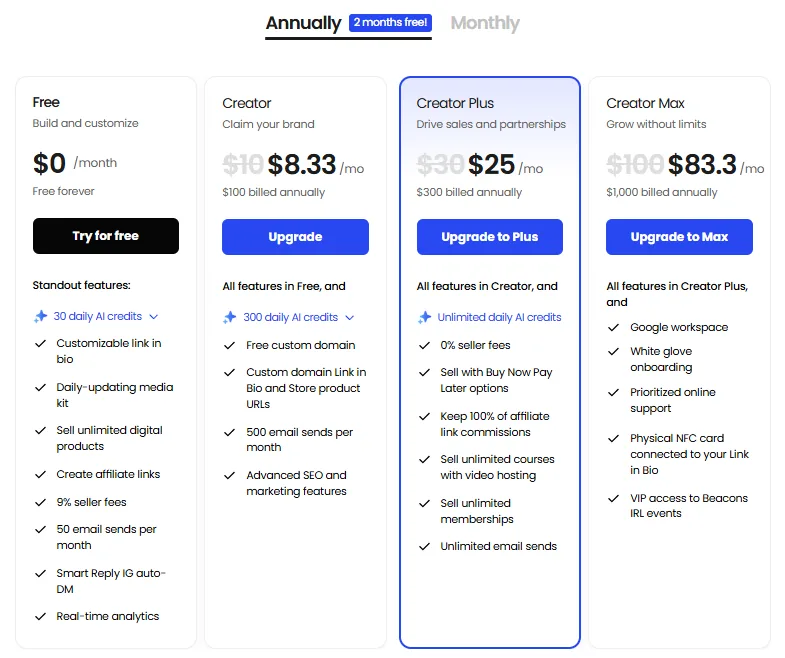
Tip: The 9% seller fee is where the real cost hides. Once you sell more than about $333 a month, Creator Plus ($30 a month) costs less than the fee.
Drawback: If you only need links, Beacons is more than you need. And the 9% fee adds up fast once you start selling.
My verdict: Start on the free plan. Upgrade to Creator Plus the month your sales pass about $333.
3. Many.bio – best easy-to-use, affordable Linktree alternative
Best for: beginners, coaches, and local businesses that want a good-looking page today.
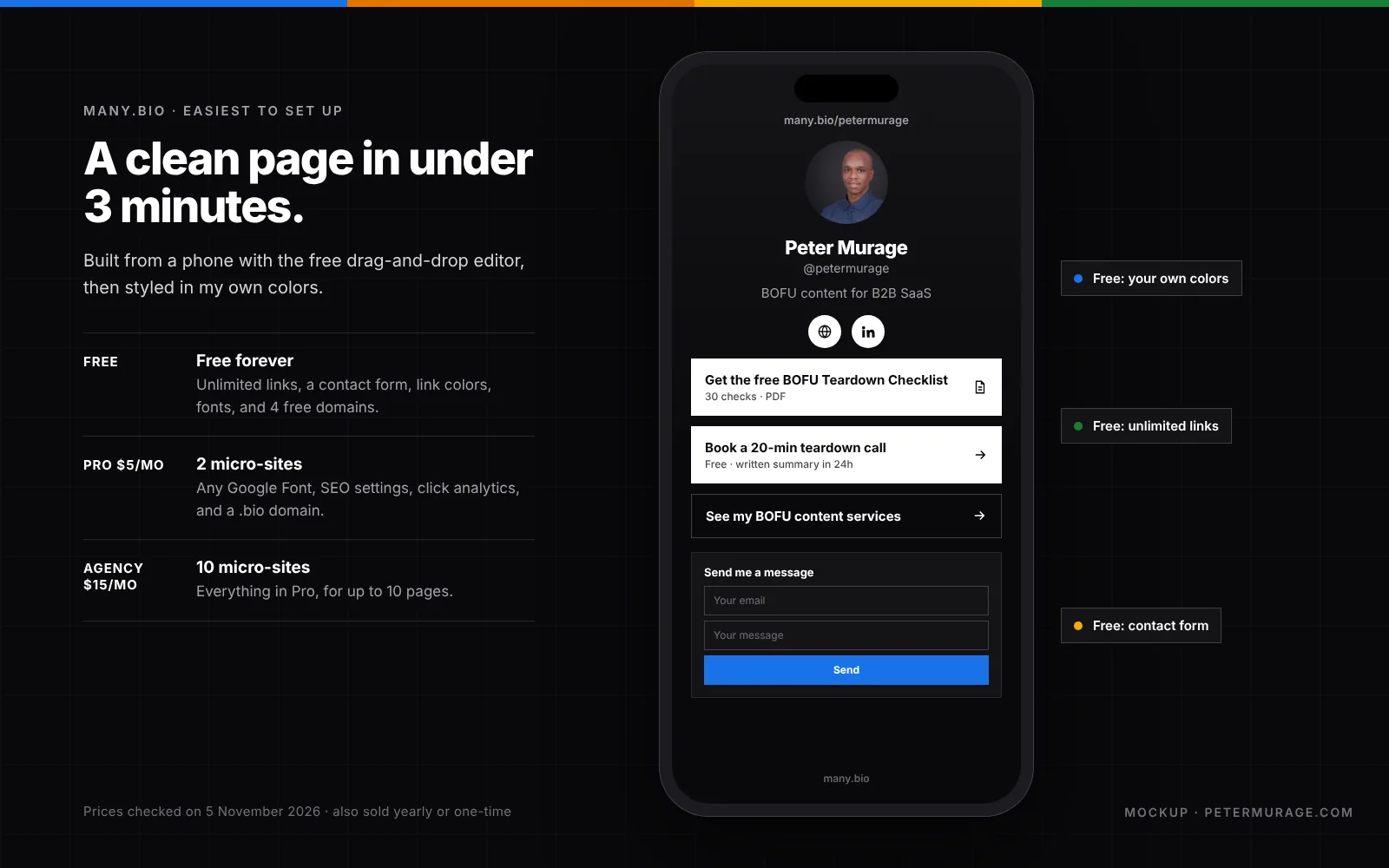
Many.bio lets you build your link in bio page in under 3 minutes. Its simple drag-and-drop editor works on the free plan, right from your phone.
It has a strong pedigree. Many.bio’s founder, Abzal Assembekov, built ContactInBio from 2017 to 2021. He launched Many.bio in 2022, a year after selling ContactInBio (Many.bio).
The focus is the same as ContactInBio: do the basics really well, and keep most of them free.
Many.bio key features
- Live in under 3 minutes, straight from your smartphone. No laptop needed.
- Your own username URL, so it matches your TikTok or Instagram handle.
- Four free domains to choose from: Many.bio, Linksto.info, Tap.fan, and TapIn.Bio.
- Unlimited links, with your own link colors, icons, font sizes, and backgrounds.
- A free contact form, custom text, dividers, and ready-made templates.
- On Pro: any Google Font, image or gradient backgrounds, custom CSS, email sign-ups, SEO settings, and Google Analytics and Facebook Pixel.
- A done-for-you option: the Many.bio team will build a custom micro-site in your brand colors for $100, one time.
Many.bio plans and pricing
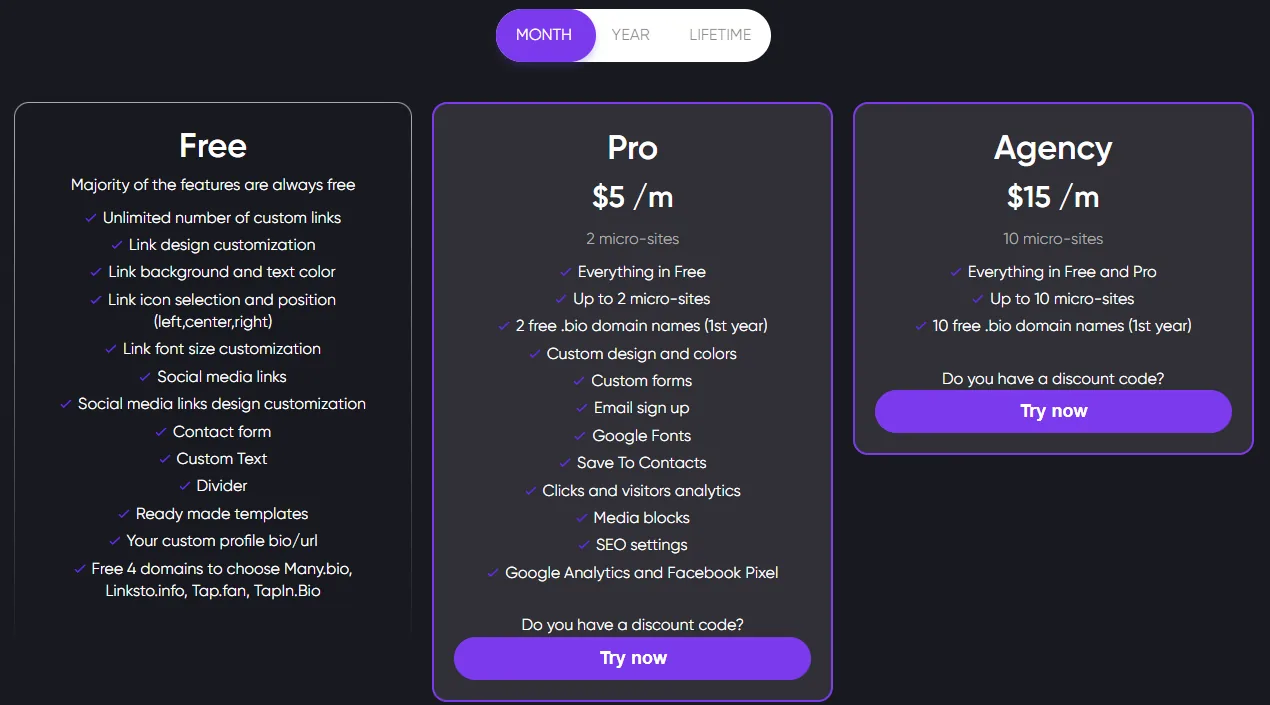
Many.bio has three plans: Free, Pro, and Agency. You can pay for Pro and Agency monthly, yearly, or once for lifetime access.
Free: $0, forever
- Unlimited links.
- Link design, background, and text colors, plus a limited choice of fonts.
- Colors for the header and divider blocks.
- Social media links with their own design.
- A contact form, custom text, and dividers.
- Ready-made templates.
- Your own profile URL on four free domains.
Pro: $5 a month, $50 a year, or $90 one time (2 micro-sites)
- Everything in Free.
- Two free .bio domains for the first year.
- Custom design and colors: over 1,500 Google Fonts, image or gradient backgrounds, and your own CSS.
- Custom forms, email sign-ups, and a “save to contacts” button.
- Click and visitor analytics.
- Media blocks.
- SEO settings.
- Google Analytics and Facebook Pixel.
Agency: $15 a month, $150 a year, or $270 one time (10 micro-sites)
- Everything in Pro.
- Up to 10 micro-sites.
- Ten free .bio domains for the first year.
| Plan | Monthly | Yearly | One time |
|---|---|---|---|
| Pro (2 micro-sites) | $5 | $50 | $90 |
| Agency (10 micro-sites) | $15 | $150 | $270 |
Tip: If you’ll keep your page for two years or more, the $90 one-time Pro plan costs less than paying yearly.
Drawback: Many.bio has fewer selling tools than Taplink or Beacons. If you need payments or a store, pick one of those instead.
My verdict: Start free. When you want your own fonts, SEO settings, and analytics, get Pro for $5 a month, or $90 one time if the page is for the long run.
Taplink vs Beacons vs Many.bio: side-by-side comparison
All three have a free-forever plan. They differ in what you pay for next.
| Taplink | Beacons.ai | Many.bio | |
|---|---|---|---|
| Best for | Coaches, service businesses, and small shops | Creators who sell and pitch brands | Beginners who want a page today |
| Free plan | Unlimited links and messenger buttons | Store and email list, 9% seller fee | Unlimited links, contact form, colors, and fonts |
| Cheapest paid plan | Pro, $3 a month billed yearly | Creator, $10 a month or $100 a year | Pro, $5 a month or $50 a year |
| Pay once | No | No | Yes, $90 for Pro |
| Custom domain | Business, $6 a month billed yearly | Creator, $10 a month | Pro, $5 a month |
| Take payments or sell | Business plan | Free plan, 9% fee | Not a focus |
| Collect leads or emails | Business plan, with a CRM | Free plan, 50 sends a month | Pro, with forms and email sign-ups |
| Click analytics | Pro | Free | Pro |
| Standout feature | Messenger buttons and lead forms | Media kit and an AI teammate | Fastest setup and a lifetime plan |
Which Linktree alternative should you pick?
Answer one question: what should your bio link do?
- It should sell. Pick Beacons if you sell digital products, courses, or memberships, or you pitch brands.
- It should bring me leads. Pick Taplink if clients reach you on WhatsApp or by DM, or you need forms, payments, and your own domain on a small budget.
- It should look good, today. Pick Many.bio if you want a clean page with your links and your colors in under 3 minutes.
Still not sure? Start on a free plan. You can upgrade later, and moving your links takes minutes.
How to switch from Linktree in 4 steps
- Open your Linktree and copy every link and its title into a note.
- Sign up for your new tool and claim the same username, if it’s free.
- Add your links, then match your colors and profile photo.
- Swap the link in your Instagram, TikTok, and YouTube bios. Keep your Linktree live for a week or two, so links in old posts and Stories still work.
Other Linktree alternatives I tested, and why they’re not here
I’ve tested plenty of other good tools since 2019. They’re not bad. One of my top three just does the same job better or cheaper.
| Tool | What it’s good at | Why it’s not in my top 3 |
|---|---|---|
| Lnk.Bio | Cheap one-time plans and a clean design | Taplink does more for about the same price |
| Zaap | Selling, an email list, and auto-synced posts | Beacons covers the same creator jobs, plus a media kit |
| Hypage | $5 one-time, no monthly fee | The $5 one-time plan still shows a Hypage brand badge. The other plan is the Hyax upgrade at $29 a month. |
| Tap Bio | A unique swipe-card design | Tap Bio permanently shut down on October 31, 2026. If you used it, Taplink is the closest replacement: free plan, $6 a month on yearly billing to remove the branding. |
| Bio.link | Free and fast | Too basic for branding |
| Tapkit | Dynamic QR codes | Pricey if you only need a link in bio |
| Feedlink, IGLinks.io, and ShopInBio | .link domains, Asia-focused pages, and store-first pages | Niche. Taplink Business covers selling. |
| Instagram’s five bio links | Free and built in | No forms, payments, design, or analytics |
Note: Linktree is still a solid tool. If your brand already lives there and you’re happy paying for Pro, stay. This guide is for anyone who wants more for less.
Linktree alternatives FAQ
What is the best free Linktree alternative?
Many.bio, for most people. Its free plan includes unlimited links, a contact form, link colors and fonts, and four free domains. Taplink’s free plan is a close second, with messenger buttons, maps, and page view stats.
Is Taplink the same as ContactInBio?
Yes. Taplink acquired ContactInBio in April 2021, so ContactInBio’s users and features moved to Taplink.
Who makes Many.bio?
Abzal Assembekov, who built ContactInBio from 2017 to 2021. He launched Many.bio in 2022, a year after selling ContactInBio.
How much does Linktree cost in 2026?
Linktree has a free plan. Starter costs $9 a month ($7 billed yearly). Pro costs $17 a month ($14 billed yearly) and removes the Linktree logo. Premium costs $35 a month ($30 billed yearly). Prices checked on 5 November 2026.
Do I still need a link in bio tool now that Instagram allows five links?
Most likely, yes. Instagram’s five links hide behind a pop-up, and you can’t add forms, payments, videos, or click tracking. A link in bio tool also works on TikTok, YouTube, and Threads.
Is Linktree banned on Instagram?
No. In 2018, Instagram briefly flagged Linktree links as spam, then lifted the block and apologized (Wikipedia). Still, check your bio link every week or so to make sure it works.
Which Linktree alternative is best for selling products?
Beacons, if you sell digital products, courses, or memberships. Watch the 9% seller fee on the Free and Creator plans. Taplink Business is the cheaper pick for service businesses that take orders and payments.
Can I use my own domain name?
Yes, on all three: Taplink’s Business plan, Beacons’ Creator plan, and Many.bio’s Pro plan.
I rebuilt this guide with my free BOFU Teardown Checklist: the same 30 checks I use on comparison and alternatives pages for B2B SaaS teams.


Thank you Peter Murage Team for providing linktree alternatives. But you can add Link.me in this list.
Hi Peter,
Have had a browse through your list and was an interesting comparison.
Actually went with the new kid on the block https://MyUrls.me as that app is being constantly worked on and by registering an account, even if actively not using right now, it keeps the account free even after the premium plan is launched, along with paid features being included according to their Twitter account, perhaps one for your comparison list.
Cya
Hi Peter,
Great job on this content.so we are provide Profilrr the new personal bio link Platforms link your social networks like Instagram, Facebook, Twitter, Google+, Pintreset, Telegram, and TikTok a wide afford one link within the social bio Profilrr to link to any or all your pages — websites
Bio link
Hi Dear,
Great job on this content.so we are provide Profilrr the new personal bio link Platforms link your social networks like Instagram, Facebook, Twitter, Google+, Pintreset, Telegram, and TikTok a wide afford one link within the social bio Profilrr to link to any or all your pages — websites
Bio link
Very informative list: Also another service I found that I use (really easy to setup) and it’s comparable is Link Genie: https://linkgenie.net/
I noticed all of the tools listed are geared towards the influencer/creator audience, and there weren’t any geared toward the rapidly growing crypto/blockchain market.
As you may have heard, Linktree-like tools have had a significant growth in the niche of web3 communities – NFT projects, DAOs, DeFi projects etc. Even Linktree added an OpenSea integration to address the need!
If you plan on releasing an update on this article or posting a new roundup of Linktree alternatives, it could be interesting to add a category for the web3 target market – it is rapidly growing market share in link-in-bio projects!
We built a 100% free link-in-bio software specifically designed for this new market. You can take a look here (https://barracuda.io) – it might expand the usefulness of your list!
It’s being by massive industry leaders like ShibToken and Sushiswap
Either way, I hope this helps you and have a great day!
Thanks
PS: if it would be helpful, I would love to send over a quick demo or blurb about Cuda Pages (https://barracuda.io) to make it even easier!
I can’t beliiiiieve I wasn’t mentioned in this text! Enjoy and don’t waste time. With Linkfree you create links in the bio, shorten your urls, create custom qr codes, host images, create virtual business cards, plus a ton of other tools.
Hi, I recommend you linksroot. Linksroot Allows You To Add All Your Links From Your Social Media To Your Latest Blog Or Vlog In One Place, Reducing Your Efforts While Also Increasing Your Reach.
Hello. I think this amazing post lacked the alternative Link in bio, URL Shortener and QR Code Generator closest to the name, LinkFree.
https://linkfr.ee/
Nice article Peter! Lots of great options out there. At Pagecloud, a drag and drop website builder, we have recently created a bunch of new themes to help users create their own custom link-in-bio pages on their own sites, here is some info https://www.pagecloud.com/link-in-bio would love to hear your thoughts.
I use Linkhub https://linkhub.online for similar purposes.
It helps to consolidate all your links in only one link bio, making it possible for creators – to spread useful links for their followers with only one click of the bio link, drive all your audience and decide where your followers go next when they click on your link in bio Instagram and get convert your followers into buyers.
Thank you for sharing this information! After reading your article, I was able to make an informed decision to use my current Wix account to create a landing page. I was initially using Linktree’s free version, but I couldn’t figure out how to redirect one of my domains to it. Then I came across your site and realized that wasn’t one of Linktree’s features. I went through all of your alternatives, as well as your advice regarding having a landing page. I went to Wix to see if they had something comparable that I could utilize, and they did. They also had a 50% discount promotion going on, so I was able to update the site with my domain for $6.50 per month for three years if I paid everything up front (which I did).
hey peter, Checkout https://bioiy.com Which i use that give most of the features from linktree and more with the free plan.
Hi,
thanks for the great & thorough article.
I bought a ContactInBio Business account and found the software easy to use. I want to remove the ContactInBio branding and use my own DNS – what all savvy marketers want as a feature – and it’s not built-in. Against a few extra bucks per month, it’s apparently possible. I contacted support to get this working but after a week I still have no reply.
If you think at one point you’ll need support, do NOT take ContactInBio.
Hi Ariel,
I understand ContactInBio sold their platform to Taplink.at.
Please check it out; thanks!
Had you tried ss88.my? Similar to linktree but free plan have more features.
Hi Jay, it appears that ss88.my is more of a link shortener than a link in bio tool. But thanks for the highlight!
I’ve checked out Fastcard too. and they have some really cool location-aware widgets that make it like linktree on steroids.
https://www.fast.cm/
Hi Michael, I’ve checked Fastcard and it’s sure a worthy alternative!
Hello, just found your article about Linktree alternatives. I would love if you consider to have a look at an alternative called linkbox.net. It is free to use, no payment membership at all and from Europe, so it complies with the European regulations on data protection which Linktree is not.
Hey Peter! loved the in-depth review and screenshots!
I’ve been using ahoyo.to for my side-projects after moving out of linktree. Did you check it out too? I feel like the features are even bigger, but maybe the links options are kinda simple. wdyt?
Hi Dan, thanks for this wonderful addition!
Thank you for your very well-thought out and well-written article about all of these Linktree alternatives! I need a quick and dirty summation and this is perfect. Not only have a dead set on which one I’m going to use, but I’m going to check out more of your content. This is as great example of how to offer info-rich content without a big sell. Thanks again!
Thanks Rachel!
You should try out Tapkit. Creative brands love using it as it has a full drag and drop builder. You can design a bio link that’s as unique as you or your brand and they have some great templates. Plus its all Free.
Awesome overview to consider! Thanks for sharing! Will be trying the free route… WordPress!!!
DHBonner link on this page needs an update, but otherwise your recommendations are great. You’ve focused on the details that matter (surprising how many reviews miss the basics), and it seems like a pretty thorough survey of your picks for the top products. Appreciate your efforts.
Thank Albie for noticing this. I’ve updated the link!
This is a really informative post.
Interesting that the website landing page, which you recommend the most, will most likely last the test of time considering how often the social media apps keeps changing their settings. Now that we have instagram shopping available, I finally decided to create this page on our site.
Thank you for sharing your knowledge!
Thanks Lulu, I appreciate that you found this resourceful!
Thank you so much for this information! I have been using Linktree but recently I heard they had serious problems with Instagram and accounts using Linktree were getting banned somehow. Do you know something about this? I would like to replace Linktree with a safe option (from Instagram point of view) Thanks again!
Hi Diana, this used to happen a while back, but at the moment I believe it’s relatively safe to use Linktree on Instagram. The trick is to do regular checks of your link, maybe weekly. Just to ensure that it’s still working!
Bop.me is actually the same as Linktree, but it’s completely free. There is even a convert to bop.me option on their website- http://www.bop.me
Hi Broderick, thanks for the suggestion. Bop.me is such a wonderful Linktree alternative!
Not only do I find this helpful, it’s pretty cool. I don’t know why but I never bought into the linktree idea and was always searching for something cooler.
Great article! One issue: I think it’s fair to say that if people use and understand WordPress there is no need for link aggregators. However the great majority of people don’t understand website CMS like WordPress. thereby creating the need for these useful tools. These tools don’t claim to be WordPress, instread they promote an easy way for anyone to aggregate their links. I don’t think WordPress is really an alternative to these at all really, it’s apples and oranges. I’m curious to see how this niche plays out.
Hi Eric, I’m in the process of updating the article and revamping my little blog, and surprisingly I now view this topic from your angle! Actually, I’ve learned it’s like comparing fruits and vegetables not even “fruits and fruit”. Anyway, I appreciate your inputs!
Try http://bleep.me/ It has all these features and more, much better, makes a totally responsive page that saves an app, add to contacts and inline embeded mucis and videos!
oh.. and every new free user saves rainforest 😉
Thanks Ricardo! I’ll check it and see if it fits a place in the guide!
Hey, godd job for this list,
I have founded others alternative and is https://socialinks.org
Thanks Johhny!
Checkout https://sharely.in. Which give most of the features from linktree but also it allows multiple categories and short URL’s and more.
Hi Sanjay, thanks for the suggestion!
The suggestion to create my landing page is sheer brilliance! So easy. And so much more flexible. Thank you!
Hi Marina, thank you! I appreciate that you found this resourceful!
Thanks for this alternatives is pretty cool
Hey brother, great blog post. Very insightful. I’d be honored if you would check out the beta platform we launched a couple of months ago. It’s a Linktree Alternative called Snappycard. You can try it out free at http://www.snappycard.io. I’d be honored if you would include us in your blog too. Looking forward to hearing from you.
Hi Jason. Thanks for the suggestion/outreach. I’ve just checked Snappycard.io, and it’s such a wonderful, minimalist Linktree alternative. It does the job and so I’ll include it in the list!
Hello, please do I really need a website before I can register for any of the alternatives? Can’t I just promote a product without a website?.
Hi Patience,
No, you don’t need a website to register for all of the above alternatives but one!
That’s the website alternative where you create a landing page with your links.
TIP: Signing up for tools like ContactInBio and Lynx is free, all your need is an email address, and maybe your Instagram account.
I hope this helps,
Thanks!
Hey there! Love how comprehensive this list is, although a great deal of this looks to be outdated now.
One thing that I’ve noticed with a lot of these Linktree Alternative tools is how prominent and pushy their brand messaging and calls-to-action to sign up to their platform are on free tiers. Lnk.bio for instance has an anchored call to ‘Get Lnk.bio’ that sits above a user’s content. Lynx and Contactin.bio have a ‘Get your own account’ at the bottom of every free profile, and If you are a free user of Tap.bio, the last slide of your profile is a huge list of ads driving your visitors to get their own Tap.bio account.
It seems crazy to me that this is acceptable to users? A ‘free’ tool that is using them as a free marketing engine that serves their interests over their users? I would rather pay a small premium to ensure my traffic is only interacting with my content or I would choose the platform that doesn’t monetize your personal data or advertise their product over delivering your content.
If you want your traffic and audience to engage with your content only, then a lot of the tools you have listed are doing half the job.
Food for thought!
Thanks Maclay! I appreciate your point of view in this, and fair enough, most of these tools use the “free” plan to market their “paid” plans. Well, I would say that the users are free to decide if this is acceptable to them!
This was crazy helpful thanks a ton! We were headed down one path and now we’ve changed directions.
Hi Doug, I’m happy that you found it resourceful, thanks!
Great post, love all the detail. You mush have spent a week writing all this!
Hey Jarrett, I’m happy that you found it resourceful, thanks! And sure, it took me a couple of days to get it published.
Great article! However, I find it interesting that $6/month is considered as expensive ? That’s 20 cents per day. In my humble opinion, it’s completely okay for LinkTree to charge for their premium features. I assume other people here don’t offer their services free of charge either.
True to your opinion, Linktree is a great tool and they should charge as much since they are putting value out there. But my statement was in comparison with other tools that offer more features and charge way less. Thanks for taking the time to read the post!
That helped me a lot. Got all I needed. Than you.
Hey Ali, I’m happy you found it resourceful!
I would suggest you to try smartlylink.com or smartly.link , It’s Free, works fine with your bio and you get detailed analytics with Facebook pixel targetting and Google Analytics, Priority Links and plus if you get in contact with the creators you get a forever free plan as well.
Hey Adarsh, thanks for the suggestion. I’ll try it for a few days and see if it gets a place in the next update on this post.
That will be amazing 🙂 Keep up the good work on the blog!
Now, the facebook pixel already in the premium version. Just want to inform you that
This was super helpful, thank you! I did find a workaround for the link branding problem with LinkTree… just create a url redirect! I use the 301 redirects plugin on WordPress and created a branded link that redirects to my LinkTree page. You still have the LinkTree brand on the page but at least people don’t get confused by a linktree link in your IG profile.
Hey Corina, I’m happy that you found this useful and thanks for the suggestion.
Hi Peter,
Thank you for mentioning campsite.bio!
Also a big congrats on getting a card for the keyword ‘linktree alternatives’ very impressive!
We now have a free embed your campsite feature!
Let me know if you want to talk further.
Hey Josh, thanks for the update. I’m working on an update for this post and I’ll surely include the new features.
Thanks for the awesome rundown on link tools and kind words about Campsite (I’m one of the co-founders and built it). Our free plan has actually gotten even better with some great new features. You can archive or pin your links and we just released an embed feature. You can take your Campsite profile and embed it directly into your website with a simple script we provide!
Our Pro plan allows you to manage up to 3 separate Campsite profiles on the same account (pretty handy). Thanks again for sharing Campsite. Happy we made the list!
Hey Jon, I’ll be updating this post with the Campsite’s new features in the next few days.
Awesome super duper in depth blog post, great job Peter! Wanted to add that if you’d rather use an app instead of a website, my team and I have developed Eywhere for this. https://apps.apple.com/us/app/eywhere/id1273580610 Maybe you’ll check it out! ?
Hey Jason, thanks for the suggestion. I’ll check the app and see whether it earns a place in the post.
Great article! I tried modifying my WordPress theme to be a simple landing page but ran into hurdles. So I built a WordPress plugin for creating Linktr.ee-style links alongside my regular website content. It’s free and works on your WordPress site. I’d love people to try it and give me feedback! https://wordpress.org/plugins/social-link-pages/
Hey Corey, a plugin seems like an awesome idea for designing simple social link landing pages. I’ll try it and update here within the next few days.
Excellent detail! I will set up my own at LibertyMadison.com/Instagram
Thank you
I’m happy that you found this useful!
Hi!
Well I loved your post. I’ve used WordPress in the past and love it. Also prestashop(didn’t love it so much). Anyway, I’m actually just looking to make a page that can connect my paypal and credit card for customers to buy from, as it’s just 4 items. Not a full on website. Would campsite have this e-commerce feature? Or a suggestion?? You seem to know your stuff so any advice would be greatly appreciated.
Thank you for the amazing post!!
Hi Mich, I recommend you Tapkit from the above list!
Just wanted to thank you for all the information you provided. It was VERY thorough and I’m sure it took a while to gather and put together. I’m thinking of going the website route for my link in bio. Seems a bit more flexible! Thanks again man