Prices checked on · By Peter Murage
Hypage is a link in bio page that doubles as a small store. From one link, you can sell digital products, run paid memberships, and take bookings.
I first reviewed it in March 2023. Back then, it cost $19 a month, and the developer hadn’t shipped a new feature in a long time.
That changed in October 2026. Hypage retired its old platform and relaunched on Hyax, the creator platform from the same team. The new Hypage costs $5, one time. There’s no monthly fee, and Hypage takes no cut of your sales.
So I went through the new site, features, themes, pricing, and FAQ again on 9 November 2026. Here’s what changed, what $5 gets you, and how it stacks up against Taplink, Many.bio, and Beacons.
TL;DR
- Hypage now costs $5, once. You get unlimited links, all 24 themes, digital products, courses, memberships, and bookings. There’s no monthly fee.
- Hypage takes no cut of your sales. Card payments go through your own Stripe or PayPal account. You can also accept USDC crypto straight to your wallet.
- The trade-off is branding. The $5 page shows a “Powered by Hypage” badge and lives at hy.page/you. Your own domain needs a Hyax plan, from $29 a month. A page with no platform branding at all needs Hyax Power, at $99 a month.
- For a link in bio only, I still recommend Taplink or Many.bio. Start free on Many.bio. Pay for Taplink when you want your own domain, no branding, and lead forms.
- Pick Hypage if you want to sell and gate content on a tiny budget. It’s the cheapest way I know of to run digital products and memberships from a bio link.
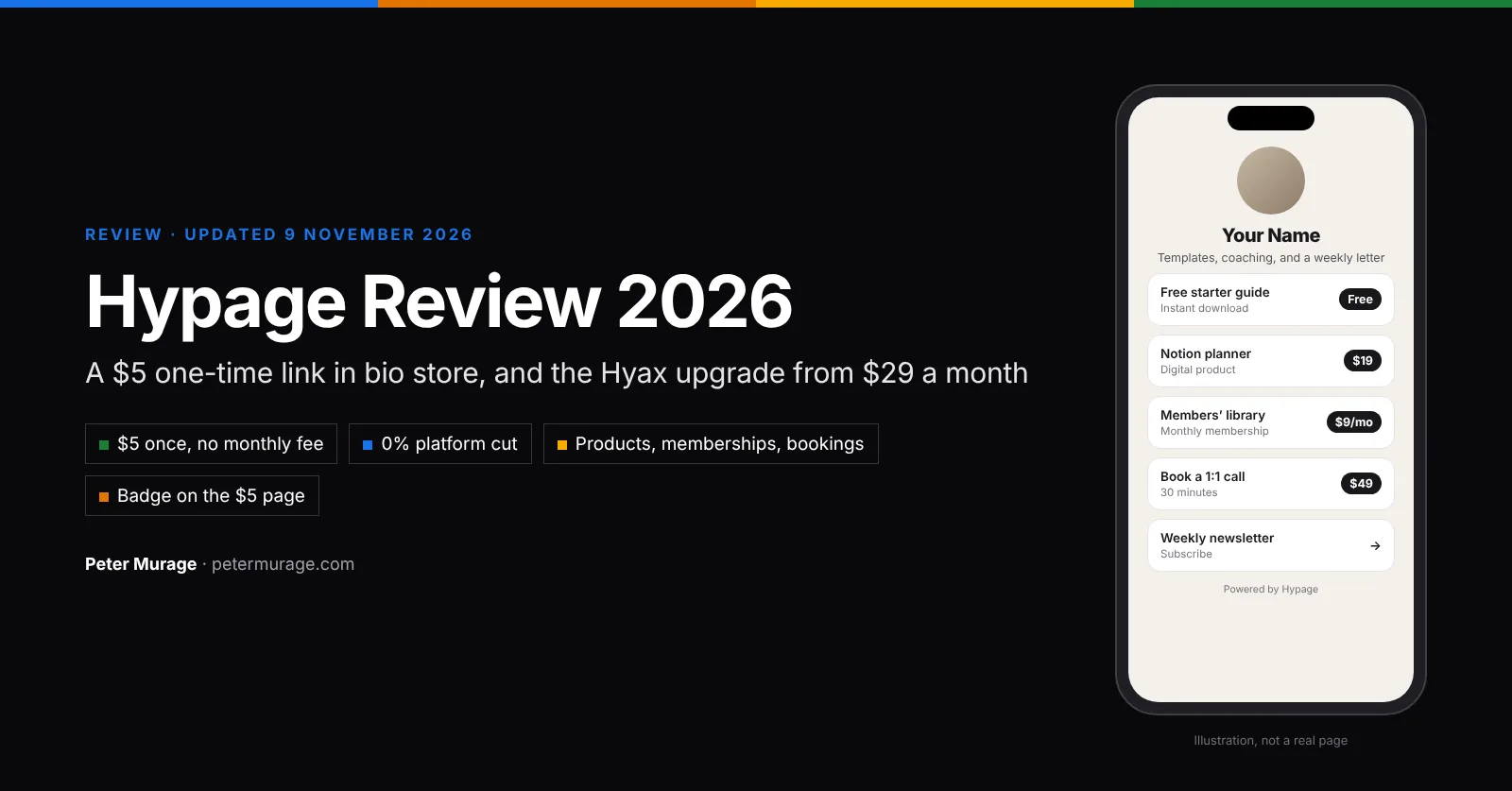
What Is Hypage in 2026?
Hypage is a link in bio store for creators. You get one page with your links, and you can sell from that same page: downloads, courses, event tickets, membership plans, and paid calls.
It’s built on Hyax, a bigger creator platform with websites, blogs, email marketing, and community tools. Your Hypage login is a Hyax login, with only the link in bio parts switched on: links, products, memberships, and bookings.
That’s the whole idea. Hypage is the $5 starter. Hyax is the upgrade when you outgrow one page.
What Changed: The Old Hypage vs the New Hypage
Hypage retired its previous platform in October 2026. If you had a page on the old hypage.com, it didn’t carry over. Hypage’s FAQ says to create a new page, which it says takes about a minute to rebuild.
Here’s how my 2023 review compares with the relaunch:
| Old Hypage (my March 2023 review) | New Hypage (November 2026) | |
|---|---|---|
| Price | Pro $19 a month, Enterprise $39 a month | $5, one time |
| Free option | A 14-day free trial (the free plan was gone) | None. You pay $5 to claim your handle |
| Links | Up to 30 per page on Pro | Unlimited |
| Memberships | Enterprise plan only ($39 a month) | Included |
| Bookings | Not in my 2023 review | Calendar, availability, and reminders |
| Payments | Stripe and PayPal | Stripe, PayPal, and USDC crypto |
| Design | Theme colors, HEX colors, or a background image | 24 one-click themes, six card styles, fonts, gradients, and patterns |
| Transaction fees | Zero | Zero (processor fees only) |
| Custom domain | 3 on Pro, 6 on Enterprise | Hyax plan only, from $29 a month |
| Remove branding | Pro plan | Hyax plan only (white label from Power, $99 a month) |
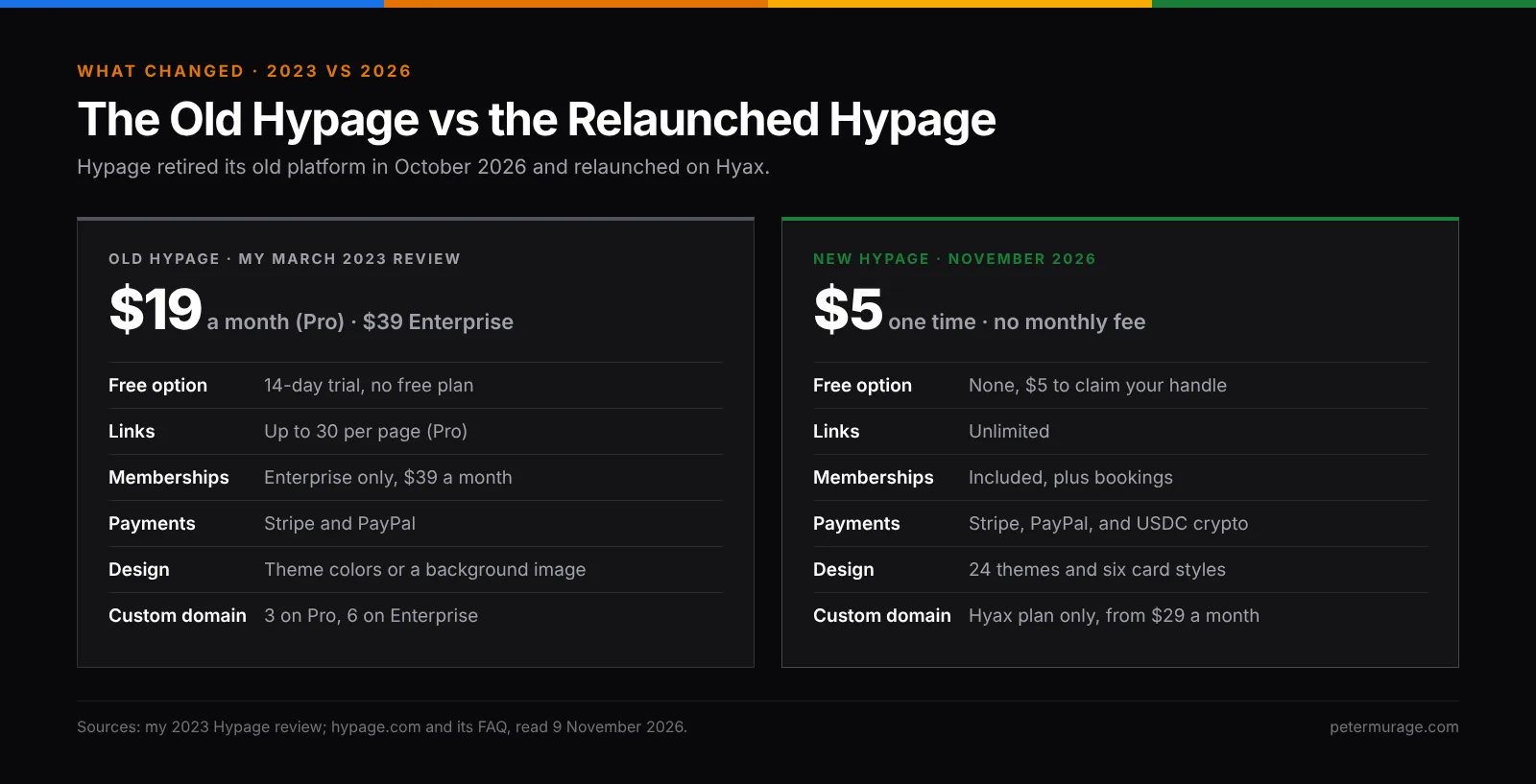
Is the new Hypage better? For most creators, yes. You pay $5 once instead of $228 a year for the old Pro plan, and memberships and bookings now come with it. The one step back: your own domain and a badge-free page now cost a Hyax subscription.

Hypage Features and Benefits
Hypage lists eight core features. Here’s what each one does for you.
1. A Link in Bio Page With 24 One-Click Themes
At its core, Hypage is a link in bio page. You add unlimited links, then pick one of 24 themes, from Clean and Mono to Midnight, Paper, and Neon. Then you fine-tune the header layout, cover image, colors, gradients, patterns, and fonts, plus six card styles.
Benefit: your page looks finished in minutes, without paying for “premium” themes.
2. Lists, Grids, and Galleries
You can group links and products into categories. Each group shows as a stack, a grid, or a scrolling row. Image cards and embeds are included too.
Benefit: a long list of links becomes easy to scan, and that matters on a phone.
3. Sell Digital Products, Courses, and Tickets
Sell downloads, courses, and event tickets with instant delivery through your own checkout. Buyers can pay by card, PayPal, or USDC.
Benefit: you don’t need a separate store like Gumroad or Payhip for a few products.
4. Paid Memberships With Gated Content
Create monthly or yearly membership plans that unlock products and courses. Members get their own login.
Benefit: recurring income from your bio link, without a Patreon-style cut.
5. Bookings for Calls and Sessions
A built-in calendar handles availability and sends reminders. That works for coaching calls, consults, and 1:1 sessions.
Benefit: one link takes the booking and the payment, so there’s no extra scheduling tool to pay for.
6. Crypto Payments (USDC)
Turn on crypto in Settings → Payments, add your wallet, and visitors can pay in USDC on Base, straight to your wallet. Card payments work alongside it.
Benefit: a way to get paid where Stripe or PayPal payouts are hard.
7. An Email List and a Simple CRM
Turn on the subscribe box, and every sign-up lands in the People list on your dashboard, along with your buyers. Visitor stats are included.
Benefit: you own your audience from day one, even before you pay for an email tool.
8. Your Own Hypage URL
Your page lives at hy.page/you, links.page/you, and you.hyax.app. A custom domain needs a Hyax plan.
What the Hyax Upgrade Adds
Upgrading to Hyax keeps the same login and the same page, and removes the Hypage badge. Hypage says it adds:
- A full website, a blog, and landing pages.
- Email marketing and automations.
- Community, a helpdesk, and live chat.
- A custom domain.
- AI writing, SEO tools, and more.
Not every Hyax plan includes all of these. Hyax’s pricing table, for example, lists community from Pro ($49 a month), not Starter.
Benefit: when one page isn’t enough, you can grow into a full creator website without moving your products or members.
How Hypage Works in 3 Steps
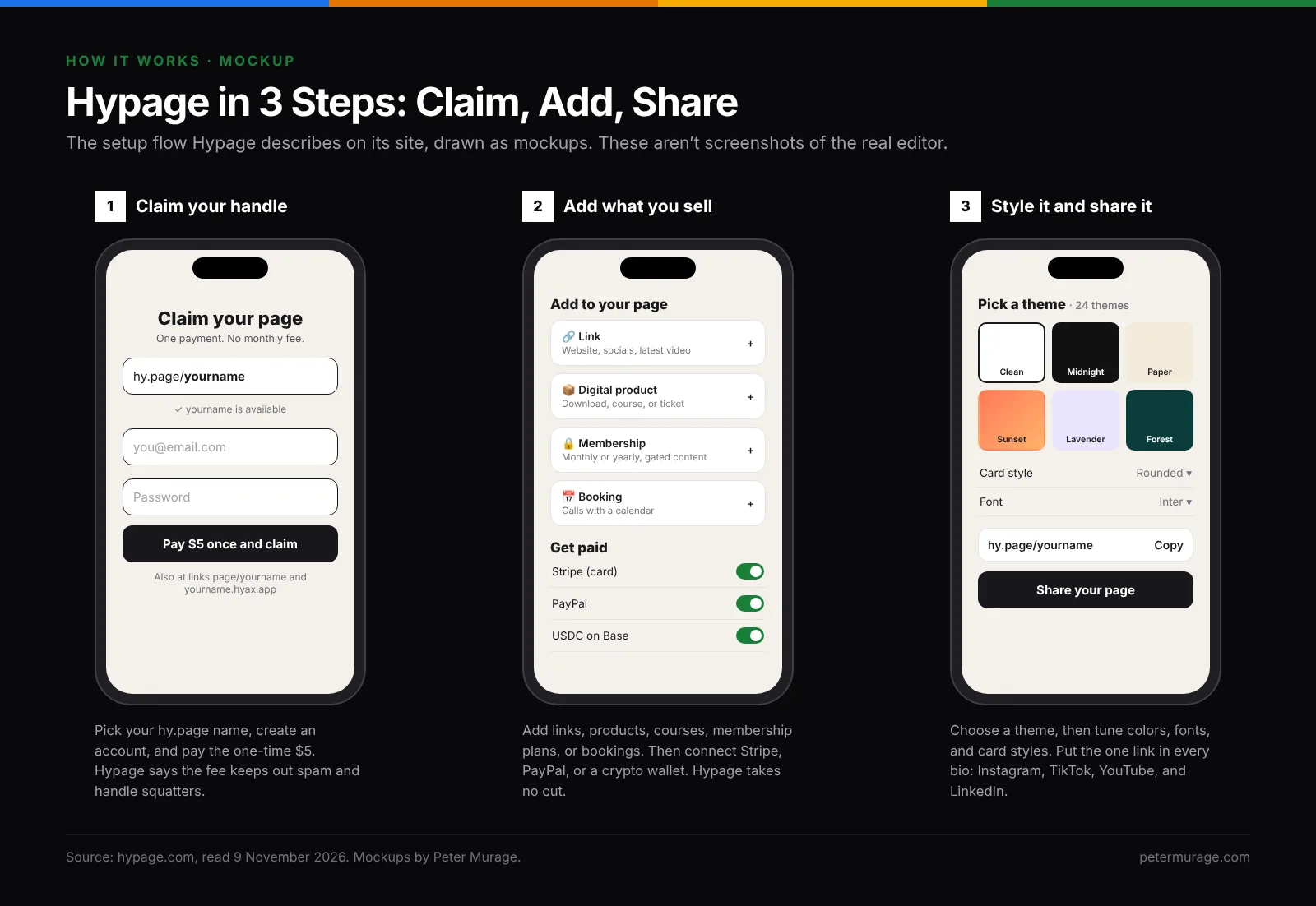
Setup follows three steps, per Hypage’s own walkthrough. I haven’t built a page on the relaunched platform yet, so the images below are mockups of the flow, not screenshots.
- Claim your handle. Pick your hy.page name, create an account, and pay the one-time $5.
- Add what you sell. Add links, digital products, courses, membership plans, or bookings. Then connect Stripe, PayPal, or a crypto wallet.
- Style it and share it. Pick a theme, adjust colors, fonts, and cards, and put the one link in every bio.
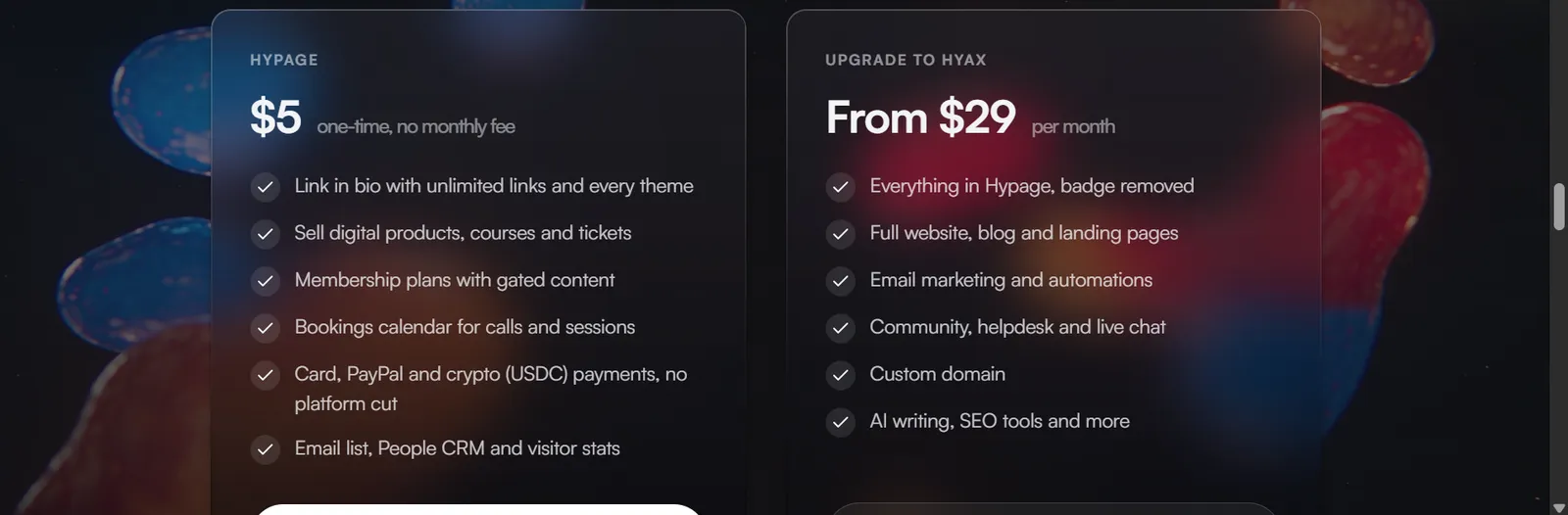
Hypage Pricing: $5 Once, or Hyax From $29 a Month
| Plan | Price | What you get |
|---|---|---|
| Hypage | $5, one time | Unlimited links, every theme, products, courses, tickets, memberships, bookings, card, PayPal, and USDC payments with no platform cut, an email list, People CRM, and visitor stats. Shows a “Powered by Hypage” badge. |
| Hyax Starter | $29 a month | Everything in Hypage, plus posts, email marketing, and a custom domain. 1 team member, 15 GB storage, up to 100,000 visits and 10,000 email sends a month. No community. Shows “Hyax branding”. |
| Hyax Pro | $49 a month | Adds community. 5 team members, 100 GB storage, up to 500,000 visits and 50,000 email sends a month. “Light branding”. |
| Hyax Power | $99 a month | 10 team members, 500 GB storage, up to 1 million visits and 100,000 email sends a month, white label. |
Why $5 at all? Hypage says the fee keeps spam accounts and handle squatters out. It isn’t a subscription, and it’s the only thing Hypage charges. Stripe, PayPal, and crypto network fees still apply.
One thing to check before you upgrade: Hypage says every Hyax plan removes the badge. But Hyax’s own pricing table lists “Hyax branding” on Starter, “light branding” on Pro, and white label only from Power ($99 a month). Ask Hyax support what your page will show before you pay for Starter.
How Hypage Compares With Taplink and Beacons on Price
| Hypage | Taplink | Beacons | |
|---|---|---|---|
| Free plan | No ($5 once) | Yes | Yes |
| Cheapest paid option | $5, one time | Pro, $3 a month billed yearly | Creator, $10 a month or $100 a year |
| Custom domain | Hyax, from $29 a month | Business, $6 a month billed yearly | Creator, $10 a month |
| Sell digital products | Yes, no platform cut | Business plan | Free plan, with a 9% seller fee |
| Memberships | Included | Not listed | Unlimited on Creator Plus, $30 a month |
| First-year cost to sell | $5 | $72 (Business, yearly) | $0 plus 9% of sales, or $300 for Creator Plus |
Taplink and Beacons prices were checked on 5 November 2026 for my Linktree alternatives guide.
How Hyax Compares With Other Creator Stores
Once you upgrade, Hyax competes with full creator stores, not link in bio tools. Here are the closest matches at the same price point:
| Platform | Entry price | Fee on your sales | Good to know |
|---|---|---|---|
| Hypage | $5, one time | 0% | Products, memberships, and bookings, with a badge |
| Hyax Starter | $29 a month | Not stated on the pricing page | Adds posts, email marketing, and a custom domain; community starts on Pro ($49 a month) |
| Stan Store Creator | $29 a month ($300 a year) | 0% | No free plan, a 14-day trial, courses and memberships included |
| Beacons Creator Plus | $30 a month ($300 a year) | 0% | Unlimited courses and memberships, plus a media kit |
| Payhip Plus | $29 a month | 2% | A free plan with a 5% fee; Pro is $99 a month with 0% |
Sources: Hypage, hyax.com (re-checked on 10 November 2026), and Beacons pricing pages; Stan Store’s pricing article (updated July 2026); Payhip’s plans as listed on 28 October 2026. Card and PayPal processing fees apply on every platform.
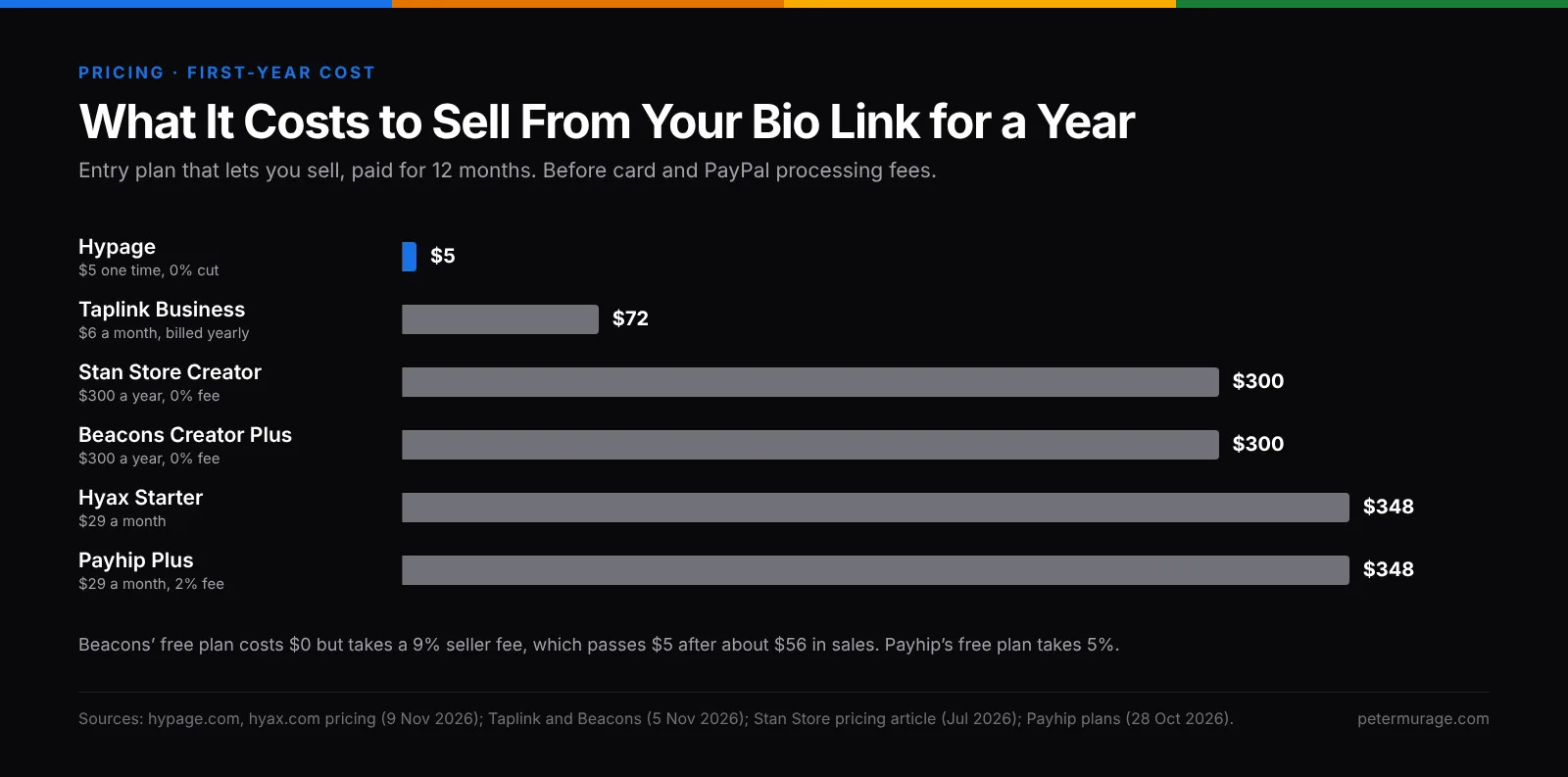
The takeaway: at $5, Hypage is in a price class of its own. Hyax at $29 a month is priced like Stan Store and Beacons Creator Plus, which are more established. Compare their features before you upgrade.
Hypage vs Taplink vs Many.bio for a Link in Bio
If all you need is a link in bio, here’s how Hypage compares with my two top picks:
| Hypage | Taplink | Many.bio | |
|---|---|---|---|
| Best for | Creators who sell products or memberships | Coaches, service businesses, and small shops | Beginners who want a free page today |
| Price to start | $5, one time | Free | Free |
| Free plan | No | Unlimited links and messenger buttons | Unlimited links, a contact form, colors, and fonts |
| Your own domain | Hyax, from $29 a month | Business, $6 a month billed yearly | Pro, $5 a month |
| Lead forms or email sign-ups | Subscribe box and People list | Business plan, with a CRM | Pro, with forms and email sign-ups |
| Payments | Card, PayPal, and USDC, no platform cut | Business plan | Not a focus |
| Standout feature | Memberships and bookings for $5 | Messenger buttons and lead forms | Fastest setup and a lifetime plan |
Why I Recommend Many.bio’s Free Plan to Start
Many.bio costs nothing, and the free plan covers what most people need: unlimited links, a contact form, free color themes and fonts, and four free domains to choose from. You can set it up in under 3 minutes from your phone. Hypage, by comparison, asks for $5 before you can try it.
Why I Recommend Taplink’s Paid Plans
Taplink is the link in bio I’ve recommended the longest. Its Business plan costs $6 a month billed yearly ($72 a year). It removes the Taplink branding, adds your own domain, lead forms, payments, and a CRM. On Hypage, your own domain starts at $29 a month on Hyax, and a fully white-label page needs Hyax Power at $99 a month.
Taplink’s Pro plan, at $3 a month billed yearly, adds templates, images, video, and click analytics if you don’t need payments yet.
Hypage Pros and Cons
Pros
- One $5 payment, then no monthly fee.
- No platform cut on sales. Only the payment processor’s fees.
- Memberships, bookings, products, courses, and tickets are all included.
- 24 themes and deep design controls, with no premium-theme upsell.
- Crypto (USDC) payments next to card and PayPal.
- A clear upgrade path to a full website on Hyax.
Cons
- No free plan or trial. You pay $5 to see the editor.
- A “Powered by Hypage” badge on the $5 page.
- No custom domain without a Hyax plan, from $29 a month.
- Old pages didn’t migrate after the October 2026 relaunch.
- Review sites still describe the old platform. Capterra’s newest Hypage review is from March 2023, so there’s little independent feedback on the relaunch yet.
My Verdict: Taplink First, Hypage if You Sell
For a link in bio, I recommend Taplink. Start on its free plan, and move to Business at $6 a month billed yearly when you want your own domain, no branding, and lead forms. If you just want a free page today, start with Many.bio.
But if you want to sell digital products and gate content for members, Hypage is a worthy choice. $5 once gets you a store, memberships, and bookings with no monthly fee and no cut of your sales. None of the creator stores I compare here comes close on price.
Upgrade to Hyax only when you need a full website, email marketing, or a community (from Pro, $49 a month). At that point, compare it with Stan Store and Beacons Creator Plus first.
Hypage FAQ
Is Hypage free?
No. Hypage costs $5, one time, to claim your page. There’s no free plan or trial, and no monthly fee after that.
Does Hypage take a cut of my sales?
No. Card payments go through your own Stripe or PayPal account, and USDC goes straight to your wallet. You only pay the payment processor’s fees.
Can I remove the “Powered by Hypage” badge?
Only by upgrading to a Hyax plan, from $29 a month. Hyax’s pricing table lists white label from its Power plan at $99 a month, so confirm what Starter removes before you pay.
Can I use my own domain with Hypage?
Not on the $5 plan. Your page lives at hy.page/you, links.page/you, and you.hyax.app. A custom domain comes with a Hyax plan.
What happened to my old Hypage page?
Hypage retired its previous platform in October 2026. Old pages didn’t carry over, so you’ll need to create a new page and add your links again.
What is the difference between Hypage and Hyax?
Hypage is the link in bio store built on Hyax. Hyax is the full platform, with a website, blog, email marketing, community, and more. Upgrading keeps your Hypage page as it is.
Is Hypage better than Taplink?
For selling and memberships on a tiny budget, Hypage costs less. For a link in bio with your own domain, no branding, and lead forms, Taplink Business is better value at $6 a month billed yearly.
Related: the 3 best Linktree alternatives in 2026, my Zaap review, and my Gumroad alternatives. I rebuilt this review with my free BOFU Teardown Checklist.