Case study · Independent teardown, not a client project · Nov 2026
Lindy Case Study: A Stale Comparison Page, Now Teaching Google’s AI
Lindy’s “Lindy vs Zapier” page still recommends Relay.app. Relay shut down in September 2026. And that page isn’t only read by buyers: Google’s AI Mode lists it as a source. So I scored the page on my 30-check BOFU Teardown Checklist, tested Lindy and Zapier by hand, and rebuilt it.
Free · 20 minutes · written summary within 24 hours
Update · 24 Nov 2026
Lindy has changed some of its pages since I checked them.
- App count: the comparison page’s body and sidebar now say 3,000+. One FAQ answer still says “more than 4,000”.
- Starting price: on 24 November, Lindy’s pricing page showed two prices on the same computer: Team from $29.99 for 3,000 credits in one browser, and from $49.99 for 5,000 credits in another. It looks like a pricing test. Either way, the comparison page still lists Lindy from $49.99 a month.
- Still the same: the comparison page still recommends Relay, still says it was last updated on 12 November 2025, and still offers “up to 40 free tasks per month”.
The findings below are dated to when I checked them, 12–17 November 2026. A dated screenshot backs each one. Here’s what the same pages showed on 24 November. Click any image to see it full size.
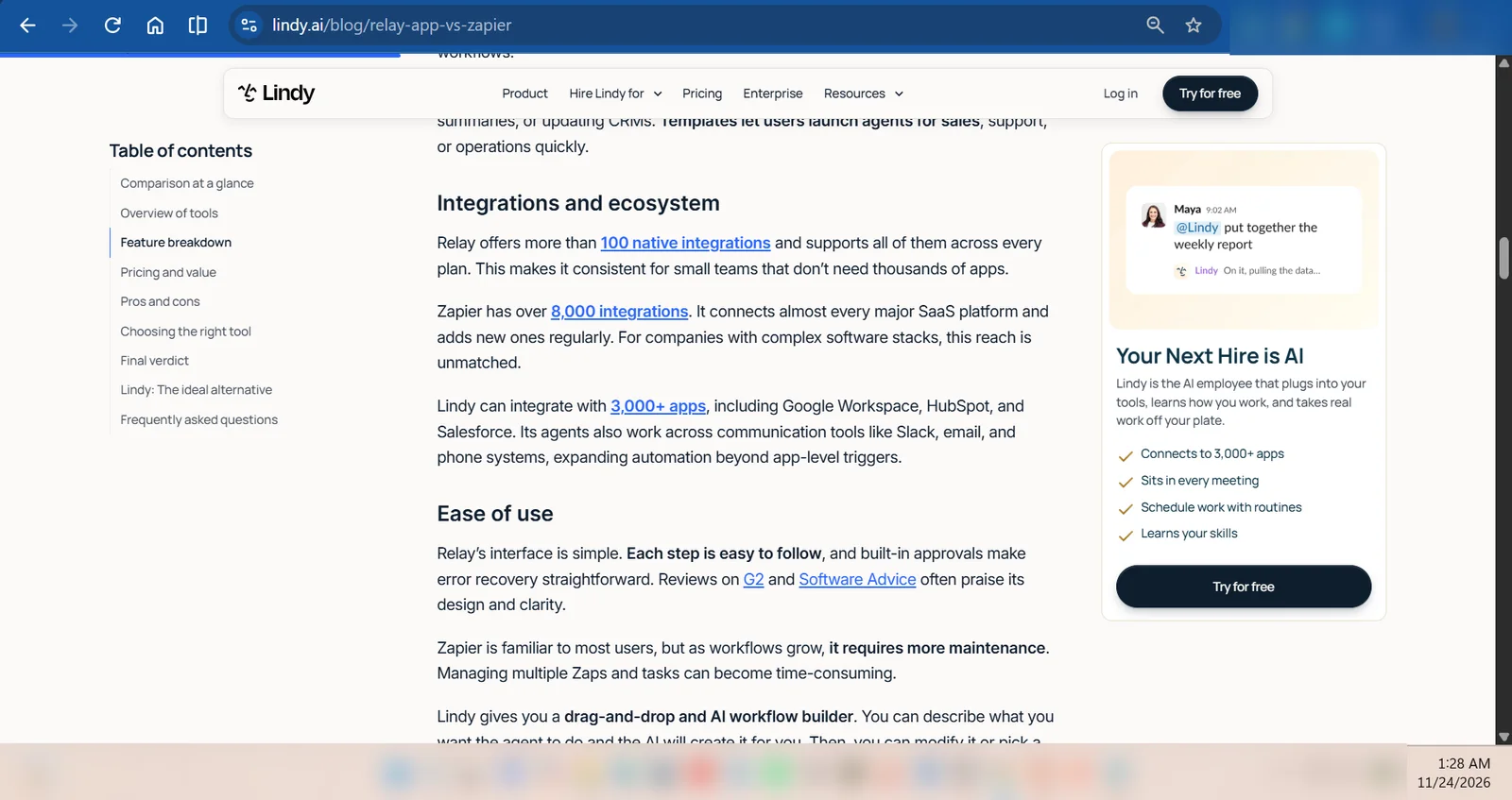 Body and sidebar now say 3,000+ · 24 Nov
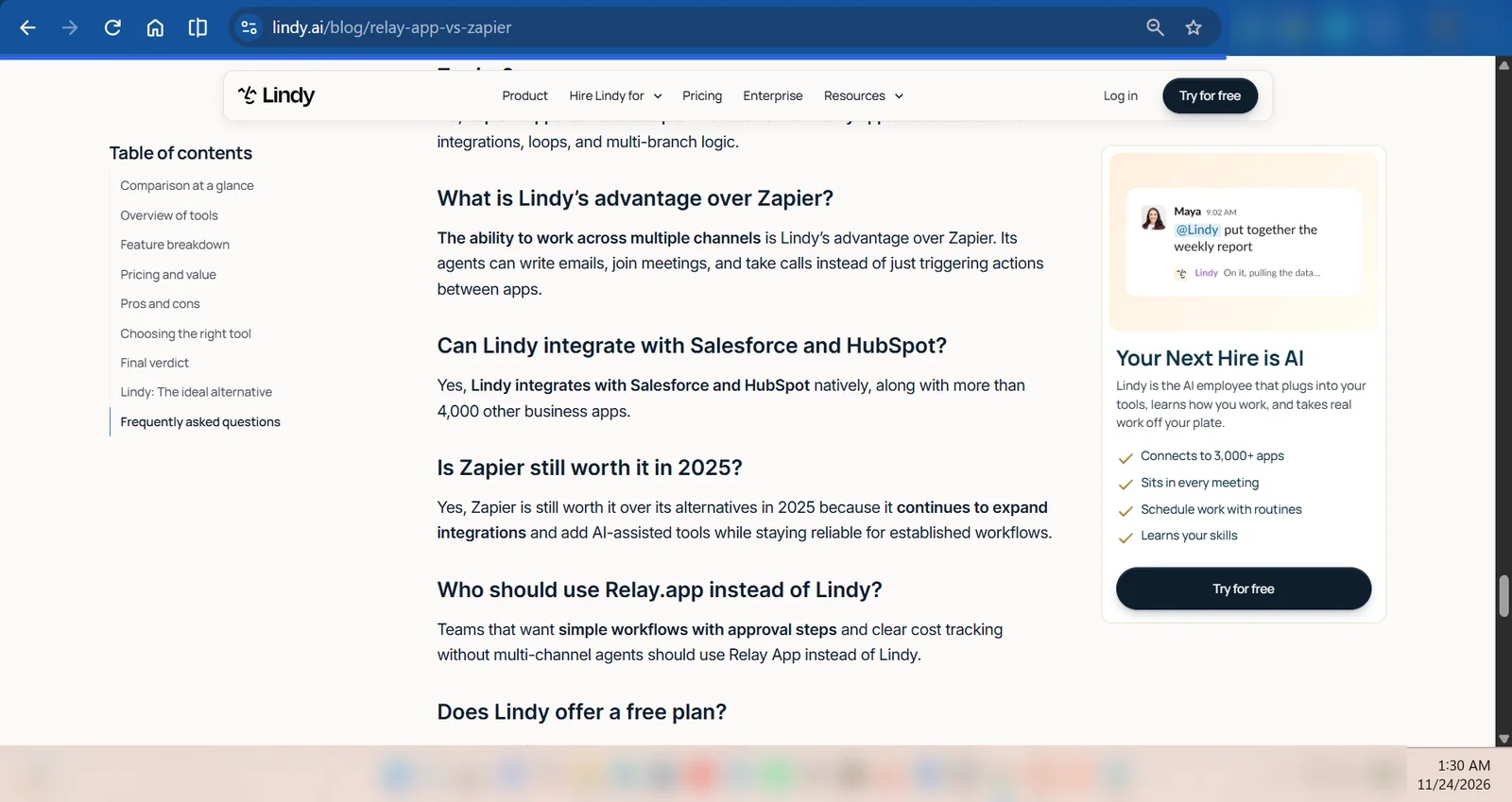 The FAQ still says “more than 4,000” · 24 Nov
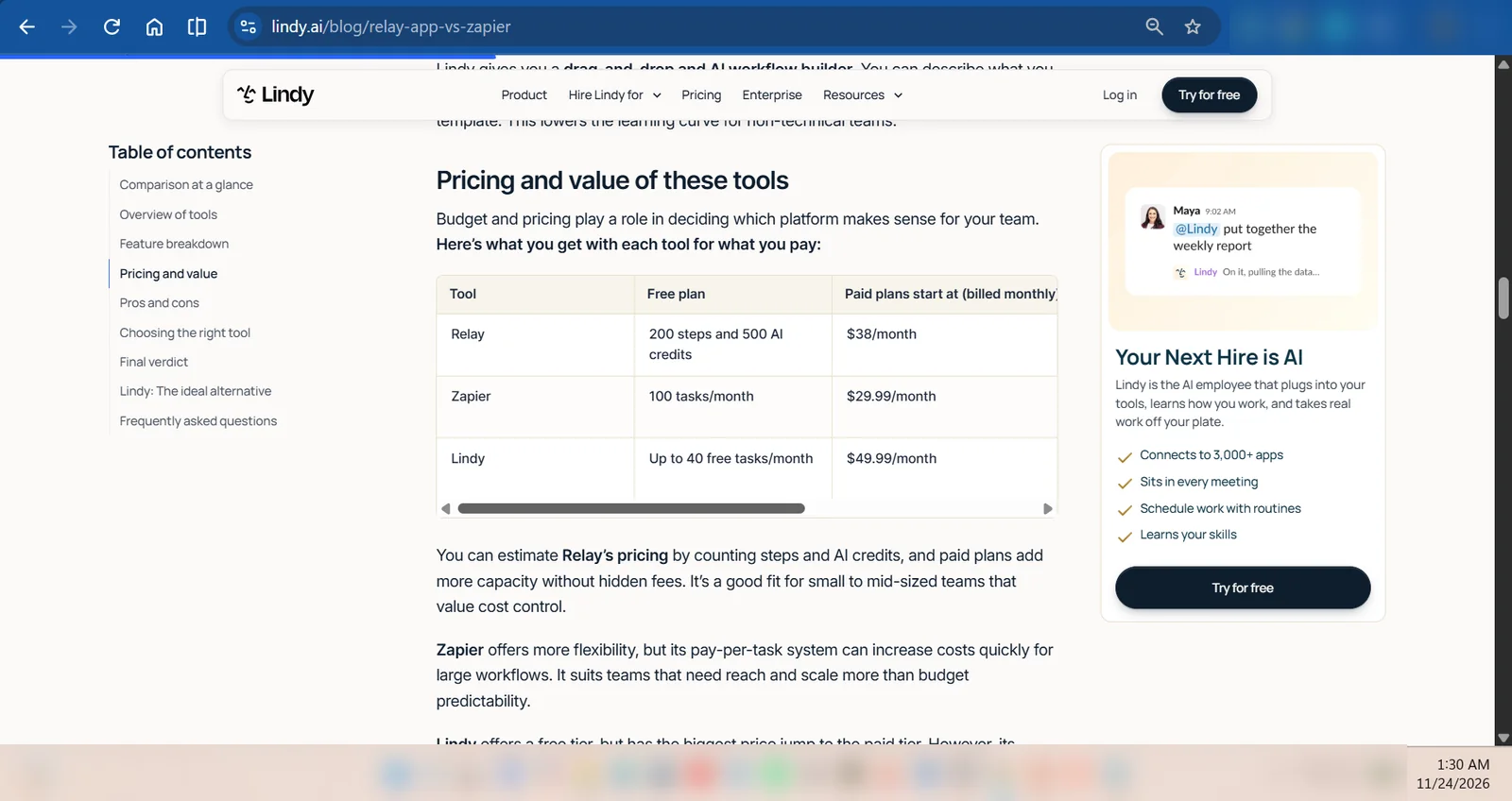 Comparison table: Lindy at $49.99, Relay still listed · 24 Nov
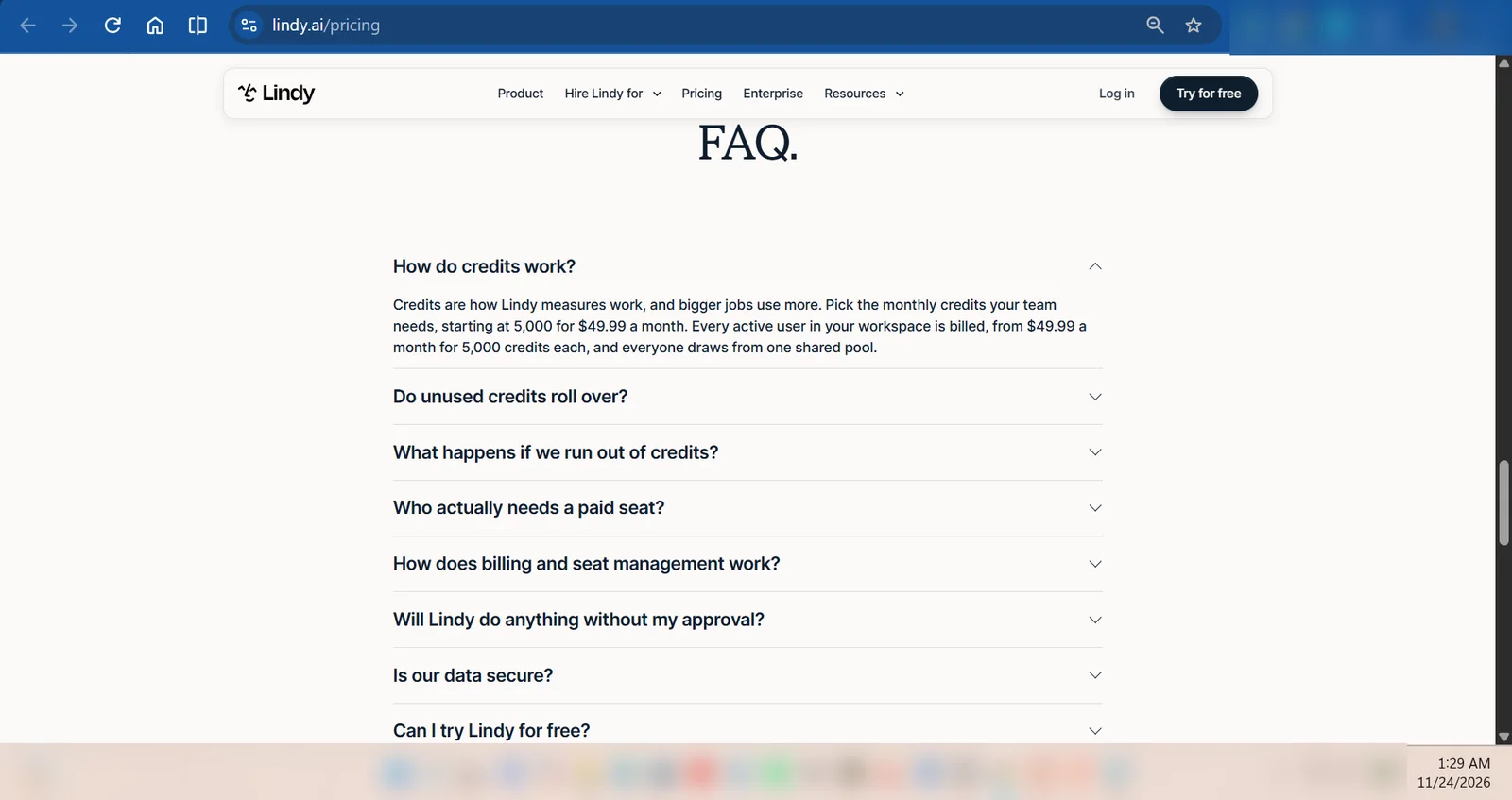 Pricing FAQ, browser 1: from $49.99 for 5,000 credits · 24 Nov
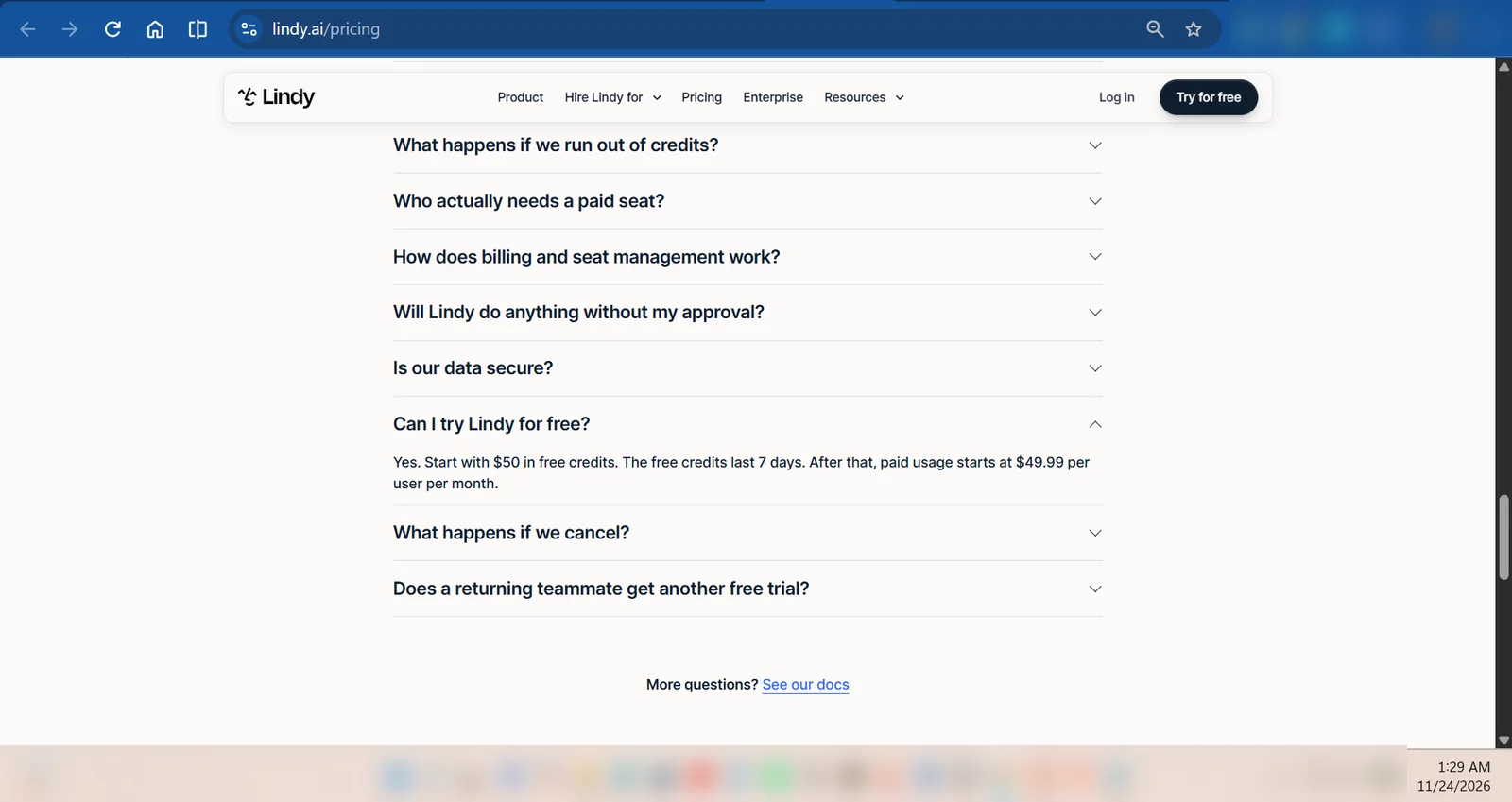 Pricing FAQ, browser 1: paid from $49.99 · 24 Nov
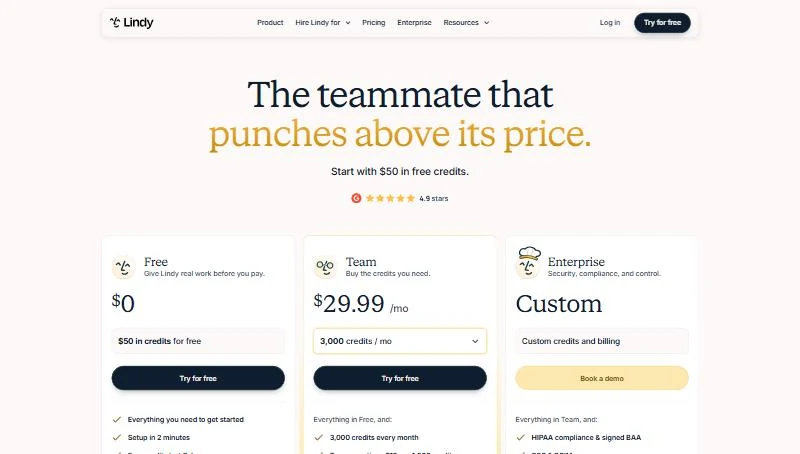 Pricing page, browser 2: Team from $29.99 · 24 Nov
27 → 50
the live page’s score out of 60, and the rebuild’s
2/10
the live page’s lowest phase: Buyer and trigger
3
different free offers across Lindy’s own pages
0
times Lindy is named in Zapier’s Relay migration guide, or in 343 comments on Relay’s shutdown post
The short version
One Stale Page, One Missed Shutdown, One Rebuild
- The page: lindy.ai/blog/relay-app-vs-zapier. Type /lindy-vs-zapier/ and Lindy redirects you there.
- The flaw: Relay still fills about a third of the page, four months after its founder announced the shutdown (checked again 24 Nov 2026).
- The finding: Google’s AI answers cite Lindy’s own pages. And when I checked them, 12–17 November, those pages disagreed on the free offer, the app count, and the starting price.
- The rebuild: both tools tested by hand, written in Lindy’s voice, and scored 50/60. See the rebuilt page →
Why a SaaS team should care
Your comparison page has a second reader now. Google’s AI reads it, and then answers your buyer before they ever click.
So swap in your own “[you] vs [competitor]” page and ask one question: when were its facts last checked?
01 The challenge
A Comparison Page Still Recommending a Tool That Shut Down
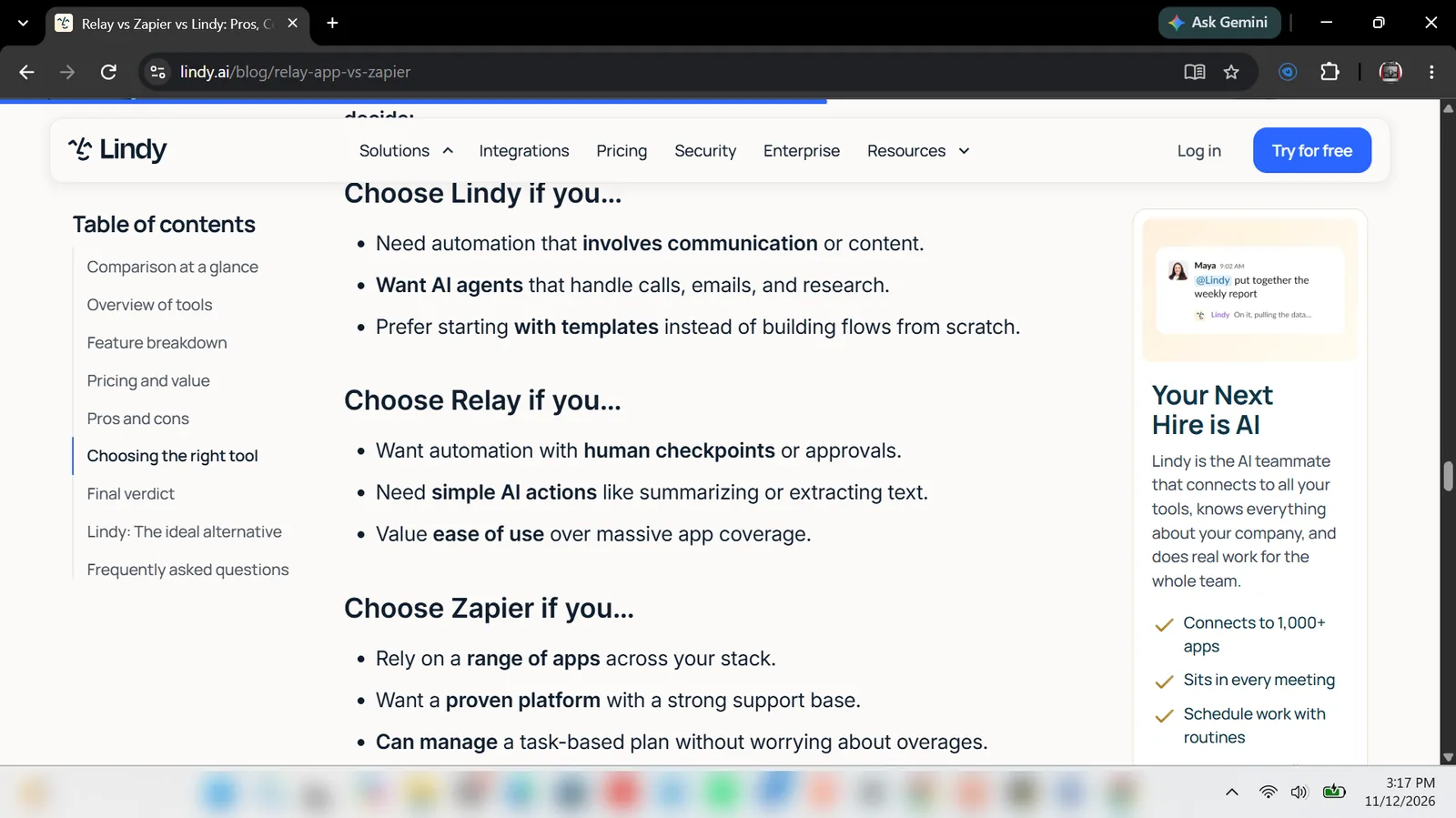
Lindy’s page compares three tools: Relay, Zapier, and Lindy. It says it was last updated on 12 November 2025, and still did on 24 November 2026.
That was a fair page a year ago. However, Relay.app no longer exists.
- July 2026: Relay’s founder, Jacob Bank, announced the shutdown on LinkedIn.
- 15 August: free users lost access.
- 14 September: paid customers followed.
- 13 November: Relay’s homepage says every account, workflow, and run history was permanently deleted.
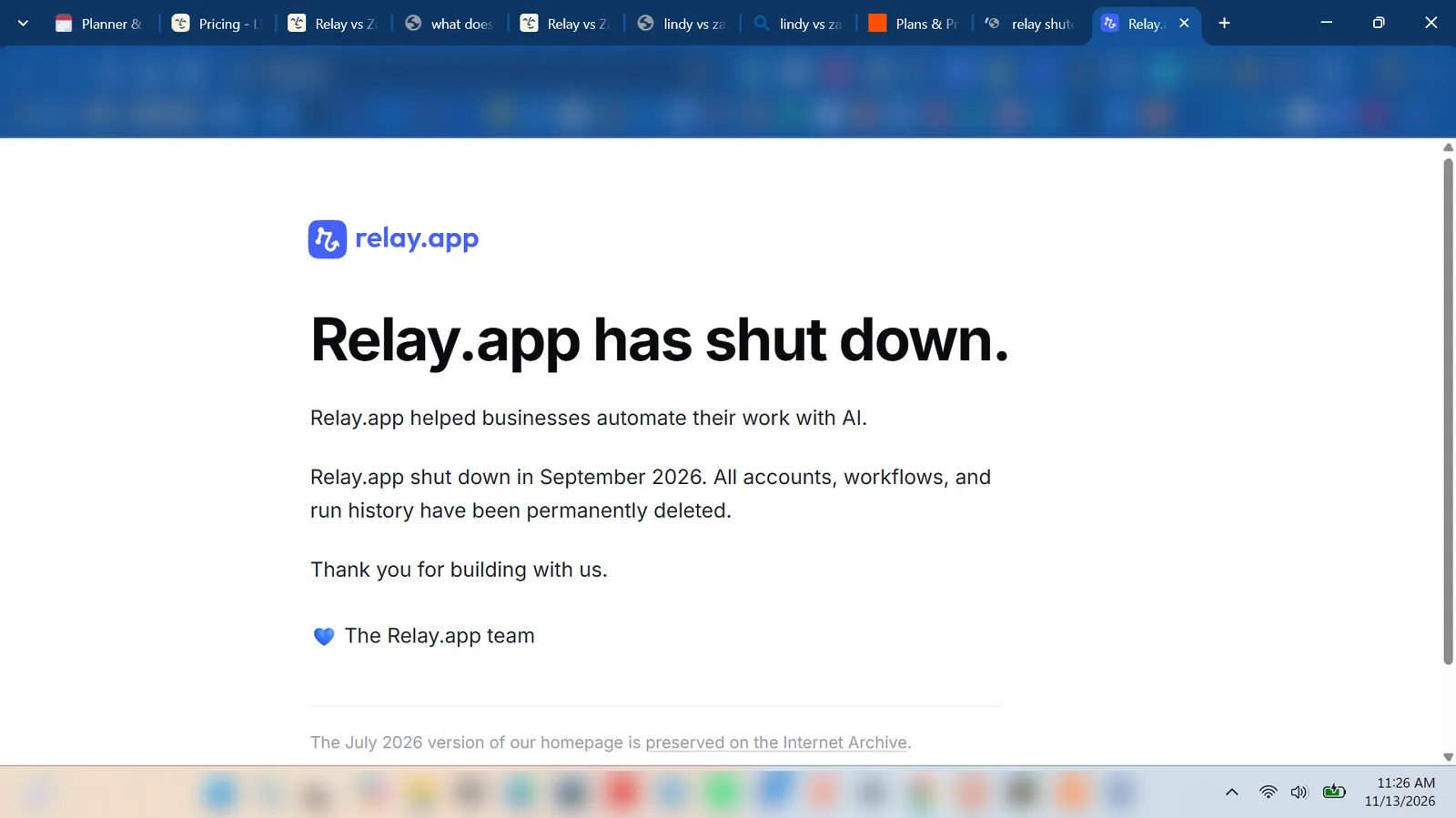
So every Relay customer had to pick a new tool, in a 30 to 60-day window.
That’s the best switching trigger a comparison page can ask for. And Lindy’s page doesn’t mention it (checked again 24 Nov 2026).
Instead, a buyer who landed there on 12 November met:
- a pricing row for Relay, a product they can no longer buy
- a “Choose Relay if…” section
- a Relay FAQ, next to a Zapier FAQ that still asks about 2025
- Lindy’s free offer as “up to 40 free tasks per month”, which isn’t what Lindy’s pricing page offered
Meanwhile, others moved.
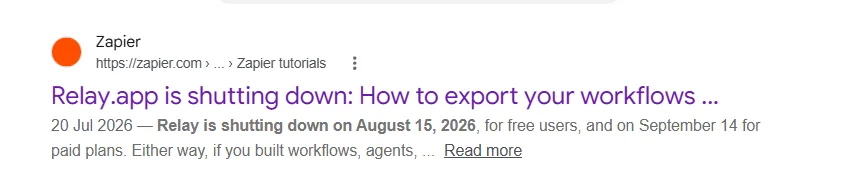
Zapier published “Relay.app is shutting down: How to export your workflows and move to Zapier” on 20 July, before the first cut-off. It lists n8n, Make, and Zapier. It doesn’t mention Lindy.
And under the founder’s announcement, 343 comments name n8n, Zapier, and Make as places to move. None of them names Lindy.
That stings, because Relay’s two strengths were AI steps and human approvals. That’s Lindy’s pitch, almost word for word.
02 The insight
The Stale Page Is Now Google’s Source
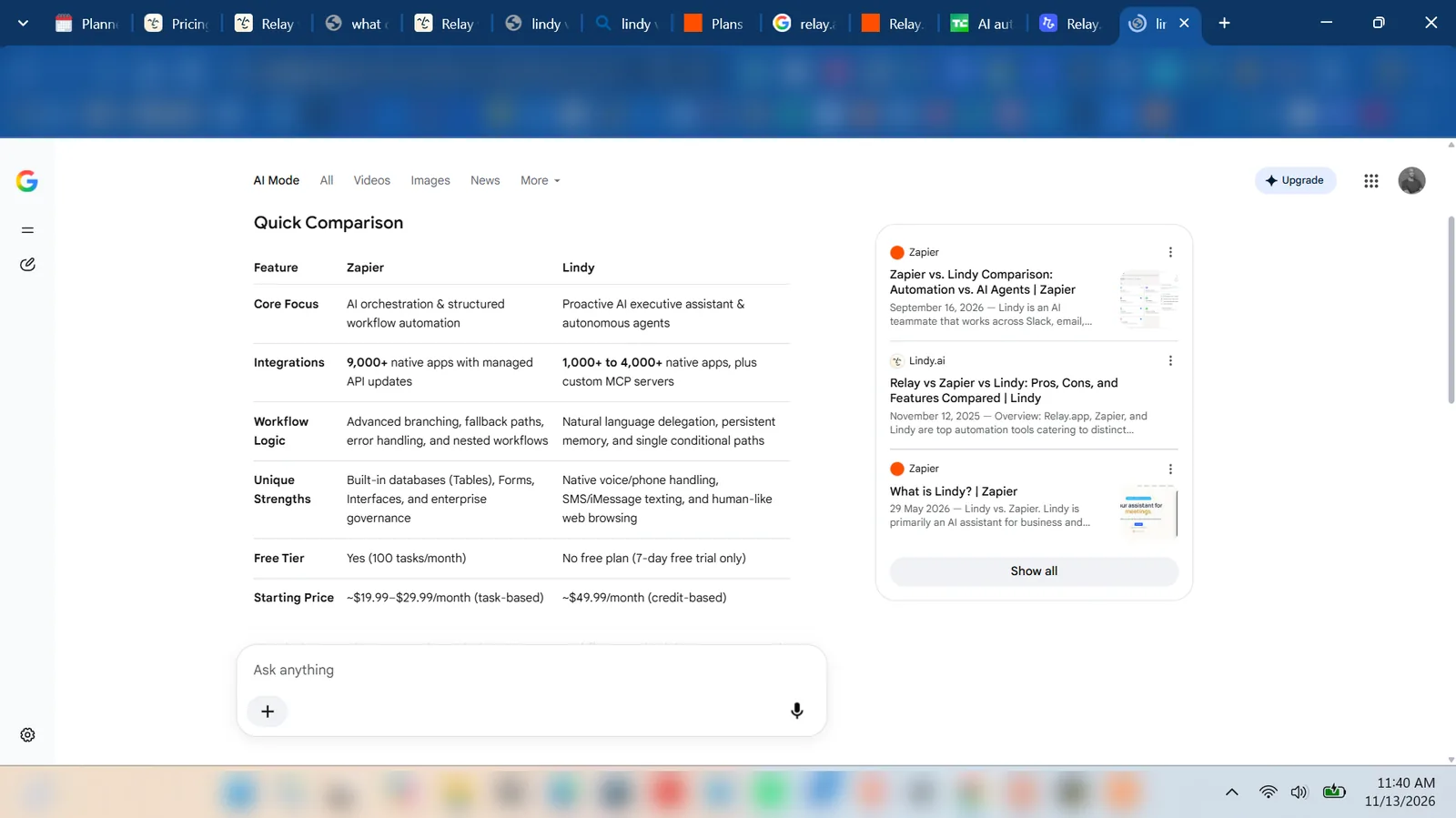
On 13 November, I asked Google’s AI Mode to compare Lindy and Zapier.
Its answer says Lindy has “No free plan (7-day free trial only)”, with “1,000+ to 4,000+” apps. And one of its sources is Lindy’s own Relay page (the screenshot at the top of this page).
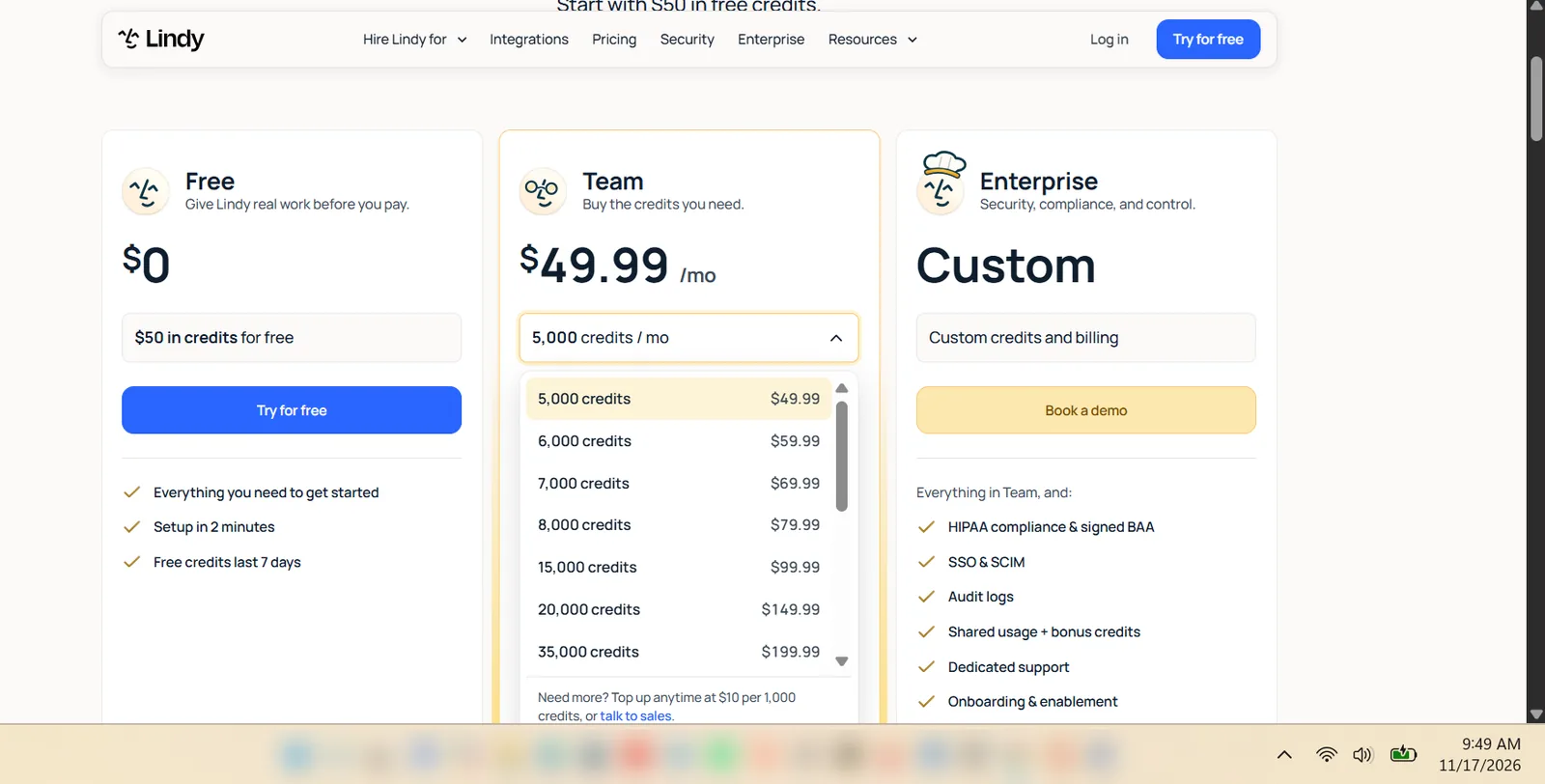
Now look at Lindy’s pricing page. On 13 November, it showed a $0 Free plan with $50 in credits that last 7 days.
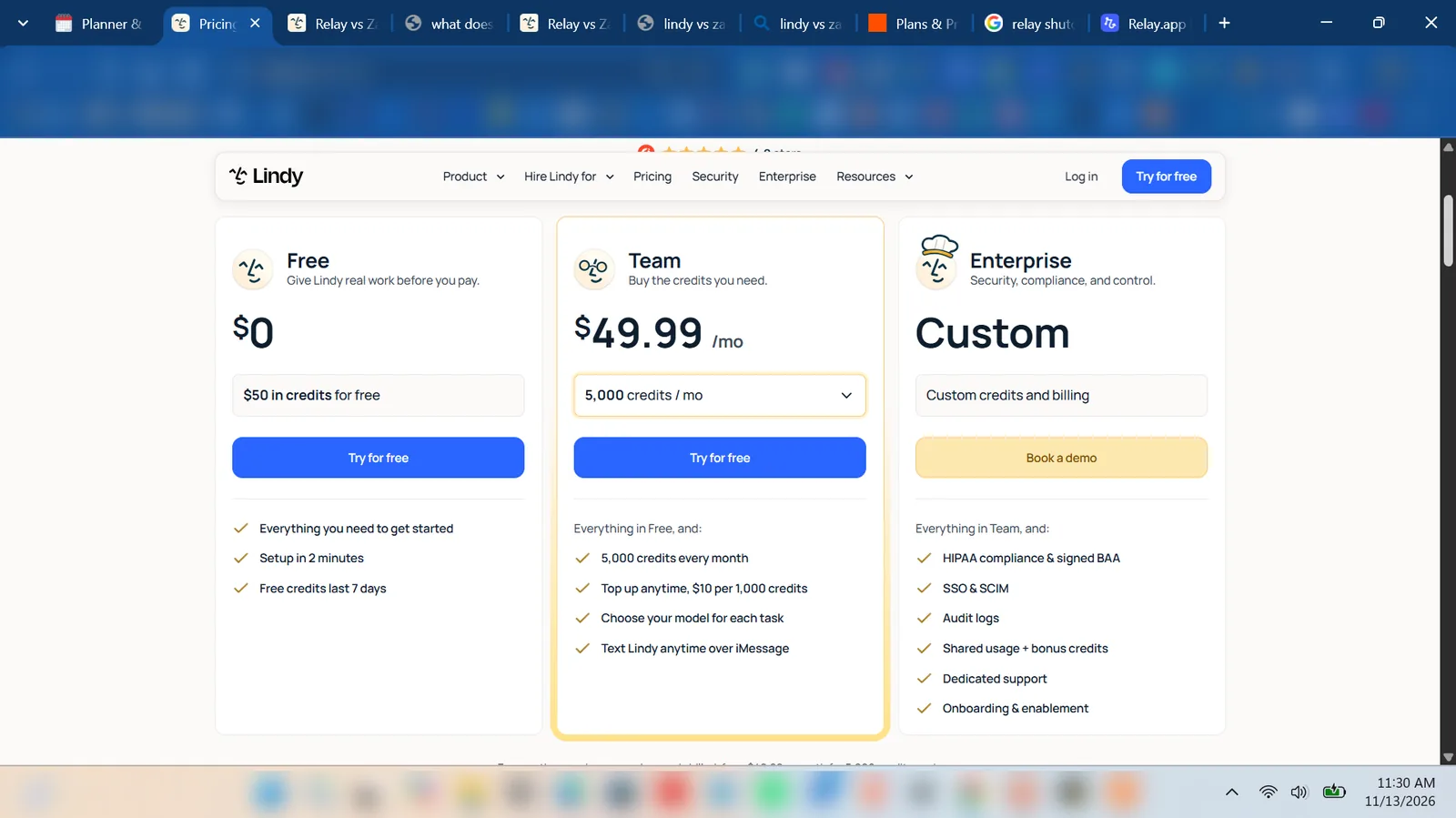
So it’s not a free-forever plan. It’s a 7-day trial. On that point, the AI answer and the pricing page agree.
However, the rest of the answer is a range, and Lindy’s own pages, as I found them on 12 November, explain why:
- Three free offers. The page’s FAQ said “up to 40 free tasks per month”. Its button said 7-day trial. Lindy’s homepage said $50 in credits.
- Three app counts. The page body said 4,000+. Its sidebar said 1,000+. The pricing page said 3,000+.
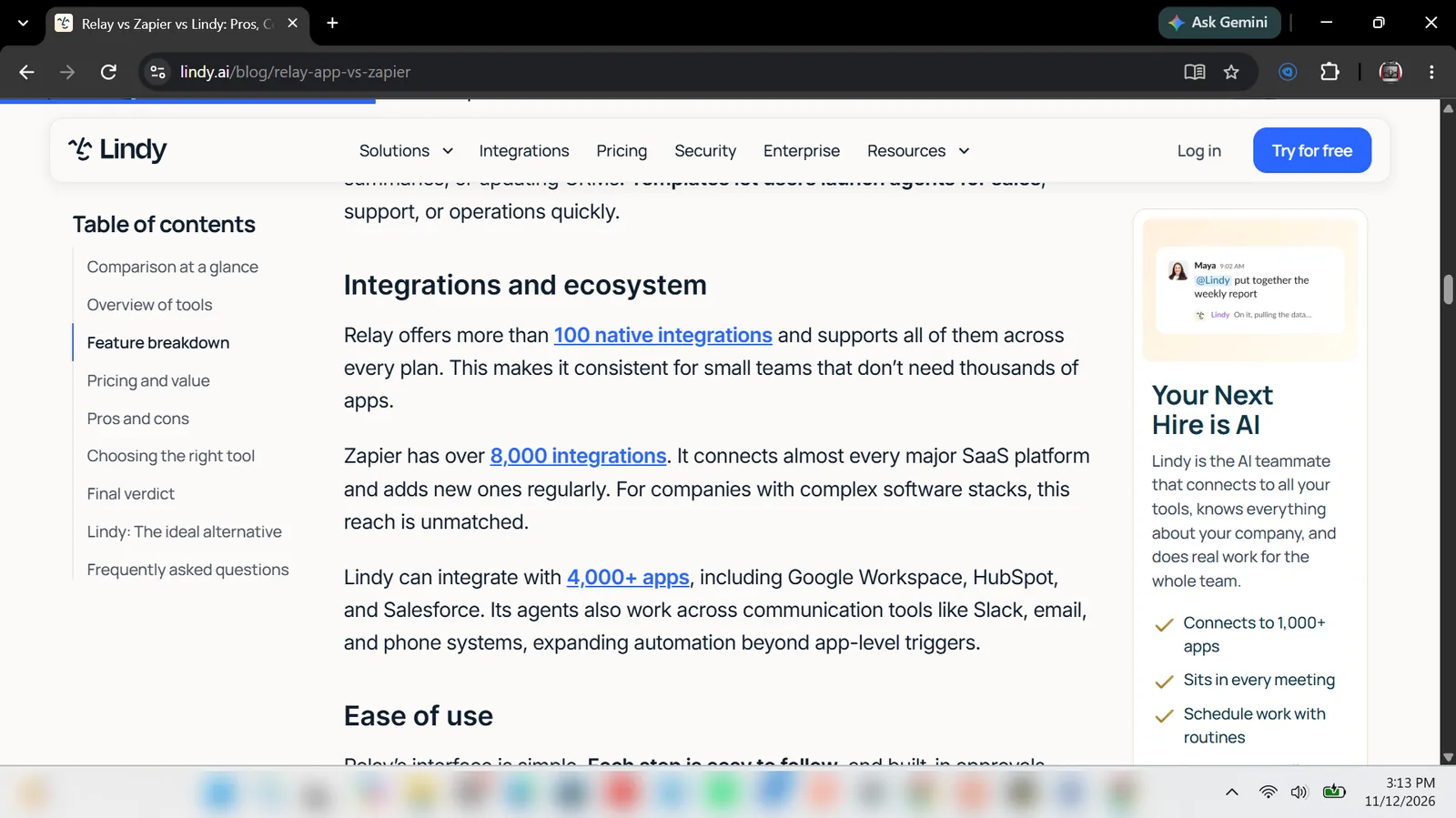
Update, 24 Nov 2026: the page’s body and sidebar now say 3,000+. One FAQ answer still says “more than 4,000”.
So Lindy’s own pages gave three answers. And the AI answer gave a range.
ChatGPT, on the same day, says it checked current pricing. Its answer gets the free offer right.
Four Days Later, the Same Pattern on Lindy’s Own Pricing
On 17 November, I searched “lindy pricing”.
Google’s result for Lindy’s pricing page showed Lindy’s own description: “from $29.99 a month for 3,000 credits each.”
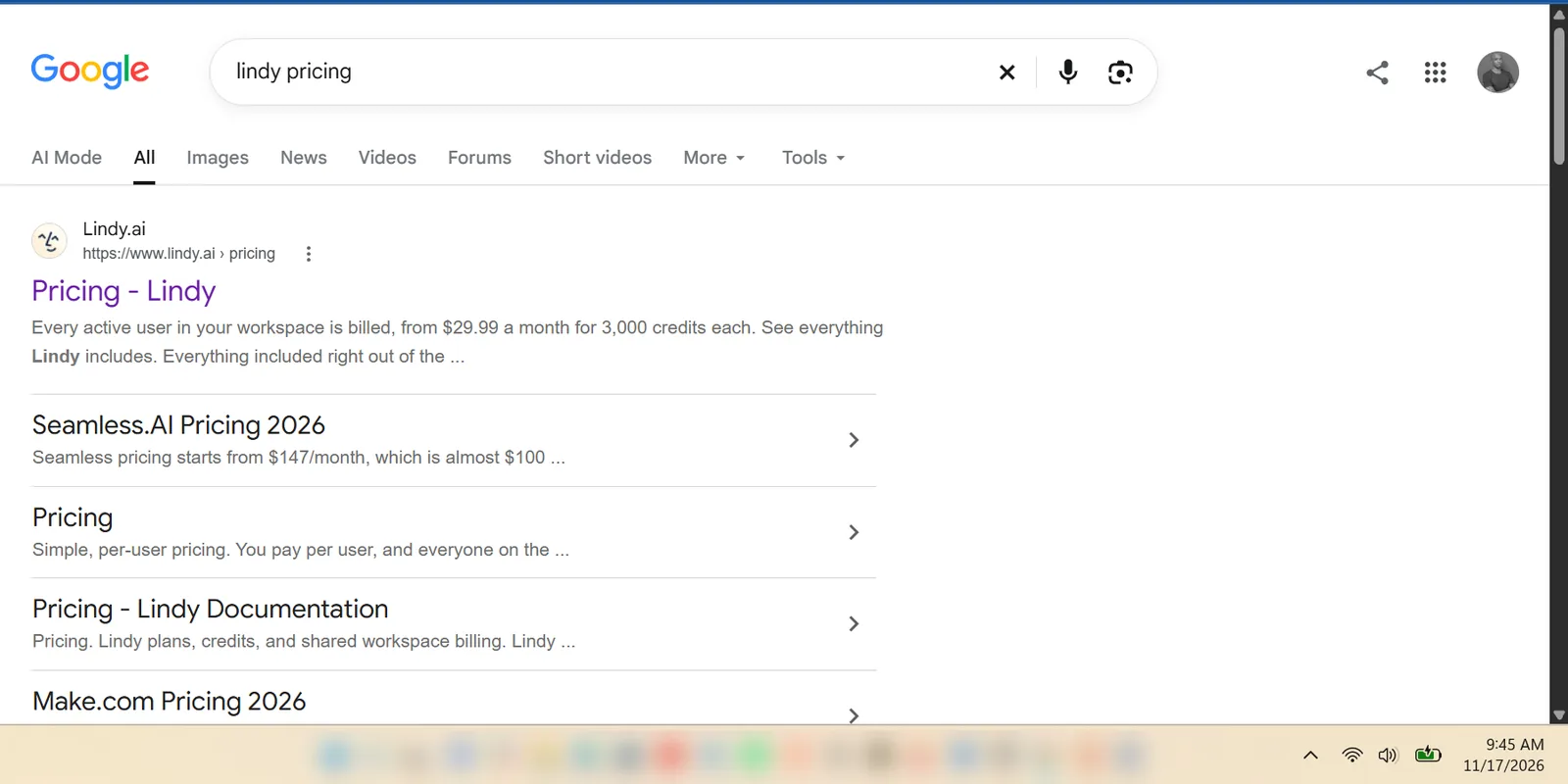
However, that morning the pricing page started Team at 5,000 credits for $49.99. There was no 3,000-credit option in the list.
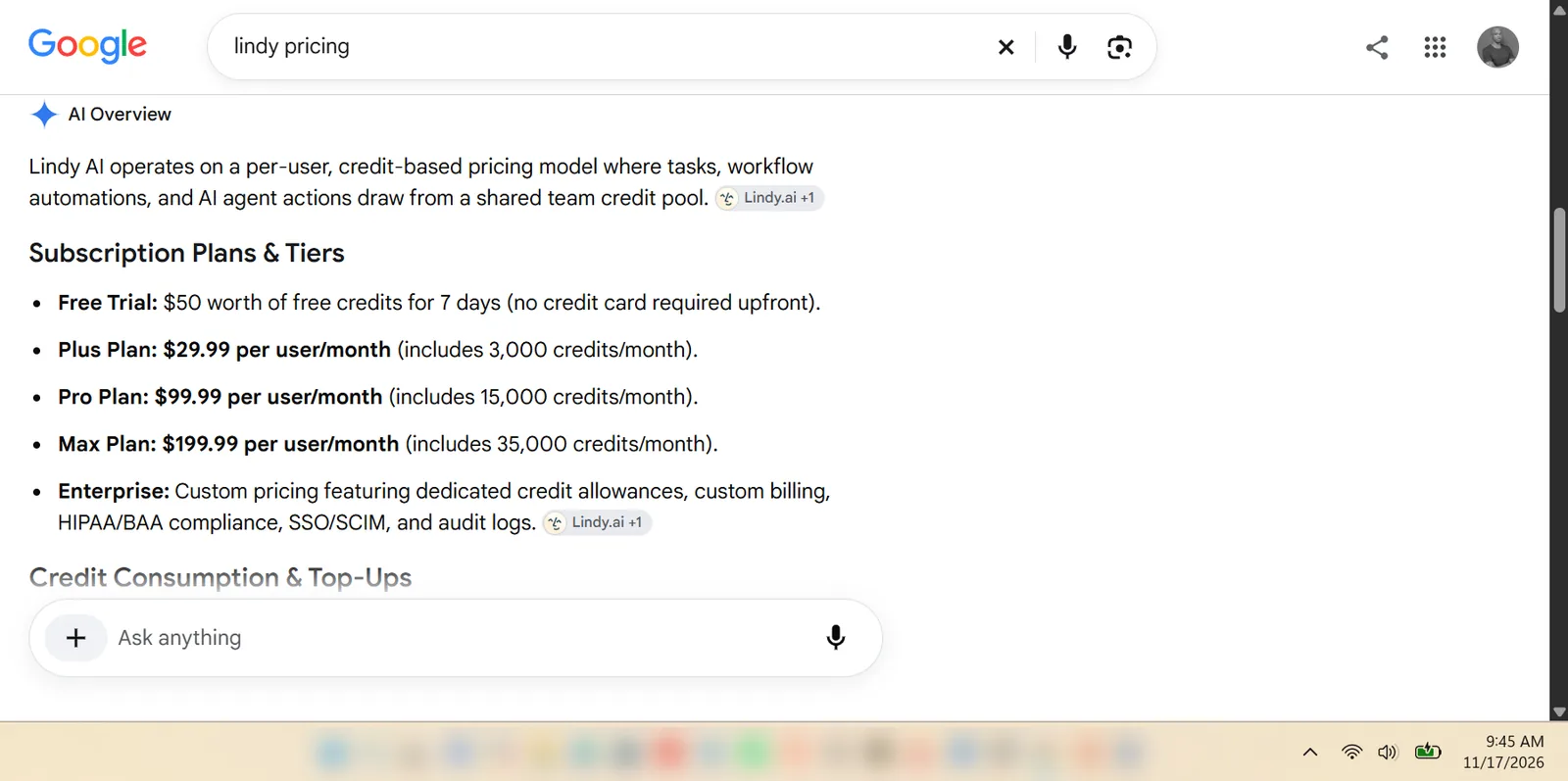
Then the AI Overview, which cited Lindy.ai. It said:
- “Plus Plan: $29.99 per user/month”, with 3,000 credits
- “Pro Plan” and “Max Plan”, names that weren’t in the pricing table
- “no credit card required upfront”, while my own sign-up asked for a card
And Lindy’s homepage result said plans start at $49.99, then “Pro and Max add…”. So the old plan names were still on Lindy’s own site.
They’re in its docs, too. Lindy’s pricing docs say “Lindy offers Plus, Pro, and Max plans.” And their FAQ says you can start “no credit card required.” Both were still there on 24 November 2026. So Google’s AI isn’t inventing those plan names. Lindy’s own docs feed it them.
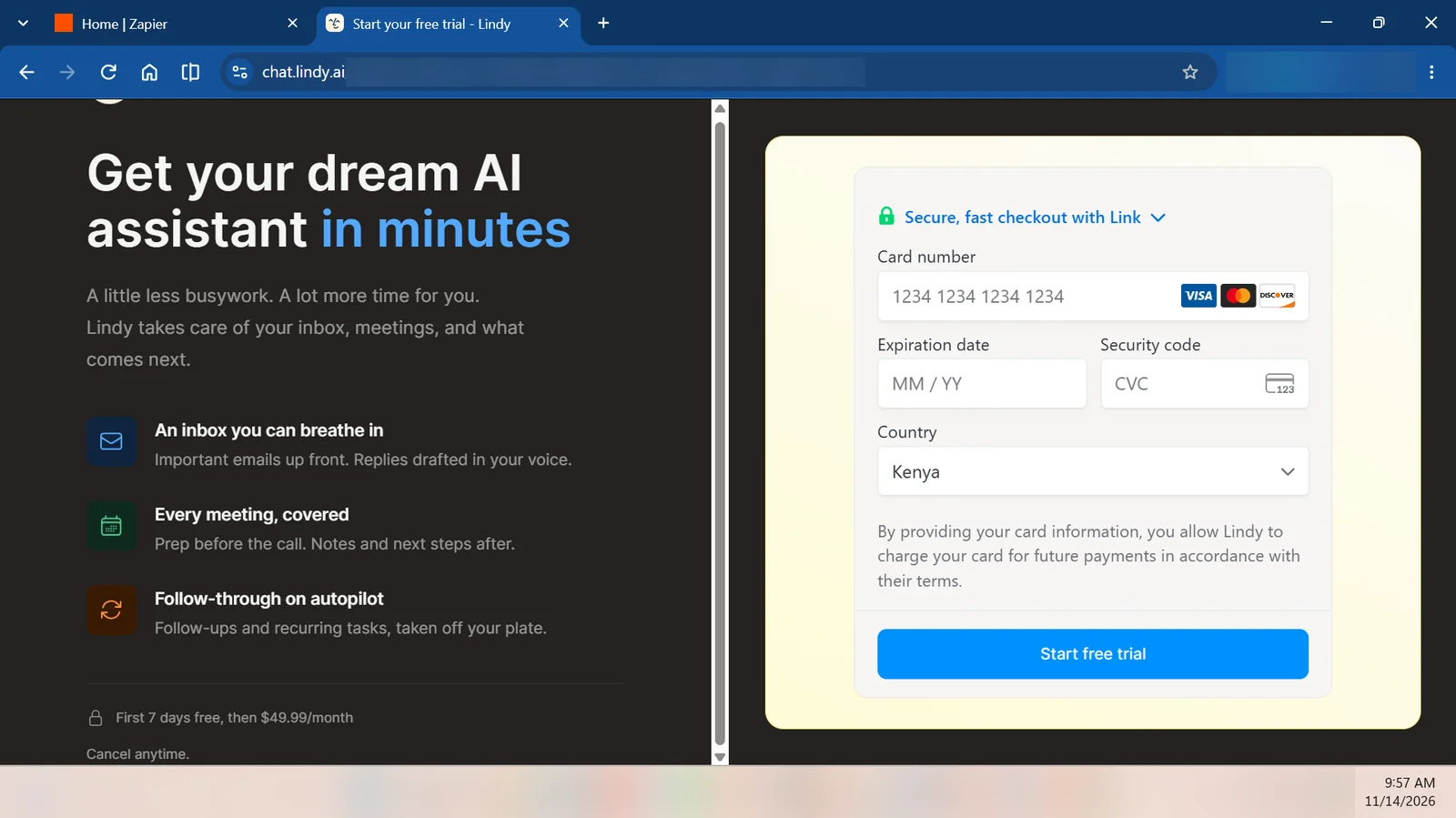
The card is a different story. My own sign-up, on 14 November, asked for one before the free trial started.
One more result on the same page. Zapier’s “Lindy pricing and plans for 2026”, updated in November, said prices start at $29.99 per user per month for 3,000 credits.
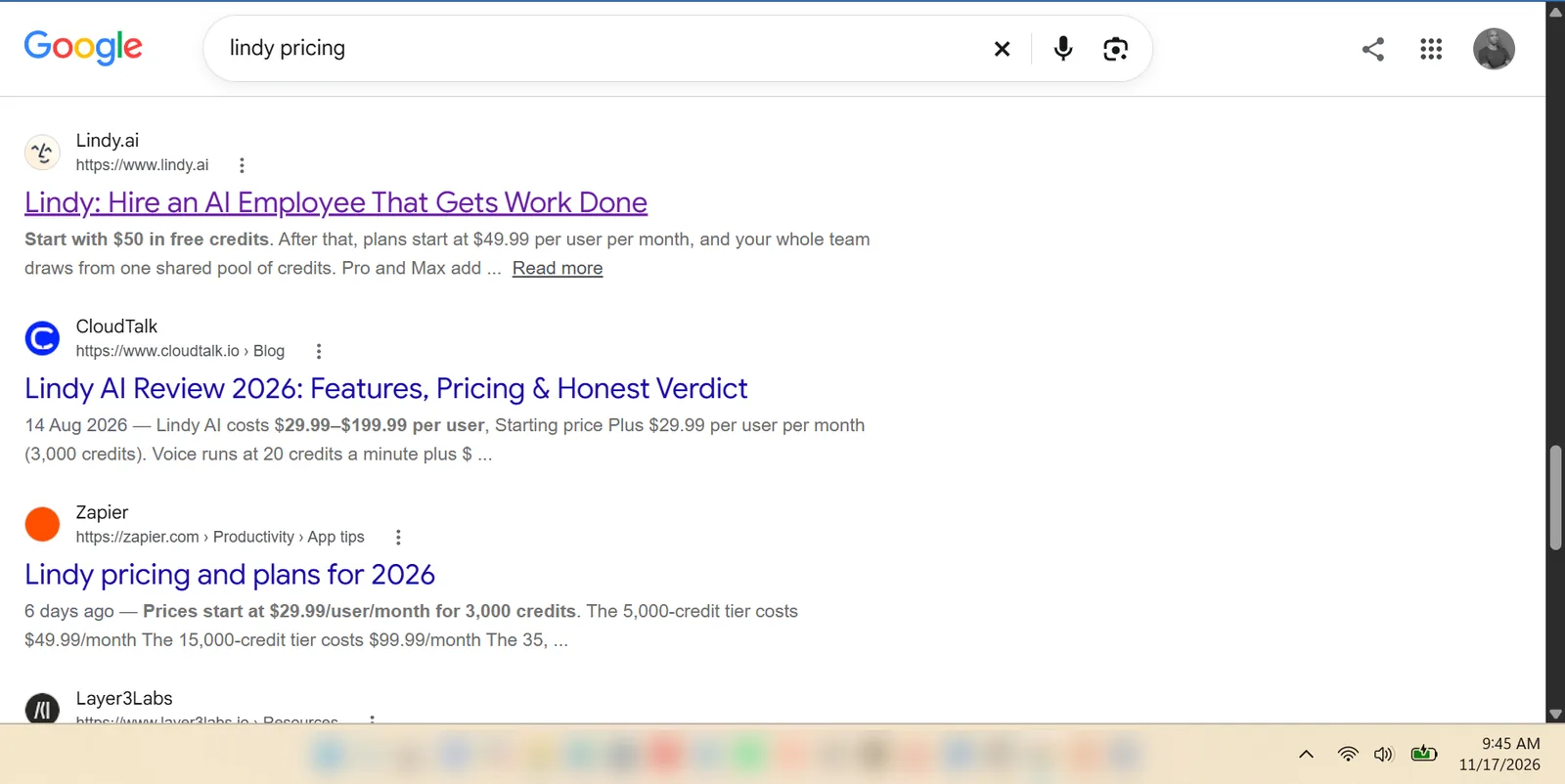
So on 17 November, a buyer could read $29.99 in Google’s result, $29.99 in the AI answer, and $29.99 in Zapier’s guide. Then they’d click through to Lindy and see $49.99.
That’s not a pricing problem. It’s a freshness problem. And it’s the cheapest fix in this teardown.
Update, 24 Nov 2026: Lindy’s pricing page now shows some visitors Team from $29.99 for 3,000 credits, which matches the search description. Others, on the same day and the same computer, still saw $49.99 for 5,000. And the comparison page still lists Lindy from $49.99 a month. If it’s a pricing test, that’s Lindy’s call. But a buyer, Google, and an AI answer can each still meet a different starting price. The mismatch moved. It didn’t go away.
03 The strategy
30 Checks, Six Phases, One Score out of 60
I scored the page on my BOFU Teardown Checklist: 30 checks in 6 phases, from the buyer’s trigger to the page’s freshness.
Each check gets a 0, 1, or 2:
- 0: missing
- 1: there, but weak
- 2: done well
I scored the live page on 13 November 2026, with one line of evidence for every check and dated screenshots behind them.
| Phase | Max | Lindy’s page | In one line |
|---|---|---|---|
| 1. Buyer and trigger | 10 | 2 | The trigger is real, but the page never uses it |
| 2. Query, SERP, and AI | 10 | 7 | The research is there; the page loses its own brand query |
| 3. Page architecture | 12 | 5 | Organised by topic, not by tool, with tables that scroll sideways |
| 4. Conversion path | 12 | 6 | Eight CTAs, but none names the plan to buy |
| 5. Trust and proof | 8 | 4 | Numbers are linked, but they don’t match each other |
| 6. Freshness and risk | 8 | 3 | No price on the page carries a date |
| Total | 60 | 27 |
The lowest phase is Buyer and trigger, at 2 out of 10. Here are four checks in plain words.
1.1 Does the Page Start From a Real Switching Trigger? 0 out of 2
The intro is a neutral three-way overview. It says it was last updated on 12 November 2025. And it never mentions the shutdown.
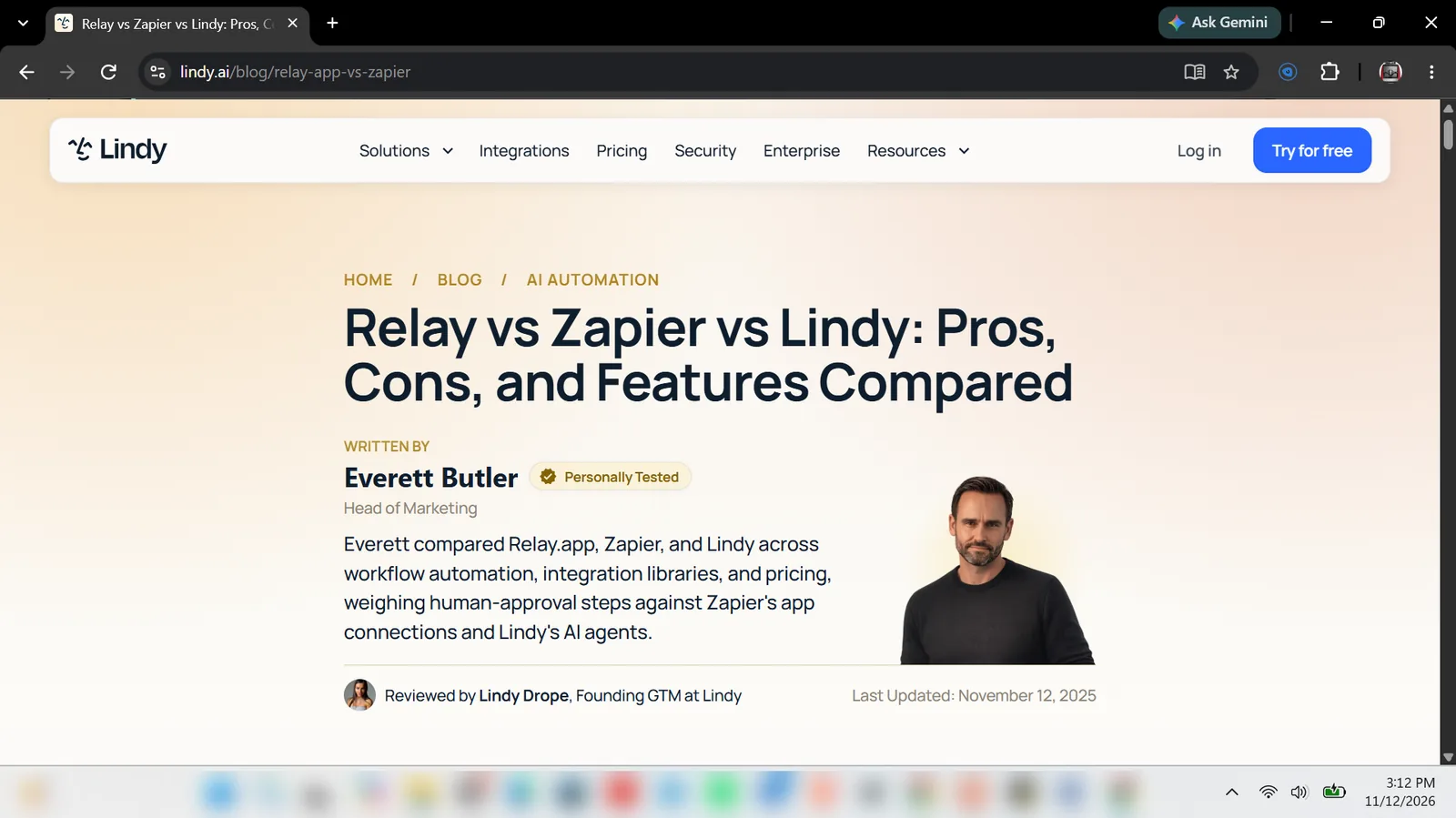
However, the trigger is real. Every Relay customer had to move.
So why a 0? Because I score the page, not the market. The shutdown is the opportunity. It goes in the fix list, not in the score.
2.2 Do You Know Who Owns Google and Bing? 2 out of 2
On 13 November, I searched “lindy vs zapier” on both engines.
Zapier’s own Lindy comparison, dated 16 September 2026, ranks first on Google and on Bing. Lindy’s page is second on Google. And on Bing, it isn’t on page one.
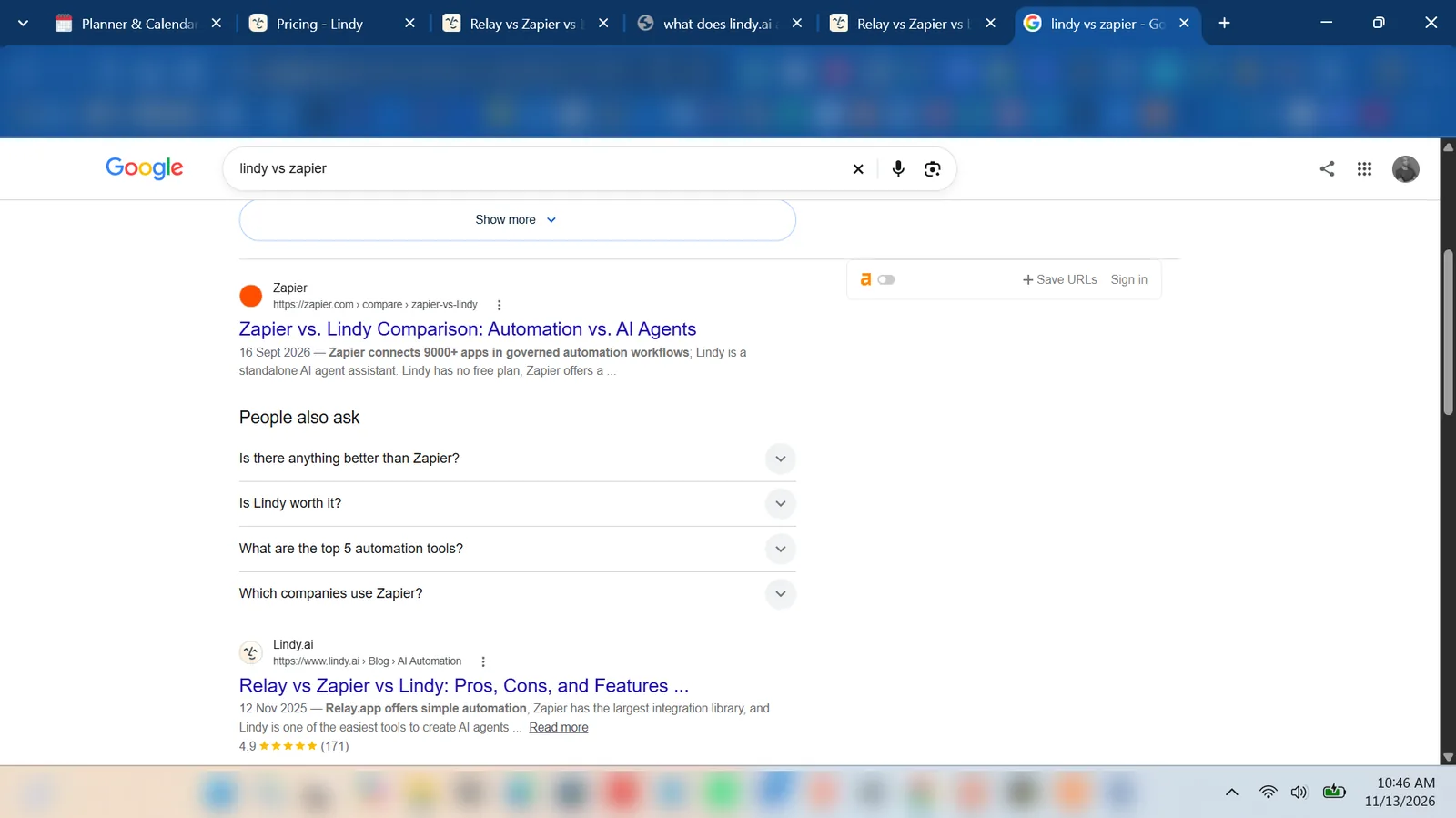
So why a 2, when Lindy is losing its own brand query? Because this check scores the research, not the ranking. The research is done. That Lindy is losing goes in the findings.
5.4 Do the Facts Match Across the Site? 1 out of 2
The author, bio, and job title are all there, in the page’s schema. That’s the 1.
However, on 12 and 13 November, the facts didn’t match:
- Free offer: the page’s FAQ said “up to 40 free tasks per month”. Its button said “7-day free trial”. Lindy’s homepage said $50 in credits.
- App count: 4,000+ in the body, 1,000+ in the sidebar, and 3,000+ on the pricing page. (By 24 November, the body and sidebar said 3,000+.)
- Zapier’s apps: the page said 8,000+. Zapier’s own page said 9,000+.
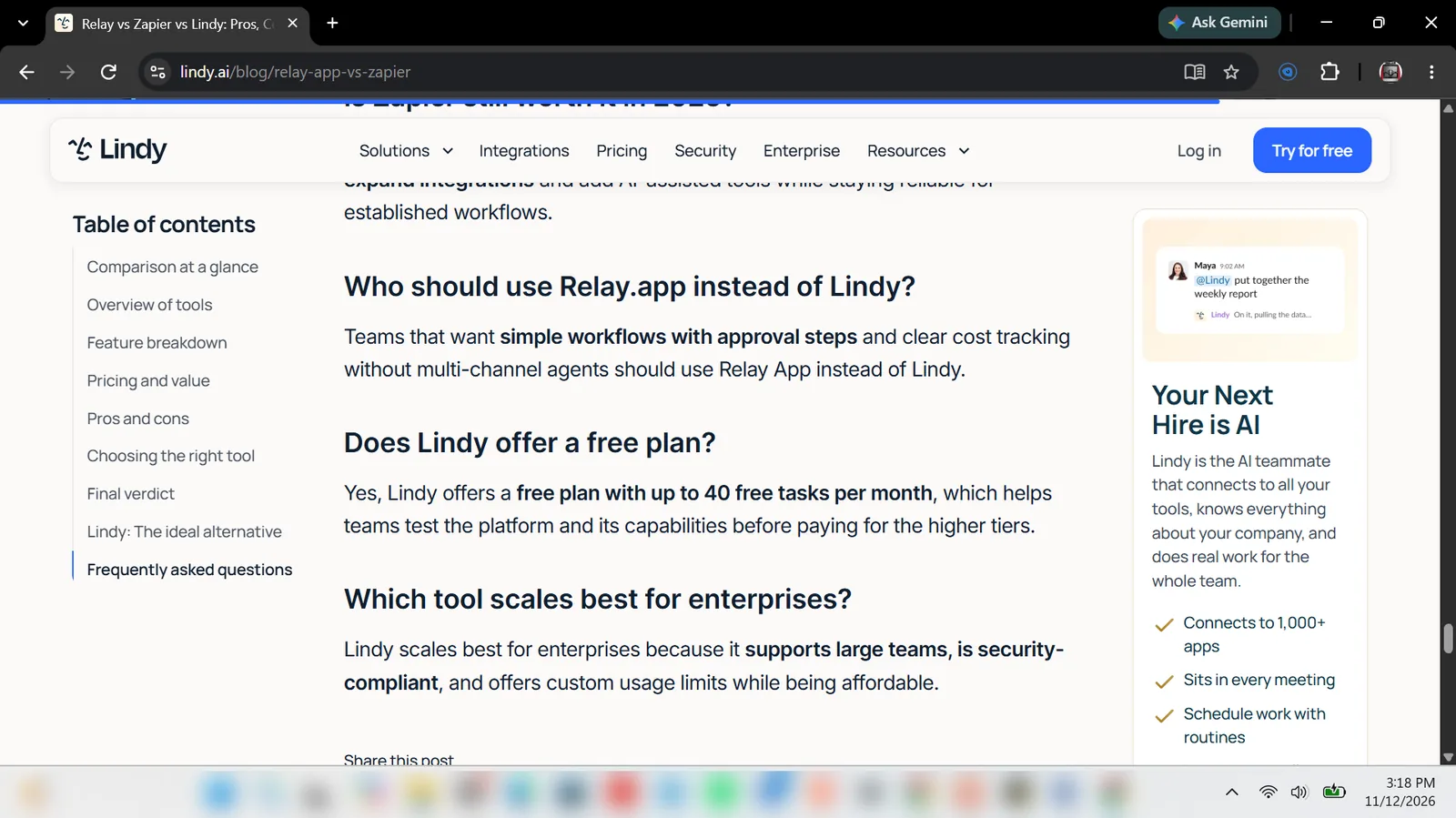
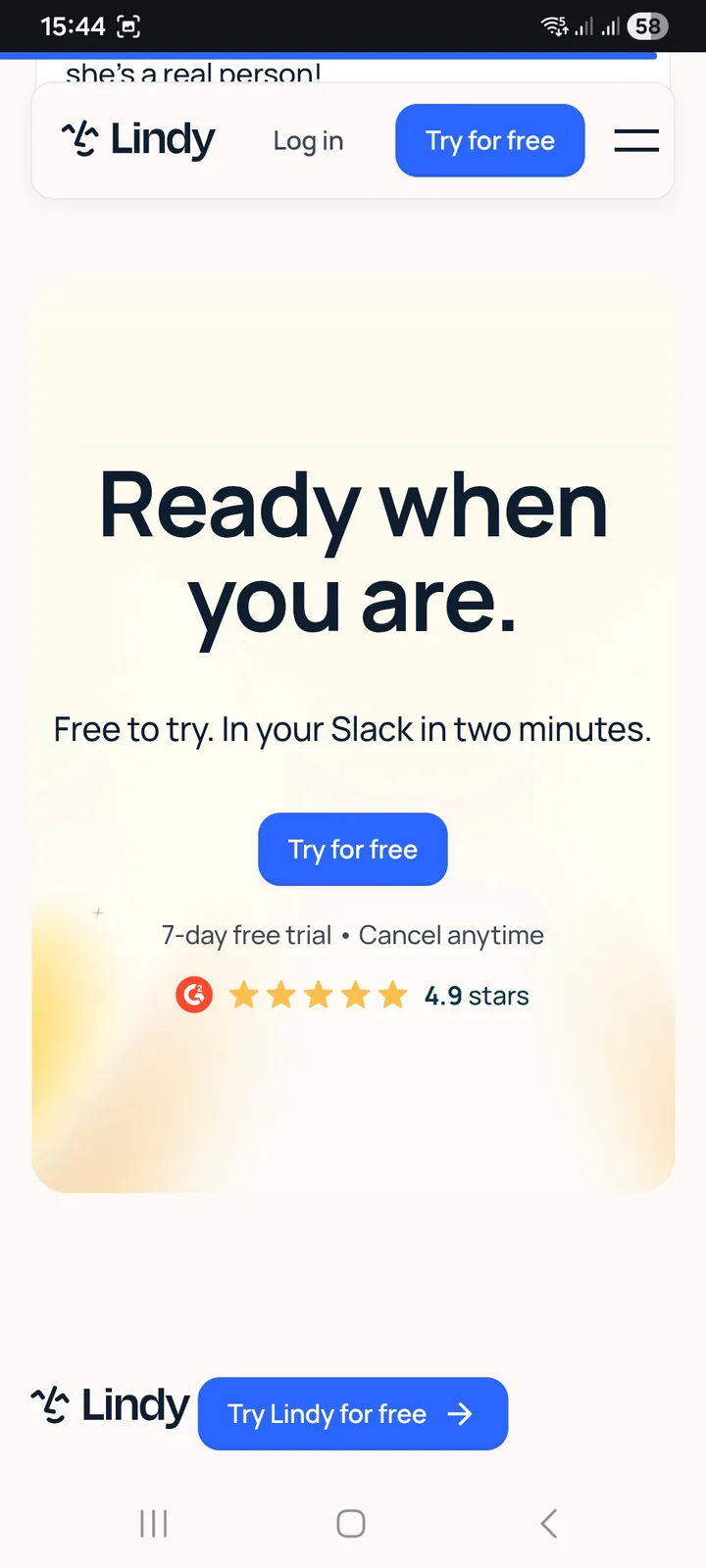
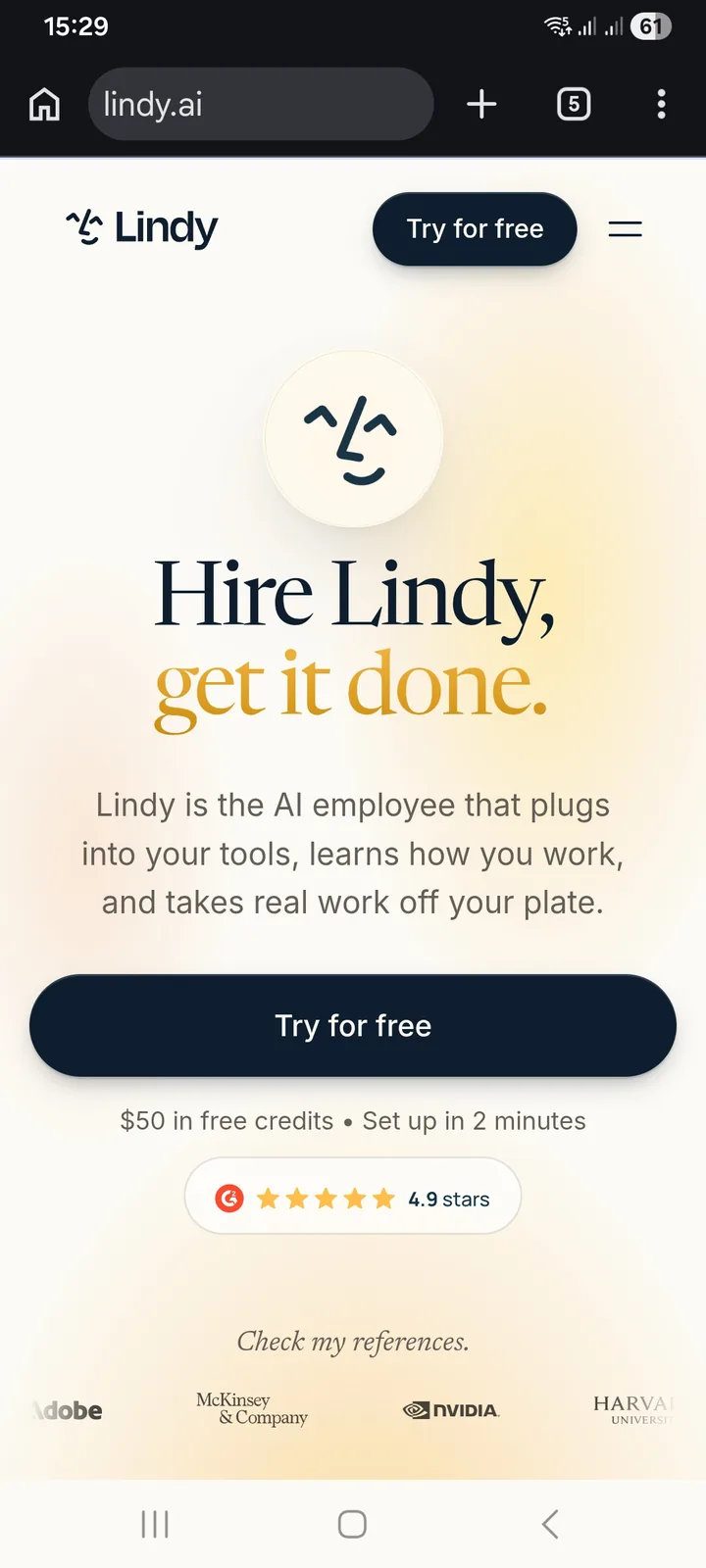
This is the check behind the lead finding. The site gives three answers, and the AI answer in 02 gives a range.
6.2 Are Prices Re-Checked on a Schedule, and Dated? 0 out of 2
No price on the page carries a date.
And two rows are out of date:
- Lindy’s free row still describes the 40-task plan.
- Relay’s row still prices a product that no longer exists.
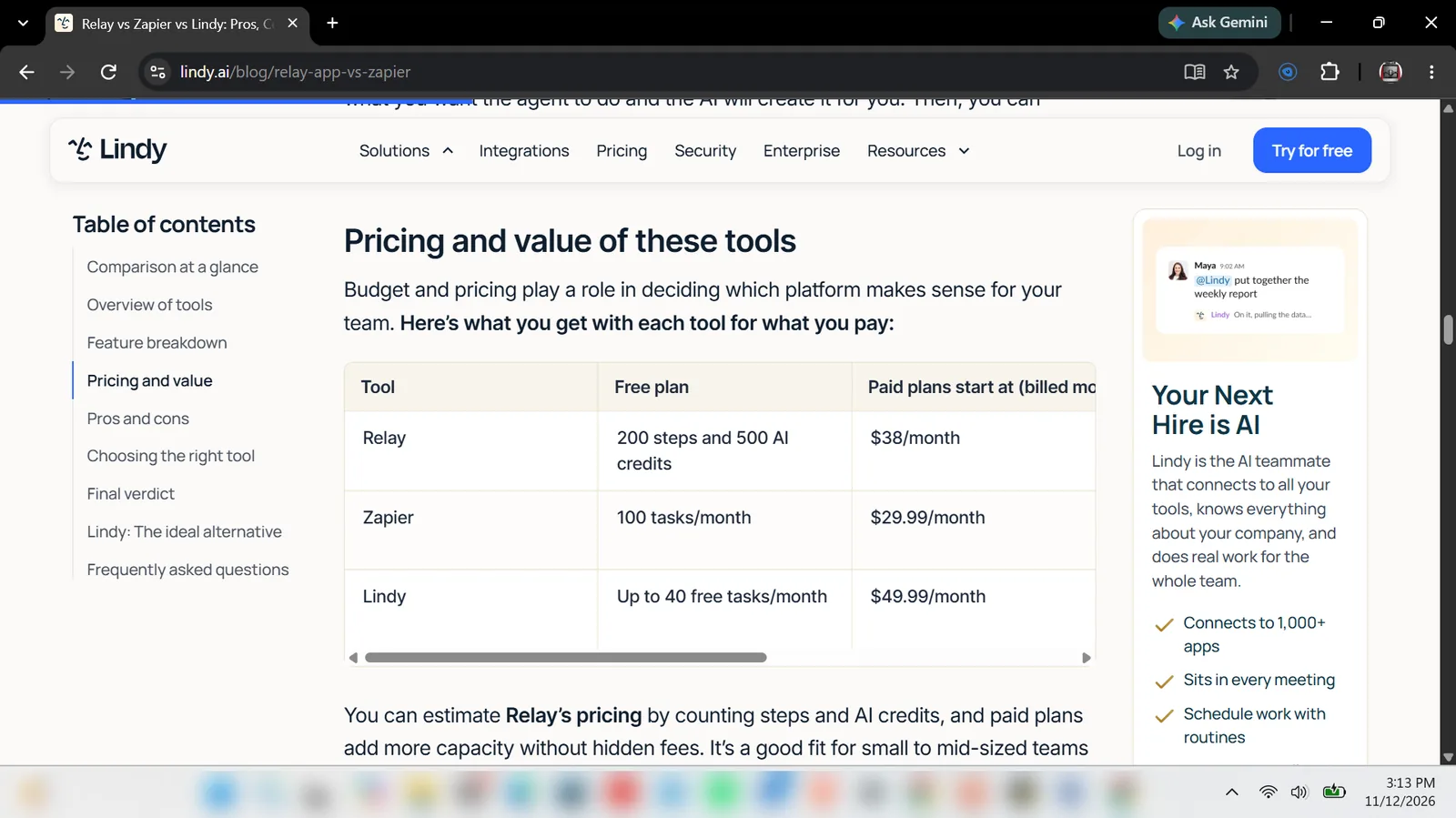
To be fair, Zapier’s price on the page is right. Its $29.99 a month, billed monthly, matches Zapier’s pricing page. But one correct row doesn’t earn the point when the rows around it are wrong.
One Honest Note on the Total
My first pass added up to 29, not 27.
So I rescored all 30 checks from scratch. Some went down: 1.1, because I’d given the market credit for the trigger. And some went up: 2.2, because I’d marked down Lindy’s ranking instead of my research.
The final is 27 out of 60. And the habit stuck: I add up the scores before a total goes in front of anyone.
04 The build
Five Fixes, Then One Rebuilt Page
The score told me what was wrong. The fixes put it in order, starting with the cheapest fix that does the most.
Fix 1: Correct the Facts Before Anything Else
- What was wrong (12–17 Nov): three free offers, three app counts, Relay priced as a live product, and a pricing description that said $29.99 while the pricing page started at $49.99. And Google’s AI answers cite these pages (see 02).
- The fix: one free offer ($50 in credits for 7 days), one app count (3,000+), the Team plan named with its starting price ($49.99 for 5,000 credits when I checked), Zapier at 9,000+ apps, a “Prices checked” date under the table, and a note at the top that Relay shut down. Then make the pricing page and its search description give the same starting price.
- What it changes for a buyer: the price they read in Google, in the AI answer, and on the page is the price they pay.
- Since then (24 Nov 2026): Lindy has fixed part of this. The app count in the body and sidebar is now 3,000+. And some visitors now see Team from $29.99, which matches the search description. But others still see $49.99, and the 40-task free offer, the Relay row, and the $49.99 on the comparison page are still there.
Fix 2: Give “Lindy vs Zapier” Its Own Page, and Lead With the Shutdown
- What’s wrong: /lindy-vs-zapier/ redirects to a three-way page built around Relay. And Zapier’s own comparison ranks first for the query.
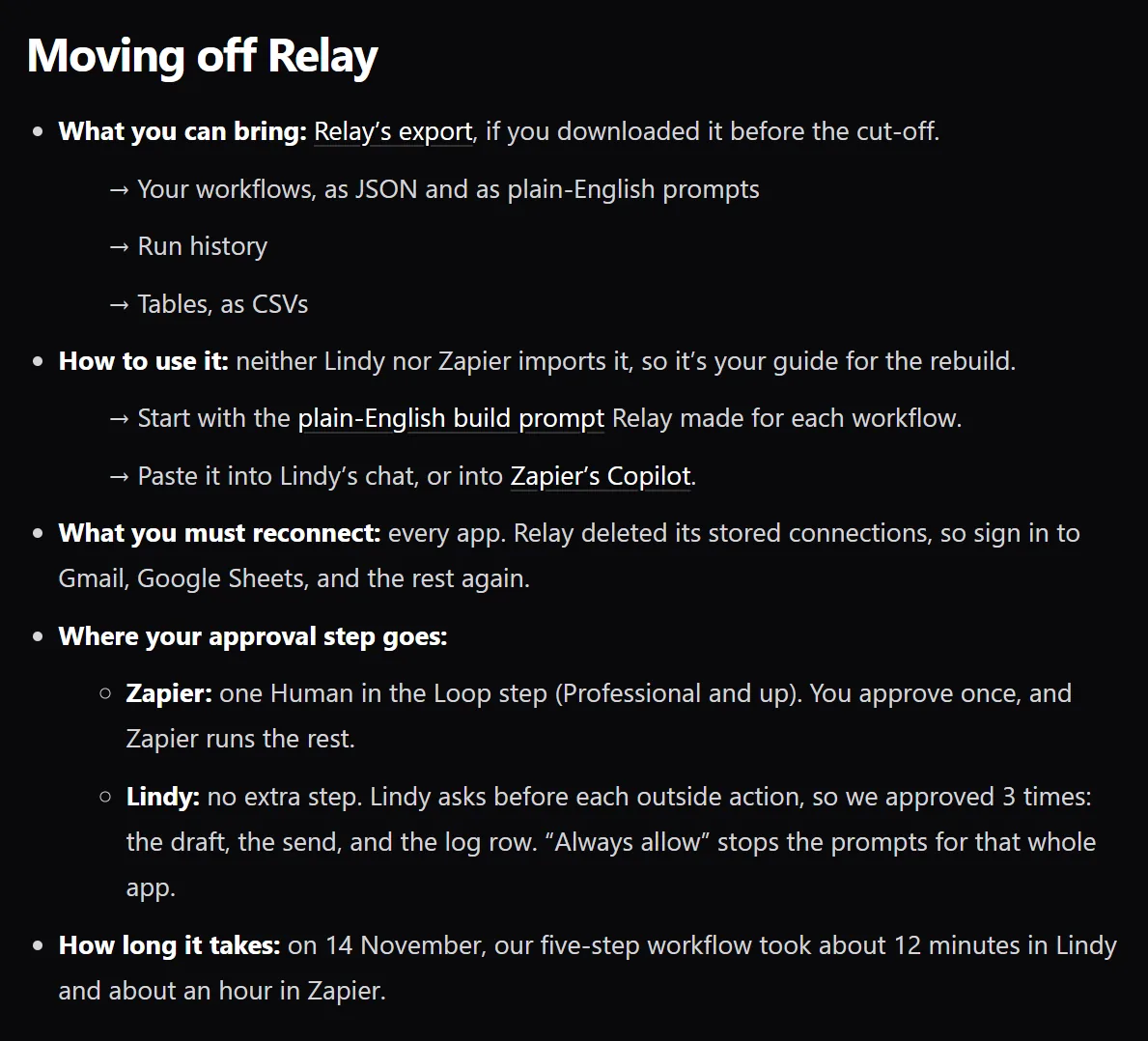
- The fix: stop the redirect. Build a two-tool page that opens with the shutdown and where Relay users should go. Add a short “Moving off Relay” section: what to rebuild from the export, how long it takes, and where the approval step goes. Then link it from Lindy’s five sibling posts. Today, none of them links back.
- What it changes for a buyer: a Relay user who searches “lindy vs zapier” lands on a page about their situation, not a page that still recommends Relay.
Fix 3: Publish the Relay Alternatives Page That Was Never Written
- What’s wrong: Lindy doesn’t have one. Zapier published its guide on 20 July, before the first cut-off. It lists n8n, Make, and Zapier. It doesn’t mention Lindy.
- The fix: a “Relay alternatives” page, with the query and the year in the H1, a quick-picks box, one block per pick, and the migration spelled out (Relay’s export of workflows, run history, and tables). Then redirect the old three-way page to it.
- What it changes for a buyer: Relay’s two strengths were AI steps and human approvals. That’s Lindy’s pitch. So a Relay user looking for the closest match would find it on Lindy’s own site.
Fix 4: One Buying Block per Tool, and Pre-Sell the Plan
- What’s wrong: the page is organised by topic: features, then pricing, then pros and cons, then “choose”. So a reader pieces each tool together from five sections. And it never names the plan to buy, or says it’s billed per user.
- The fix: one block per tool, in the same order: who it’s for, key features, free vs paid, when to upgrade, drawbacks, verdict, and a CTA. Add a two-column table that fits a 375 px phone. Name the Team plan, and spell out when to move to it: “when your $50 in credits runs out or a second teammate joins.” Then add FAQPage schema.
- What it changes for a buyer: they can read one tool from top to bottom, and leave knowing what to buy and when.
Fix 5: Show the Test, and Be Honest About Lindy
- What’s wrong: a “Personally Tested” badge and “tested for weeks”, with no screenshots, workflows, or results. And Lindy gets one drawback.
- The fix: screenshots of one workflow built in both tools, real drawbacks for Lindy, and a one-line disclosure under the intro.
- What it changes for a buyer: they can trust the page, because it shows the work, including where Lindy was slower or cost more.
How I Tested
I built one workflow in both tools, on 14 and 16 November 2026: a new email arrives, AI summarizes it and drafts a reply, a person approves, the reply is sent, and the result is logged to a Google Sheet.
I used Lindy’s Free plan and Zapier’s free trial, and signed up like any new user would. Neither company paid me, and I paid neither.
Then I wrote the rebuilt page in Lindy’s voice, as the page I’d hand them.
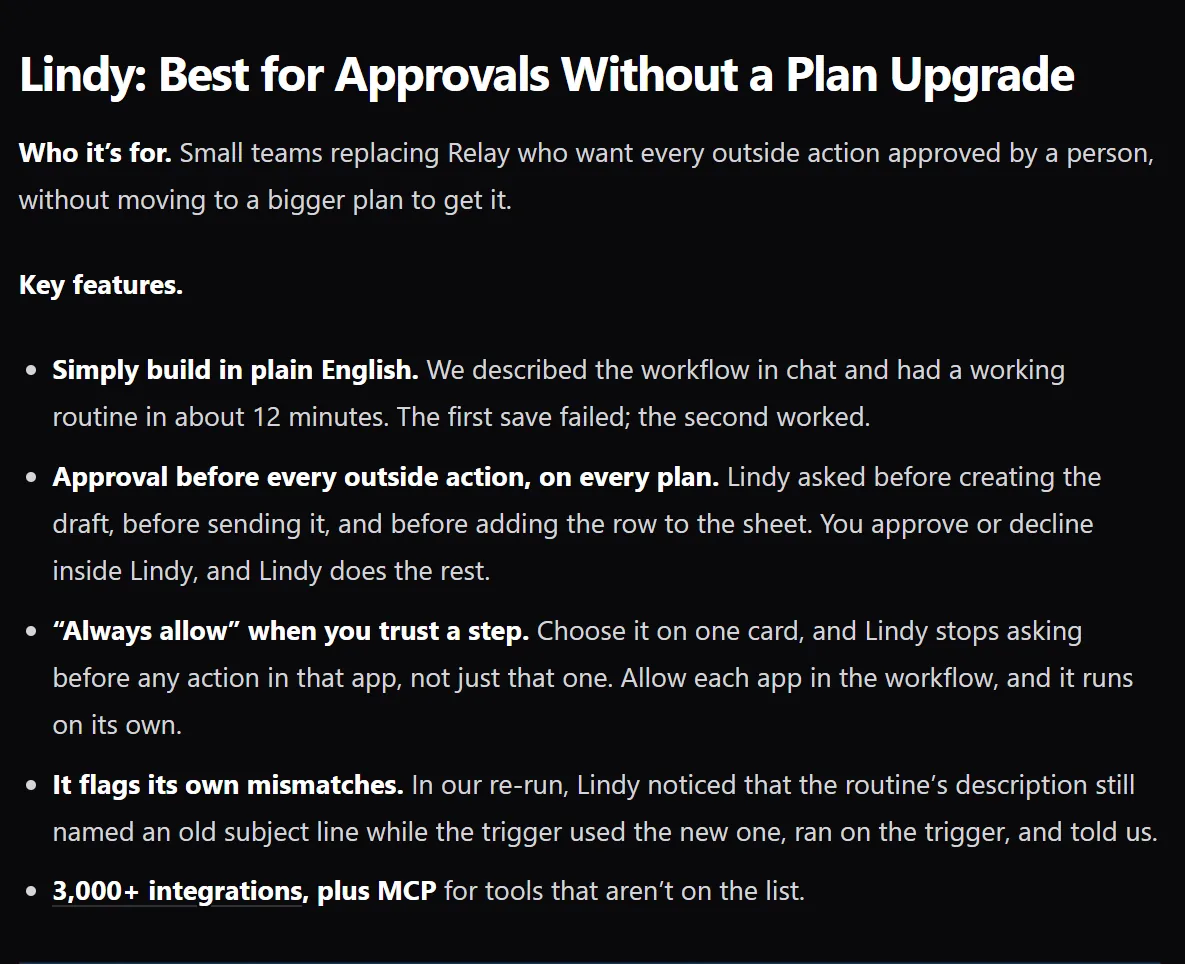
It covers fixes 1, 2, 4, and 5. Fix 3 is a separate page.
However, a few parts of the fixes only Lindy can do: stopping the redirect, linking from the sibling posts, and adding schema to a live page. So the sample can’t score them. More on that in the results.
05 The results
Four Numbers From the Rebuild
I scored the rebuilt page on the same 30 checks, with the same rules, on 17 November 2026.
RESULT 5.1
27/60 to 50/60 on the Same 30 Checks
| Phase | Max | Lindy’s page (13 Nov) | Rebuilt page (17 Nov) |
|---|---|---|---|
| 1. Buyer and trigger | 10 | 2 | 9 |
| 2. Query, SERP, and AI | 10 | 7 | 8 |
| 3. Page architecture | 12 | 5 | 12 |
| 4. Conversion path | 12 | 6 | 8 |
| 5. Trust and proof | 8 | 4 | 7 |
| 6. Freshness and risk | 8 | 3 | 6 |
| Total | 60 | 27 | 50 |
- The biggest jump: Page architecture, from 5 to a full 12. The shown test (3.2) and one buying block per tool (3.4) each went from 0 to 2.
- Where the last 10 points went: 8 sit with checks a sample can’t reach (see the note below). The other 2 are honest gaps: no real buyer quotes (1.4), and no author bio, because I won’t write one for a real person (5.4).
Note: 4 checks, worth 8 points, need Lindy’s own site or product, so a sample can’t score them: 2.5 (other posts linking to the page), 4.5 (the product carrying the loop), 4.6 (CTA tracking), and 6.4 (schema; the sample is noindex). On the 26 checks a sample can reach, it scores 50/52.
RESULT 5.2
Buyer and Trigger: 2/10 to 9/10
The live page never mentions the shutdown. The rebuilt page opens with it: “Relay.app is gone.”
- Line one is the trigger, with the dates, and a link to TechCrunch and to the founder’s announcement.
- The buyer is named in one line: “If you ran approval workflows in Relay, you’re rebuilding them somewhere else.”
- Switching costs get their own section, “Moving off Relay”: what your export holds, what you must reconnect, where the approval step goes, and how long the rebuild takes.
RESULT 5.3
About 12 Minutes in Lindy, About an Hour in Zapier
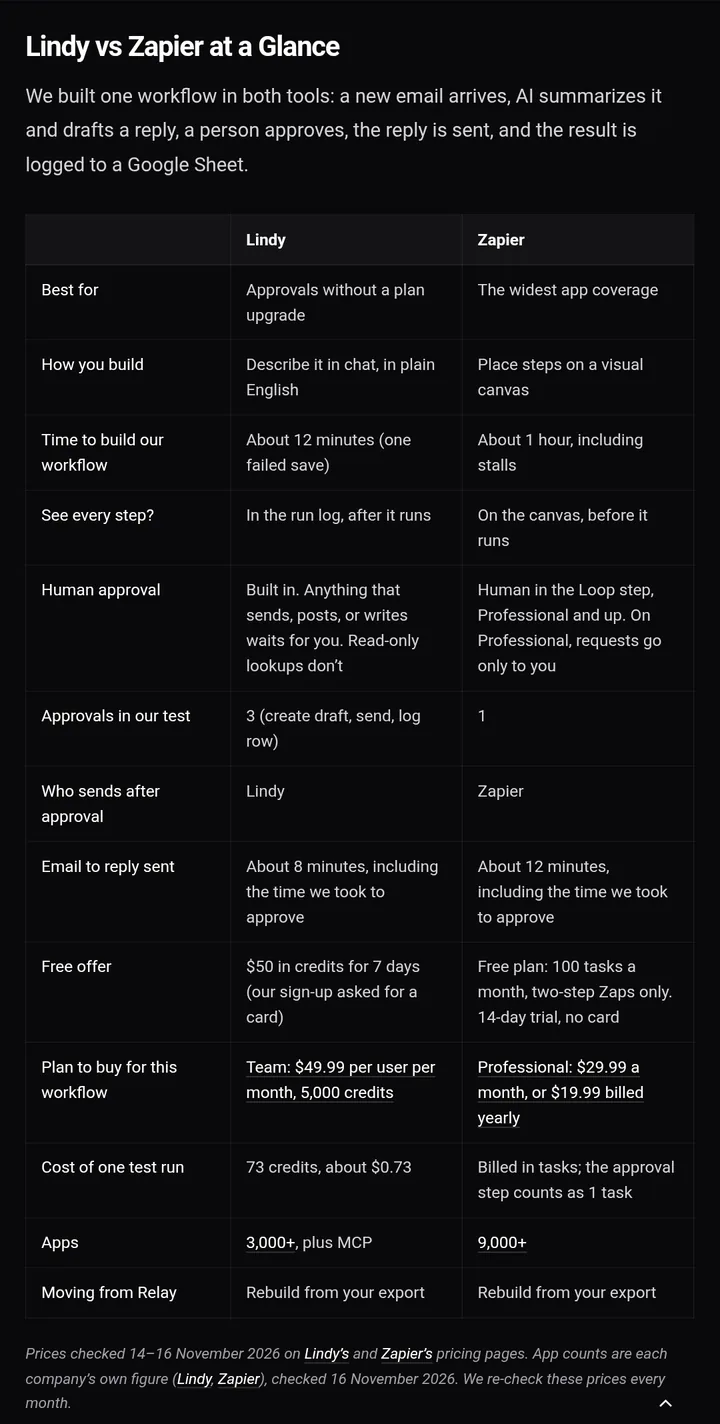
The same five-step workflow, built in both tools:
| Lindy | Zapier | |
|---|---|---|
| Time to build | About 12 minutes (one failed save) | About an hour, including stalls |
| Approvals per run | 3 (the draft, the send, and the log row) | 1 |
| Email to reply sent (including my approval time) | About 8 minutes | About 12 minutes |
| Cost of one clean run | 73 credits, about $0.73 | Billed in tasks; approvals need Professional |

However, faster isn’t the whole story. Lindy asked for approval three times per run, where Zapier asked once. And Zapier shows every step on a canvas before it runs, where Lindy shows them in the run log after.
So the rebuilt page gives both tools real drawbacks, Lindy included. That’s check 5.2, and it went from 1 to 2.
RESULT 5.4
One Free Offer, One App Count, Every Price Linked
On 13 November, the live page gave three free offers and three app counts. The rebuilt page gives one of each, and links them:
- Free offer: $50 in credits for 7 days. And it adds what I saw: Lindy’s docs say no card is required, but my sign-up asked for one.
- Plan to buy: Team, at $49.99 per user per month for 5,000 credits, the starting price on 17 November. (On 24 November, some visitors saw Team from $29.99 for 3,000 credits.)
- App counts: 3,000+ for Lindy and 9,000+ for Zapier, each linked to the company’s own page.
- Dates: “Prices checked 14–16 November 2026”, and “We re-check these prices every month.”
So whoever reads it, a buyer or an AI answer, gets one price, one free offer, and one app count.
Your Comparison Page Might Be Teaching AI Answers Right Now
Send me the page. In 20 minutes, I’ll show you what a buyer meets on it, and what AI Search says when it cites it.
Free · 20 minutes · written summary within 24 hours
06 What I noticed
What a New Lindy User Runs Into
These came up while I tested Lindy on 14 and 16 November 2026. They’re what a new user would meet in their first week, not a verdict on the product. And two of them are good news.
1 “Always Allow” Covers More Than the Card Suggests
Lindy asks before it sends, posts, or writes. Each approval card has an “Always allow” option. The card says it stops Lindy asking “before any Gmail action on this account.”
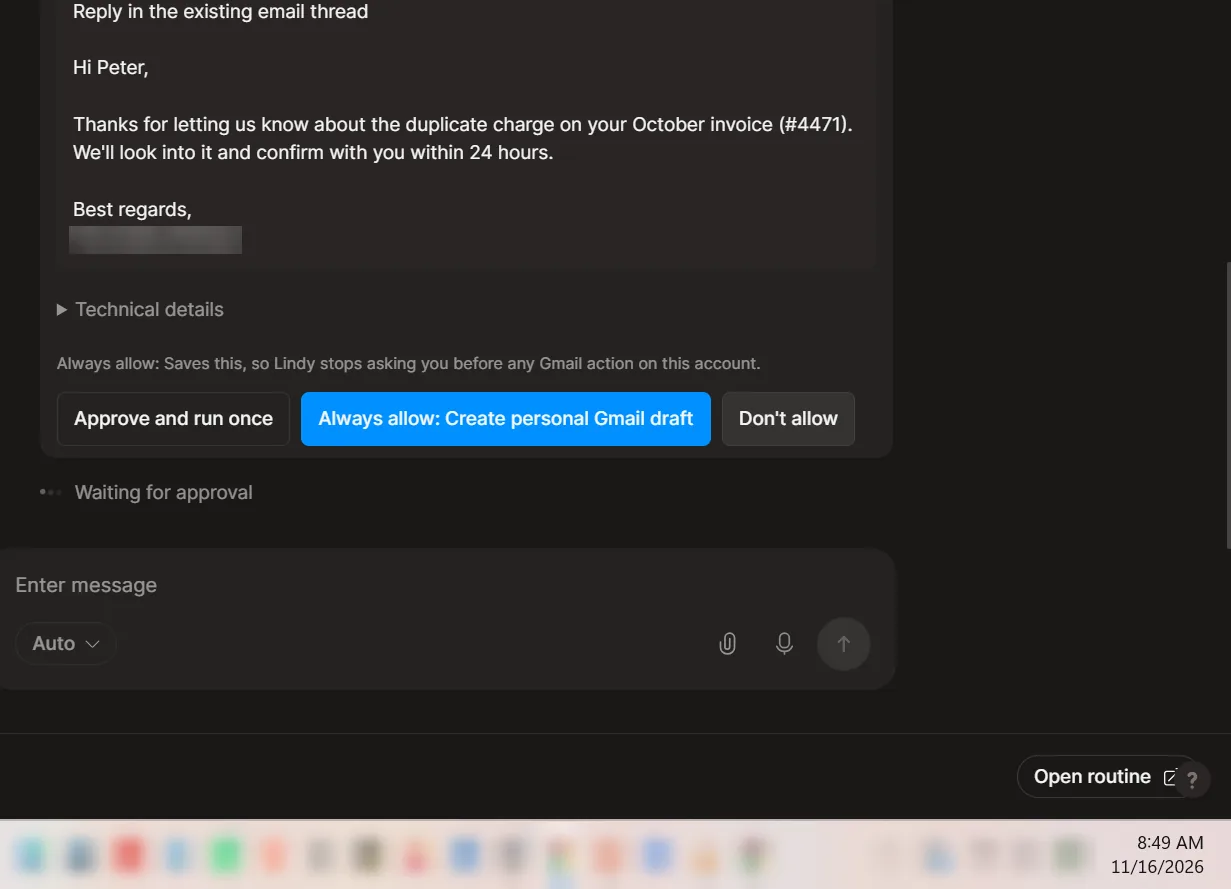
However, Lindy’s docs say more. A rule covers every account under the integration, not just one. And “Always allow” applies “workspace-wide if an owner or admin clicks it.”
On 16 November, I found no per-routine option, in the docs or in the routine’s settings.
2 Why That Matters to a New User
Lindy works in the background. There’s no canvas to check before a run.
So one “Always allow”, clicked on a different routine, or on a routine with the wrong trigger, can let Lindy send or write without asking. And if an admin clicks it, that applies across the whole workspace.
3 The Card and the Docs Don’t Match
The card says “on this account”. The docs say every account under the integration.
The docs also say the web app chat isn’t guarded. However, my email-triggered routine did ask for approval, in the web app. That’s what I saw in one routine. I’m not reading more into it.
4 A Daily Brief I Never Set Up Ran Each Morning
A daily brief ran in my test workspace each morning. I didn’t create it. It used 78 credits over two mornings.
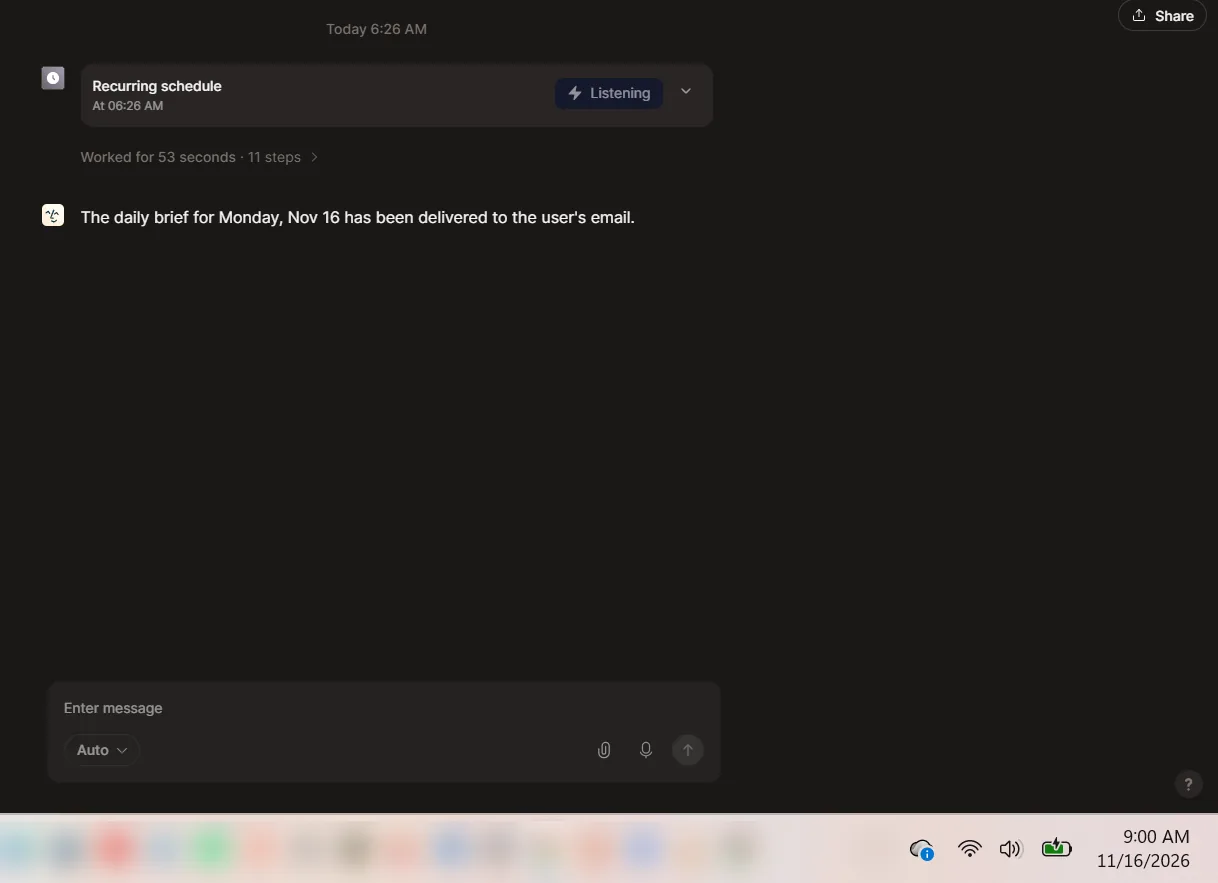
And runs that stopped after I edited a routine used another 48 credits.
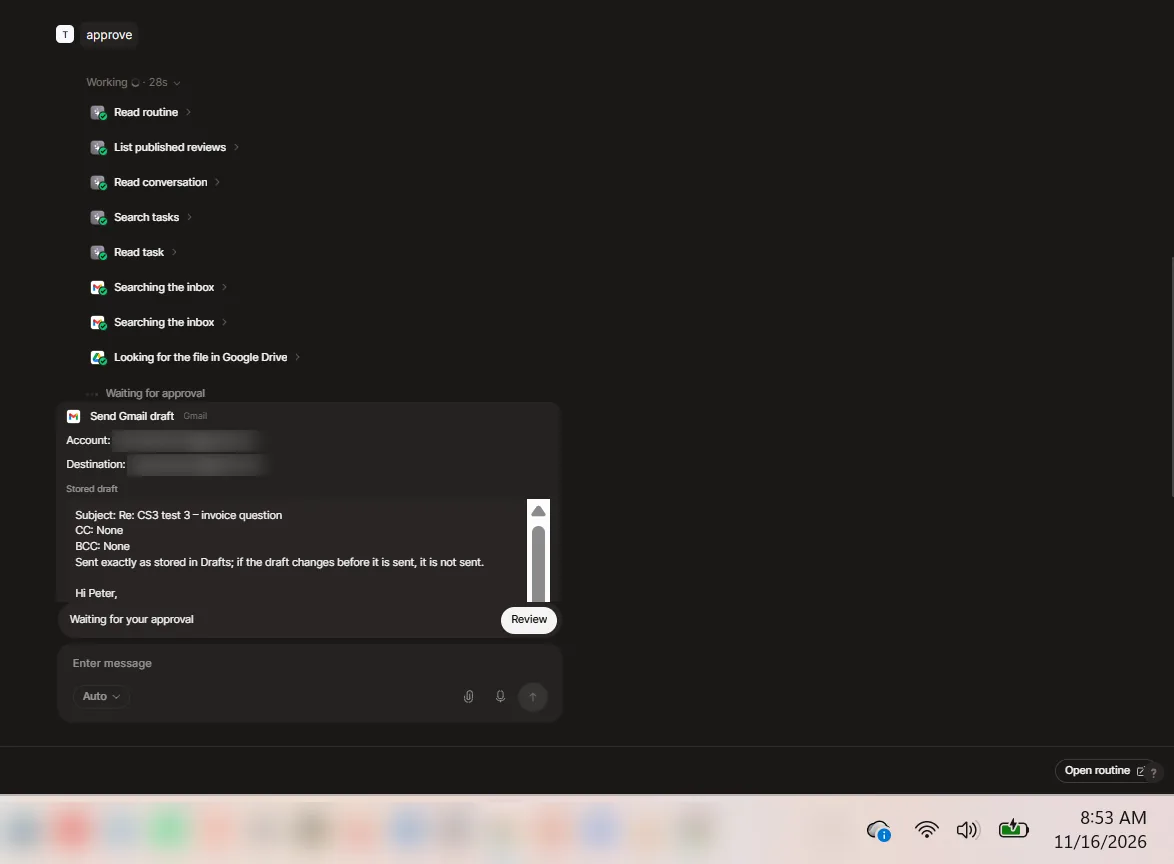
5 Lindy Searched Google Drive During an Email Workflow
At sign-up, Lindy asked for access to Gmail, Google Sheets, and Google Drive. Then, during my email workflow, it searched Drive.
6 Good News: It Says When It Fails
My first routine save failed. Lindy said it couldn’t confirm the save, instead of claiming it worked.
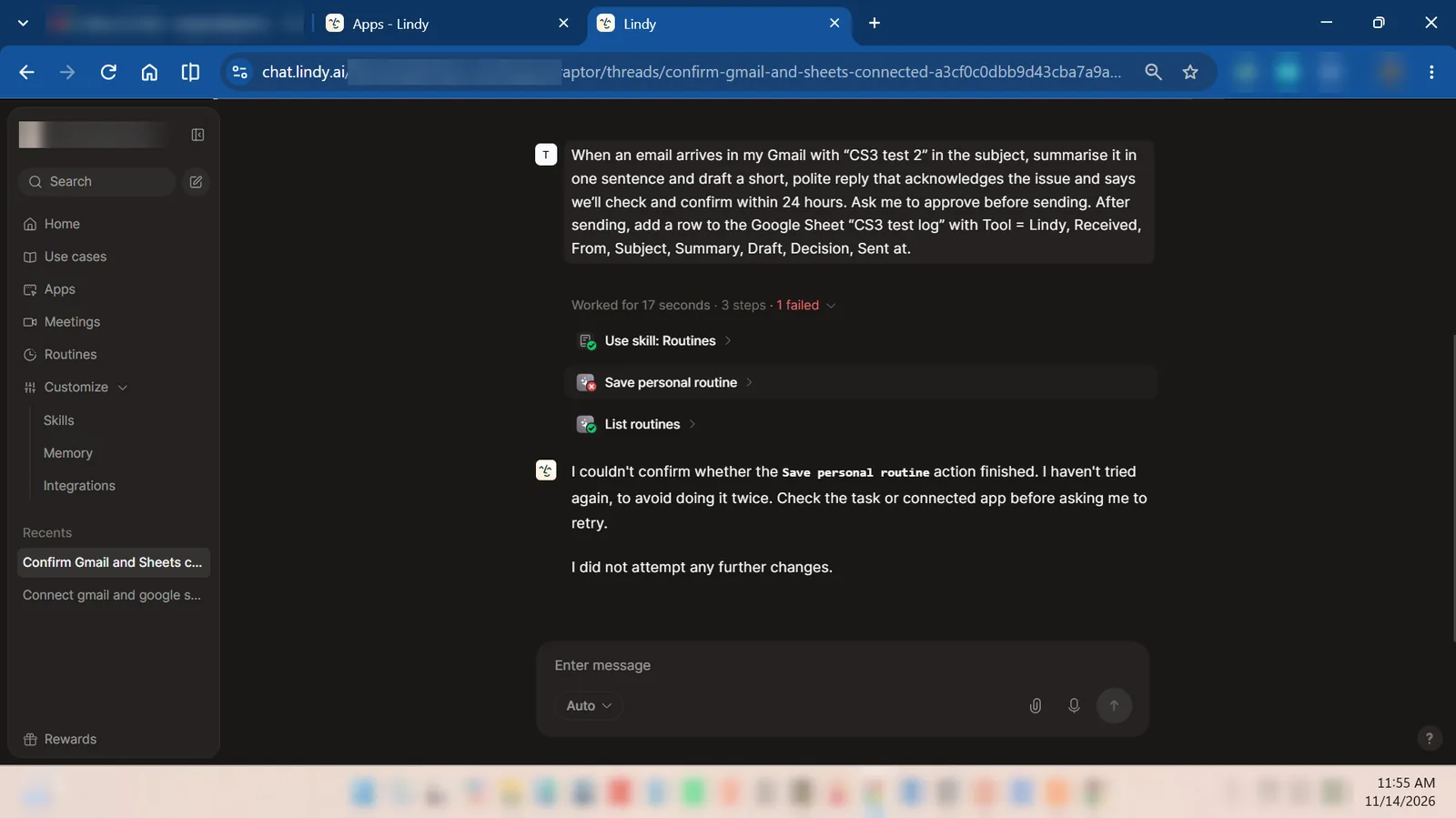
And in the re-run, it flagged its own mismatch: the routine’s description named an old subject line, while the trigger used the new one.
7 Good News: Credits Pause at Zero
Lindy’s FAQ says that when credits run out, actions pause until your next cycle. So there’s no surprise bill.
8 Loose Ends on the Pricing Page
- “Pro and Max”: the pricing page mentions computer use “on Pro and Max”. Neither plan is in its pricing table. Lindy’s pricing docs still name Plus, Pro, and Max plans too (both checked 24 Nov 2026).
- The free plan and the card: the Free plan offers “$50 in credits for free”. Lindy’s docs say “no credit card required.” My sign-up asked for a card.
- The search description: on 17 November, it said “from $29.99 a month for 3,000 credits each”, while the page started Team at 5,000 credits for $49.99. On 24 November, the page showed $29.99 for 3,000 credits in one browser and $49.99 for 5,000 in another.
07 My recommendations
What I’d Recommend to Lindy’s Product Team
Each of these comes from something I saw in 06. They’re written for the team that builds the product, not the page.
1 Add “Always Allow for This Routine”
Put it next to the integration-wide option. Then a user can trust one routine without trusting every routine that touches Gmail.
2 Put the Scope on the Button, and Ask Admins to Confirm
Say on the button what it covers, for example “Always allow every Gmail action, in every routine.” And when an owner or admin clicks it, ask them to confirm that it will apply to the whole workspace.
3 Show Every “Always Allow” Rule in One Place
List every rule in one view, with who set it, when, and a way to remove it. The docs now show a demo Connections view. However, they don’t yet say how to change or remove a rule.
4 Make the Card Match the Docs
The card says “on this account”. The docs say every account under the integration. Pick one, and use the same words in both.
5 Ask Before Starting Routines a User Didn’t Create
The daily brief in my workspace ran each morning, and used 78 credits over two mornings. Ask before turning on a routine like that. Or, at least, show it clearly, with its credit cost.
6 Make the Pricing Page, the Docs, and Every Search Result Agree
- Remove the “Pro and Max” mention, or add those plans to the table. Then update the docs, which still name Plus, Pro, and Max plans.
- Say on the Free plan whether a card is needed. The docs say no. My sign-up asked for one.
- Use one starting price everywhere. On 24 November, the pricing page showed $29.99 in one browser and $49.99 in another, and the comparison page still said $49.99. If that’s a pricing test, keep the docs, the search description, and the comparison pages in step with whichever price wins.
08 What this can’t prove
A Teardown Isn’t a Traffic Result
My other two case studies have dashboards behind them. This one doesn’t. So here’s what it can’t tell you.
- It’s not a client project. Lindy didn’t ask for this. I have no traffic, sign-up, or revenue data for its page, so I can’t say what the rebuilt page would earn.
- The sample isn’t on Lindy’s site. It lives on mine, set to noindex. So it can’t rank, be cited, or be tracked. That’s why 4 checks, worth 8 points, stay at 0.
- One workflow, tested on two days. Other workflows may take longer, or cost more, in either tool. And I didn’t test Make or n8n. They get one “also consider” paragraph each.
- The scores are my judgment. The checklist is mine, and so are the scores. That’s why every check has one line of evidence: you can disagree with any of them. And my own first pass was off by 2 (see 03).
- AI answers change. The answers in 02 are what I saw, on those dates, in my searches. Someone else may see a different answer tomorrow.
- Everything is dated November 2026. Prices, plans, and pages change. If Lindy updates its page, I’ll add a dated note and an after screenshot here.
09 The playbook for B2B SaaS
Six Lessons for Your Comparison Pages
LESSON 1
Lead With the Trigger Your Buyers Are Living Through
A shutdown, a price rise, or a plan change sends buyers looking. So put it in your first line, with the date and a link to the proof. Lindy’s page had the best trigger in its market, and never mentioned it.
LESSON 2
One Fact, One Number, Everywhere
Pick one free offer, one starting price, and one app count. Then use them on every page, in every button, and in every search title and description. Lindy’s pages gave three free offers, three app counts, and two starting prices. You saw in 02 what the AI answers said.
LESSON 3
Date Every Price, and Say When You’ll Re-Check It
“Prices checked 14–16 November 2026” takes one line. “We re-check these prices every month” takes one more. And together, they tell a buyer the page is still looked after.
LESSON 4
Test the Products, and Show the Screenshots
“Tested for weeks” is a claim. A dated screenshot of the same workflow in both tools is proof. And it gives the reader numbers to compare: about 12 minutes vs about an hour.
LESSON 5
Give Your Own Product Real Drawbacks
A buyer expects you to favour your own product. So name its drawbacks first, before they find them elsewhere. In the rebuild, Lindy has four, and Zapier has three.
LESSON 6
When a Competitor Shuts Down, Publish the Migration Page That Week
Zapier’s Relay guide went up on 20 July, before the first cut-off. As of 13 November, Lindy hadn’t published one. The best window for a migration page is the 30 to 60 days before access ends.
The raw data
Every Screenshot, Dated and Unedited Apart From Blurring
The sources: Lindy’s site and docs, Zapier’s site, Relay’s homepage, LinkedIn, Google, Bing, ChatGPT, Perplexity, Google AI Mode, and httpstatus.io. Email addresses, my taskbar icons, and my browser’s address bar, extensions, and bookmarks bar are blurred. Dates and times are left as they are. The 24 November “browser 2” capture shows the page only, without the address bar or clock. Click any image to see it full size.
Google AI Mode cites Lindy’s Relay page · 13 Nov
An AI Overview lists a $29.99 “Plus Plan” · 17 Nov
Lindy’s pricing description says $29.99 · 17 Nov
Lindy’s pricing page starts Team at $49.99 · 17 Nov
Lindy’s Free plan: $50 in credits for 7 days · 13 Nov
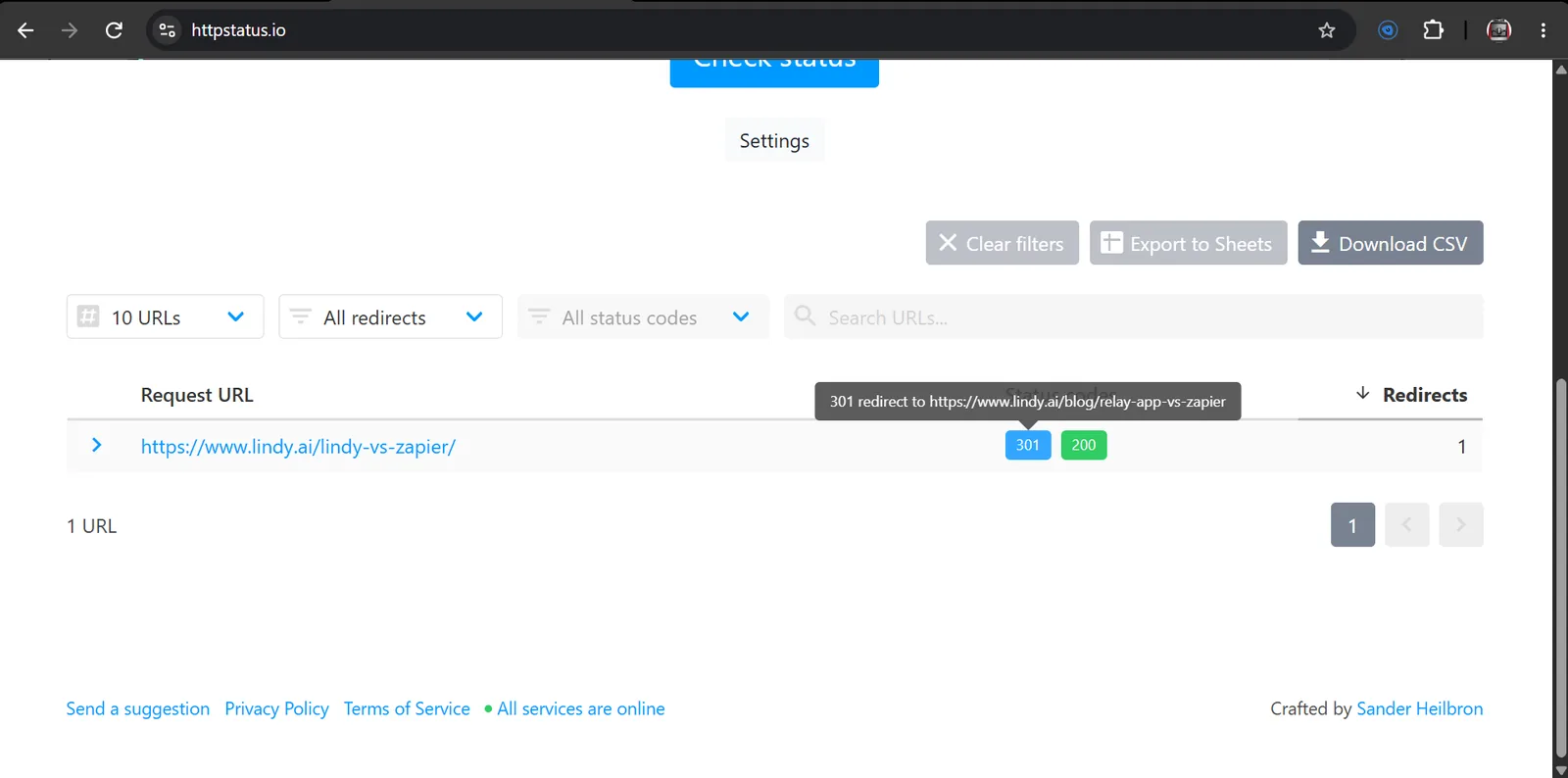 /lindy-vs-zapier/ redirects (301) · 12 Nov
The page’s FAQ: 40 free tasks · 12 Nov
The page’s button: 7-day trial · 12 Nov
Lindy’s homepage: $50 in credits · 12 Nov
4,000+ and 1,000+ apps on one page · 12 Nov
Relay’s shutdown notice · 13 Nov
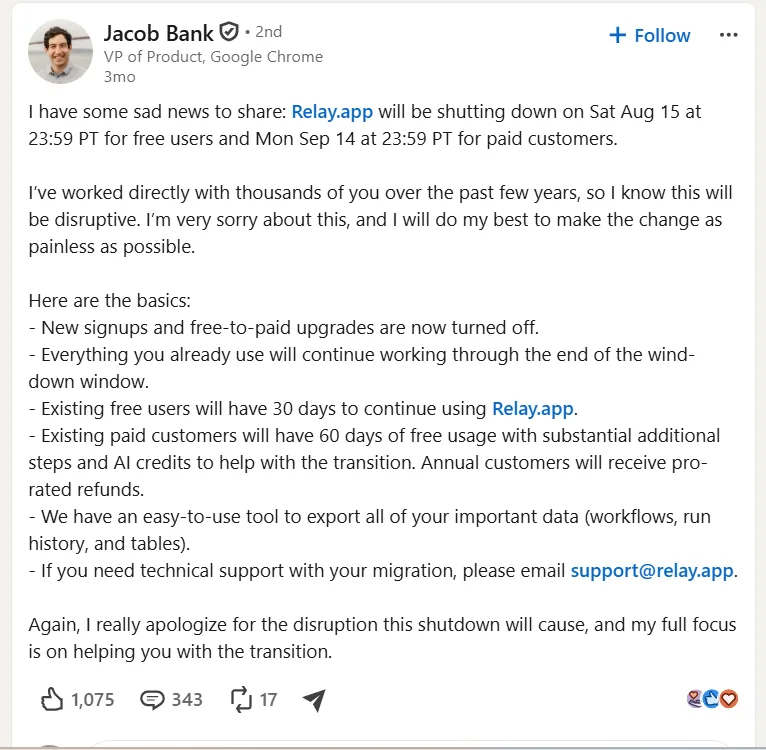 The founder’s shutdown post · 13 Nov
Zapier’s Relay guide, dated 20 Jul · 13 Nov
Zapier first for “lindy vs zapier” · 13 Nov
Lindy’s “Always allow” option · 16 Nov
My test log · 16 Nov
Lindy’s sign-up asks for a card · 14 Nov
Body and sidebar now say 3,000+ · 24 Nov
The FAQ still says “more than 4,000” · 24 Nov
Comparison table: Lindy at $49.99, Relay still listed · 24 Nov
Pricing FAQ, browser 1: from $49.99 for 5,000 credits · 24 Nov
Pricing FAQ, browser 1: paid from $49.99 · 24 Nov
Pricing page, browser 2: Team from $29.99 · 24 Nov
Disclosure
Method and Disclosure
- Dates: I captured Lindy’s page on 12 November 2026, scored it on 13 November, and tested both tools on 14 and 16 November. Prices were checked on 14–16 November, in USD. AI answers were checked on 13 and 17 November. I re-checked Lindy’s comparison page, pricing page, and pricing docs on 24 November, in two browsers.
- Tools: Lindy’s Free plan, Zapier’s free trial, Google, Bing, ChatGPT, Perplexity, Google AI Mode, and httpstatus.io.
- Free plans and trials only. Neither company paid me, and I paid neither.
- No affiliation with Lindy or Zapier, no affiliate links.
- Short quotes only. Lindy’s page is shown in screenshots, not copied. And brand names are used only to describe and compare.
Update or remove. If Lindy updates its page, I’ll add a dated note here, with an after screenshot. And if anything here is wrong, or Lindy would like it taken down, contact me and I’ll fix it or remove it.

Work with me
Want Pages That Bring in Buyers, Not Browsers?
I write comparison, alternatives, integration, and use-case pages for B2B SaaS teams. On a free 20-minute call, I’ll review 2–3 of yours and send a written summary within 24 hours.
Free · 20 minutes · 3 founding client spots, starting December 2026 to Q1 2027. Pilot pages can start this month.