Lindy vs Zapier (2026): Which to Pick After Relay.app Shut Down
Last tested 16 Nov 2026 · Prices checked 14–16 Nov 2026, Lindy’s again on 24 Nov 2026 · Drafted by Peter Murage as an unsolicited rebuild. Not published or endorsed by Lindy.
Relay.app is gone!
It shut down in September 2026. Free users lost access on 15 August. Paid customers followed on 14 September. And every account, workflow, and run history was deleted.
More than 300 people commented on the founder’s announcement, and many named where they’re moving next.
So if you ran approval workflows in Relay, you’re rebuilding them somewhere else. The only question is where.
For most teams, Zapier is the safe answer. It connects to more than 9,000 apps, and it has run business automations for years.
However, there’s a catch for Relay users: approvals!
Zapier’s Human in the Loop step needs the Professional plan or higher. And on Professional, approval requests can only go to you.
That matters if a teammate, not you, signs off on the work.
So we didn’t stop at feature lists. We rebuilt the same Relay-style workflow in both tools, and we timed every step.
We tested both tools on 14 and 16 November 2026 and show what we found, including where Lindy was slower or cost more. There are no affiliate links on this page.
The Quick Answer
Pick Lindy if you want to describe a workflow in plain English and approve each action before it happens. Our test workflow took about 12 minutes to build, and approvals are built into every plan.
Pick Zapier if you need the largest app library (9,000+) and a step-by-step canvas you can check before anything runs. You’ll need the Professional plan or higher for approvals.
Moving off Relay? Neither tool imports Relay workflows, so you’ll rebuild them from your export in either one.
Quick Picks
| Lindy | Zapier | |
|---|---|---|
| Best for | Teams who want an AI assistant to do the work and ask before it acts | Teams who want full control of every step and the widest app coverage |
| Starts at | Free: $50 in credits for 7 days, then Team from $49.99 per user per month (some visitors saw $29.99 for 3,000 credits on 24 Nov) | Free: 100 tasks a month (two-step Zaps only), then Professional from $29.99 a month |
| Approvals | Built in, on every plan | Professional and up |
| Start free with $50 in credits → | See Zapier’s pricing → |
Lindy vs Zapier at a Glance
We built one workflow in both tools: a new email arrives, AI summarizes it and drafts a reply, a person approves, the reply is sent, and the result is logged to a Google Sheet.
| Lindy | Zapier | |
|---|---|---|
| Best for | Approvals without a plan upgrade | The widest app coverage |
| How you build | Describe it in chat, in plain English | Place steps on a visual canvas |
| Time to build our workflow | About 12 minutes (one failed save) | About 1 hour, including stalls |
| See every step? | In the run log, after it runs | On the canvas, before it runs |
| Human approval | Built in. Anything that sends, posts, or writes waits for you. Read-only lookups don’t | Human in the Loop step, Professional and up. On Professional, requests go only to you |
| Approvals in our test | 3 (create draft, send, log row) | 1 |
| Who sends after approval | Lindy | Zapier |
| Email to reply sent | About 8 minutes, including the time we took to approve | About 12 minutes, including the time we took to approve |
| Free offer | $50 in credits for 7 days (our sign-up asked for a card) | Free plan: 100 tasks a month, two-step Zaps only. 14-day trial, no card |
| Plan to buy for this workflow | Team: $49.99 per user per month, 5,000 credits | Professional: $29.99 a month, or $19.99 billed yearly |
| Cost of one test run | 73 credits, about $0.73 | Billed in tasks; the approval step counts as 1 task |
| Apps | 3,000+, plus MCP | 9,000+ |
| Moving from Relay | Rebuild from your export | Rebuild from your export |
Prices checked 14–16 November 2026 on Lindy’s and Zapier’s pricing pages. App counts are each company’s own figure (Lindy, Zapier), checked 16 November 2026. On 24 November 2026, Lindy’s pricing page also showed some visitors a smaller Team tier: $29.99 a month for 3,000 credits. We re-check these prices every month.

Lindy: Best for Approvals Without a Plan Upgrade
Who it’s for. Small teams replacing Relay who want every outside action approved by a person, without moving to a bigger plan to get it.
Key features.
- Simply build in plain English. We described the workflow in chat and had a working routine in about 12 minutes. The first save failed; the second worked.
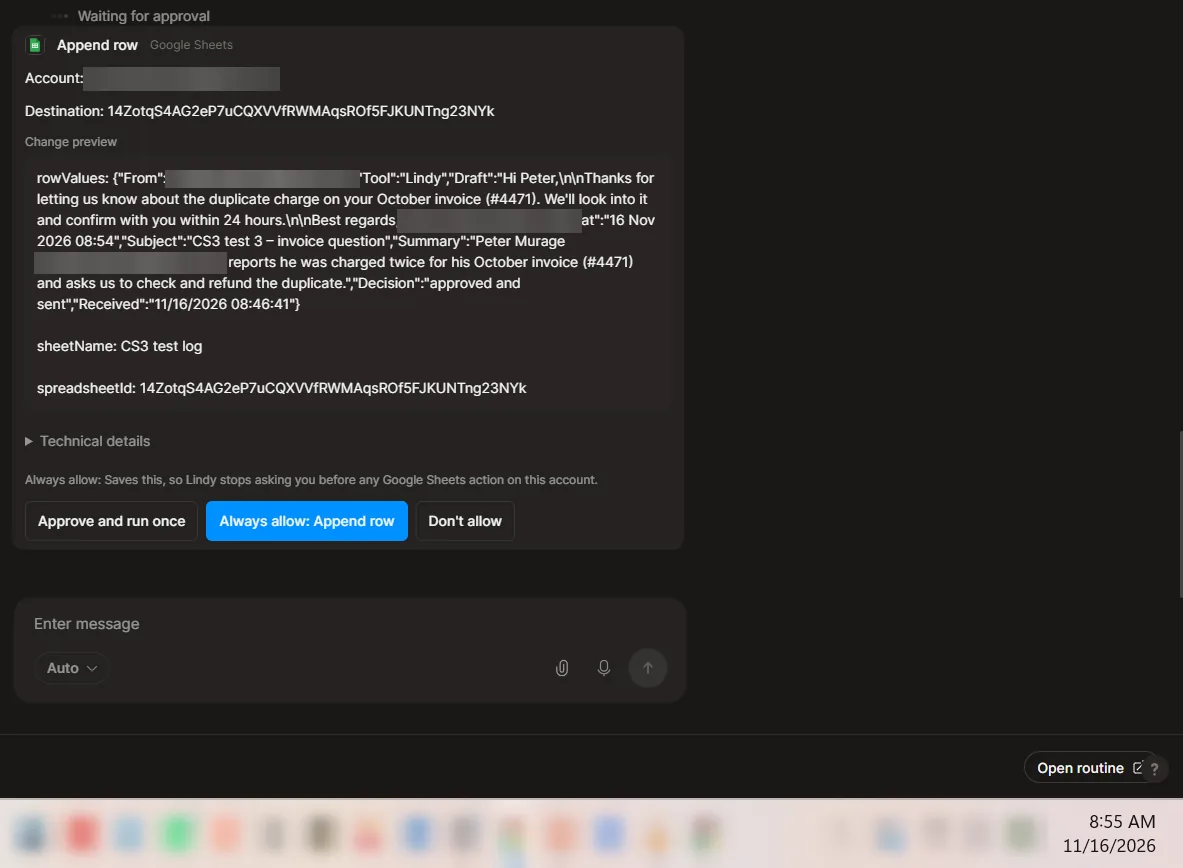
- Approval before every outside action, on every plan. Lindy asked before creating the draft, before sending it, and before adding the row to the sheet. You approve or decline inside Lindy, and Lindy does the rest.
- “Always allow” when you trust a step. Choose it on one card, and Lindy stops asking before any action in that app, not just that one. Allow each app in the workflow, and it runs on its own.
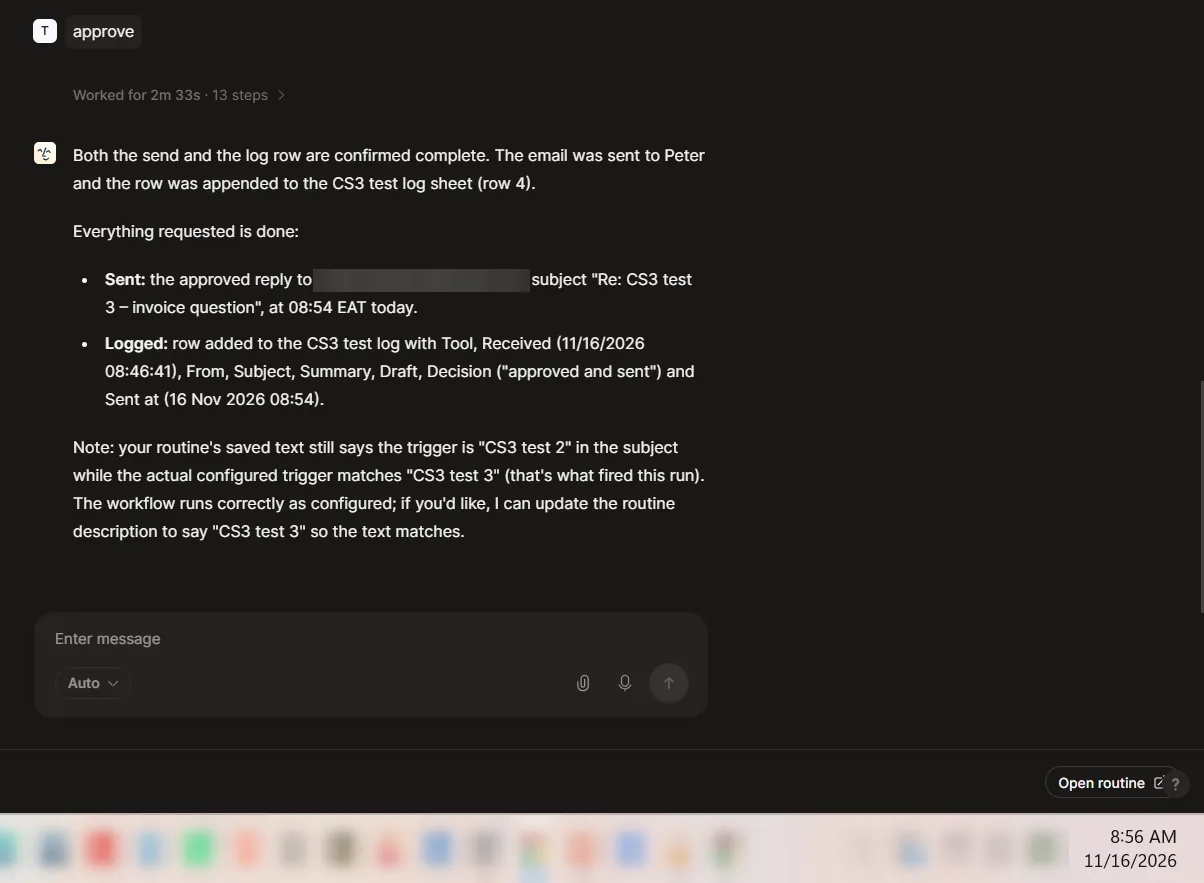
- It flags its own mismatches. In our re-run, Lindy noticed that the routine’s description still named an old subject line while the trigger used the new one, ran on the trigger, and told us.
- 3,000+ integrations, plus MCP for tools that aren’t on the list.
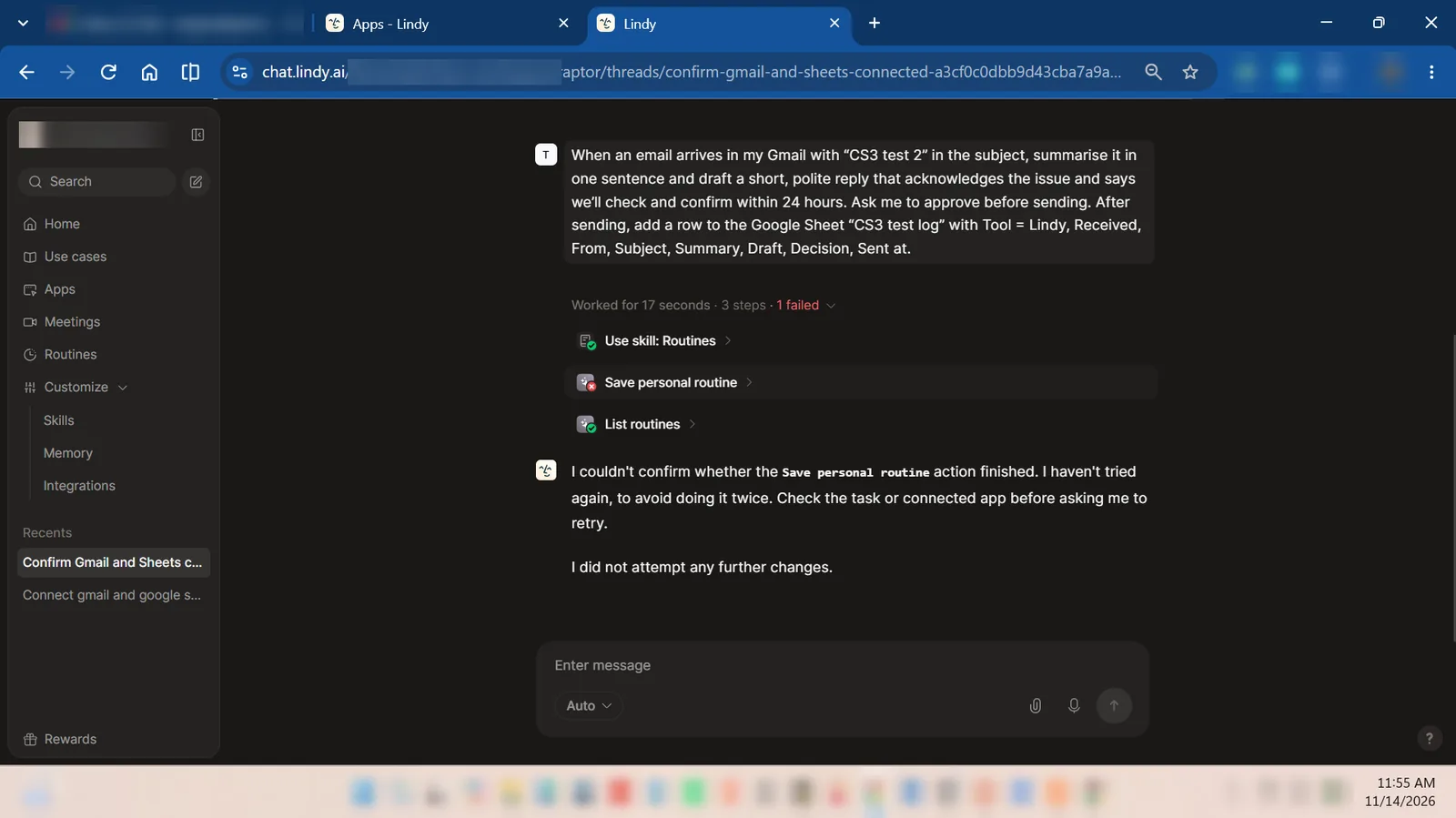
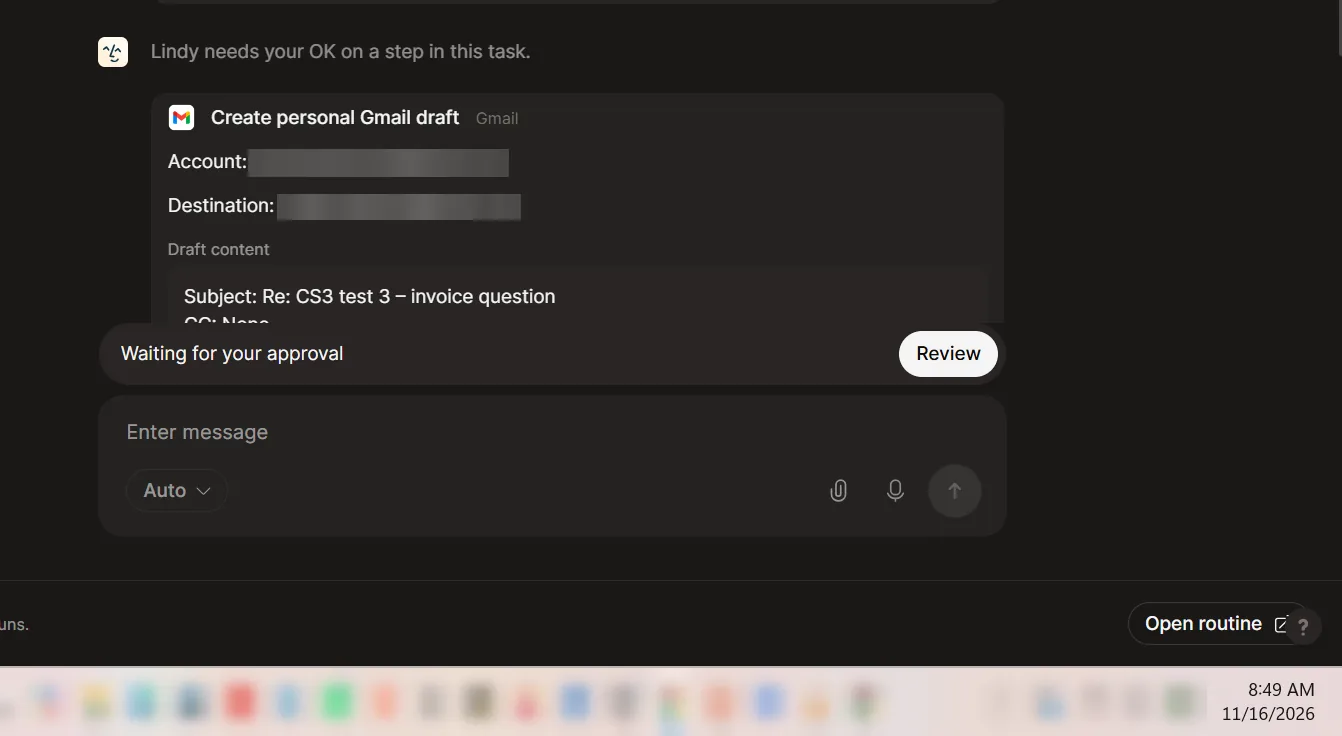
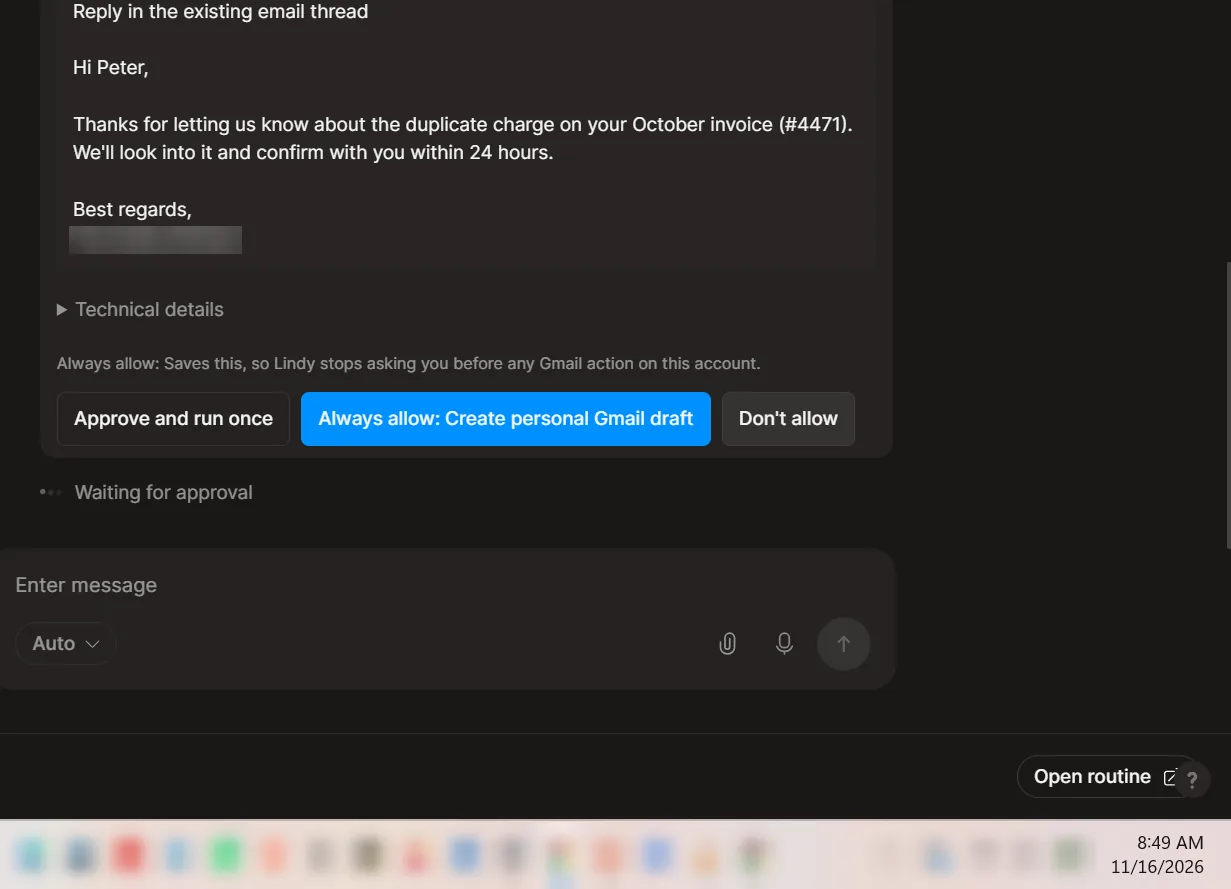
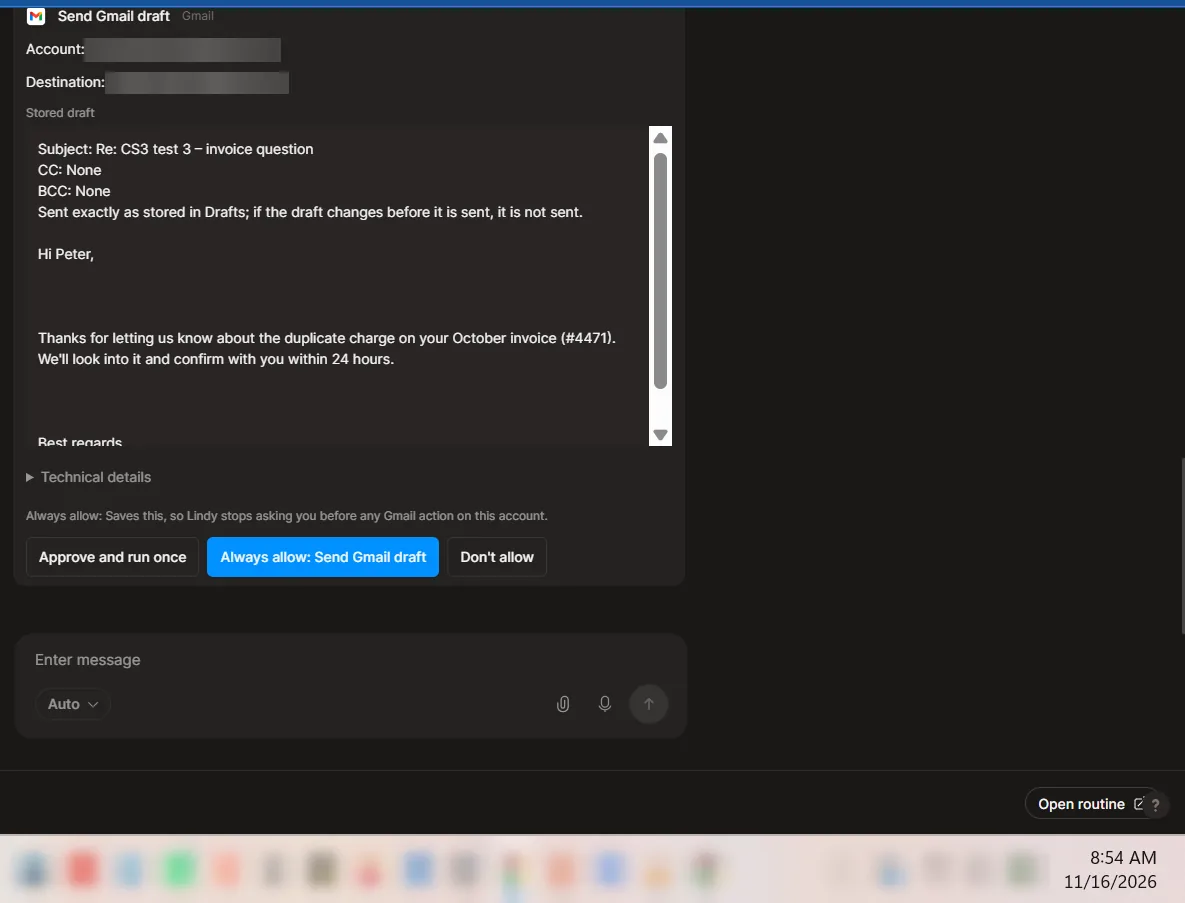
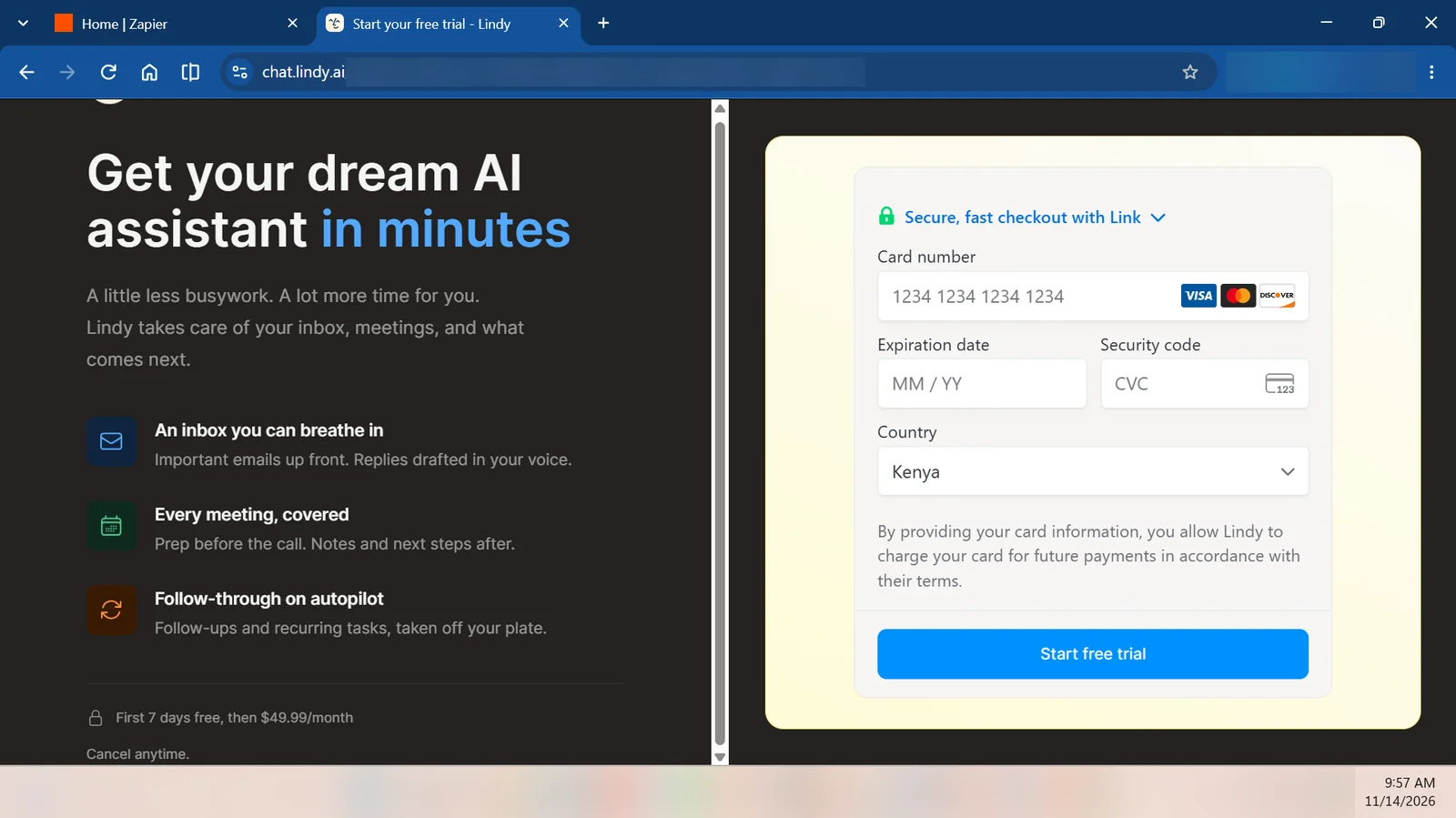
Free vs paid. The Free plan gives you $50 in credits that last 7 days. Our sign-up asked for a card. After that, Team costs $49.99 per user per month for 5,000 credits, and every active user in the workspace is billed. On 24 November, some visitors also saw a smaller tier: $29.99 for 3,000 credits. Higher tiers add credits (15,000 credits for $99.99 a month), and you can top up at $10 per 1,000 credits.
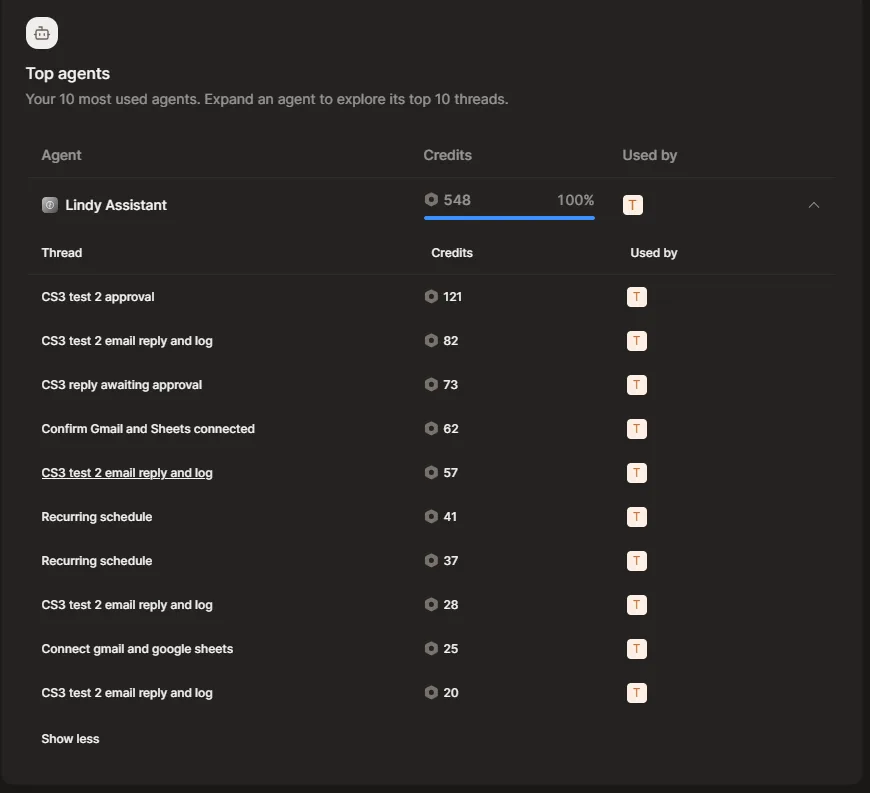
When to upgrade. Move to Team when your $50 in credits runs out or a second teammate joins. One run of our test workflow used 73 credits, so 5,000 credits covers about 68 runs a month (3,000 credits covers about 41). If you run more, the 15,000-credit tier works out cheaper than topping up.
Drawbacks.
- More approvals by default. Our workflow asked three times per run. “Always allow” fixes that, but it’s broad: it covers every action in that app, in every routine, not just the one you approved. And if an owner or admin clicks it, it applies to the whole workspace.
- No step canvas. You see what Lindy did in the run log afterwards (“Worked for 2m 33s · 13 steps”), not on a map before it runs.
- Credits are shared across everything Lindy does. A daily brief running in our test workspace used 78 credits over two mornings. Check Settings › Usage in your first week and switch off routines you don’t need. If credits run out, Lindy pauses those actions until your next cycle. There’s no surprise bill, and you can top up at $10 per 1,000.
- Broad Google access. Lindy asked for Gmail, Google Sheets, and Google Drive, and searched Drive during an email workflow. Your data is encrypted and never used to train models, and it’s SOC 2 and GDPR compliant.
Verdict. Lindy is the easiest way to rebuild a Relay approval workflow, because you build it by chatting, it asks before every outside action, and “Always allow” lets it run on its own once you trust it.
Zapier: Best for the Widest App Coverage
Who it’s for. Teams who want to see and control every step before it runs, or who depend on apps that only Zapier connects to.
Key features.
- 9,000+ apps, the largest library of any tool on this page.
- A visual canvas. All five steps of our workflow sat on one screen, in order, before anything ran.
- One approval, then Zapier sends. The approval request opened in the Zap’s run view with the draft editable. We approved once, and Zapier sent the reply and logged the row.
- AI by Zapier summarized the email and drafted the reply inside the Zap.
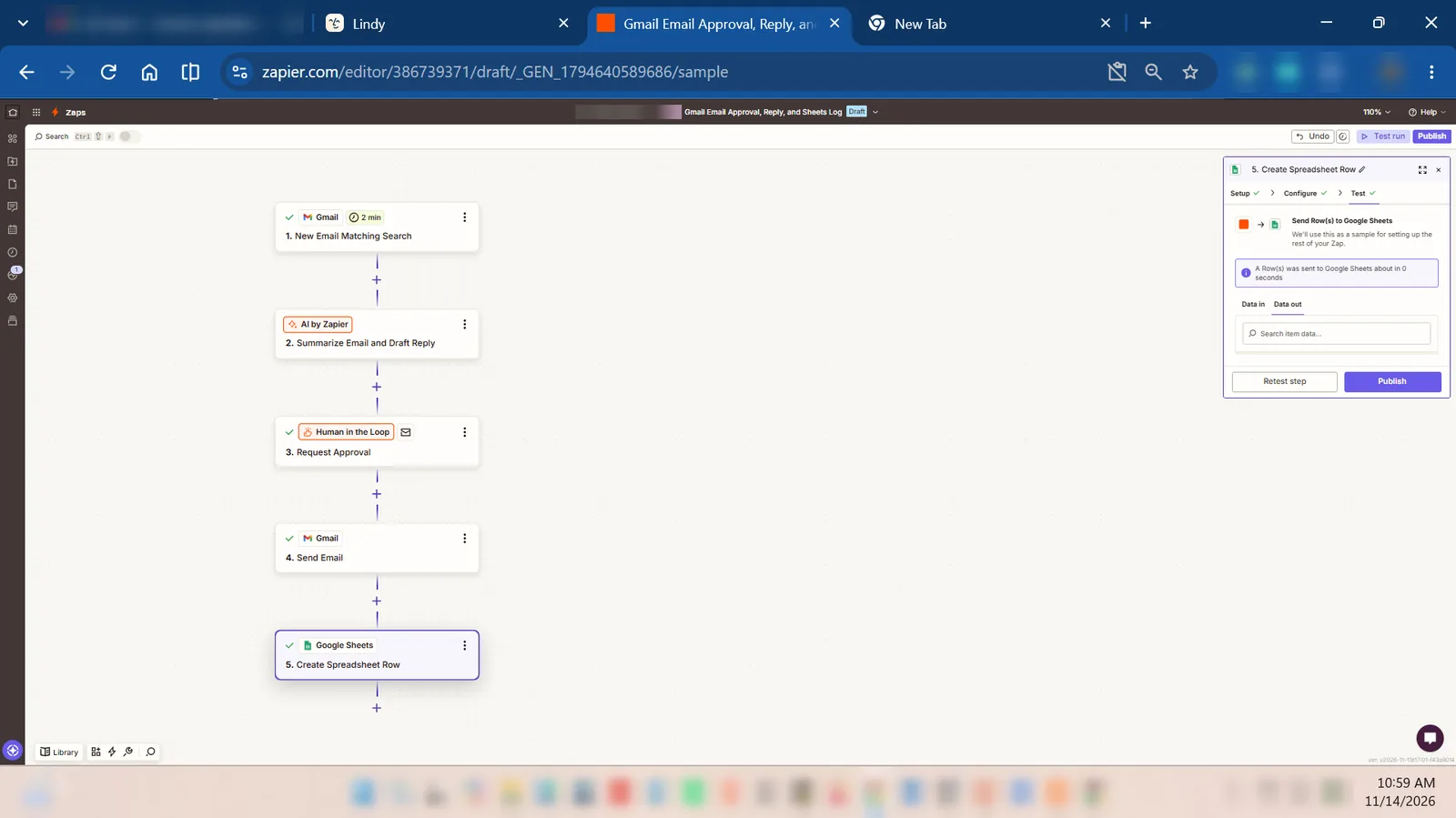
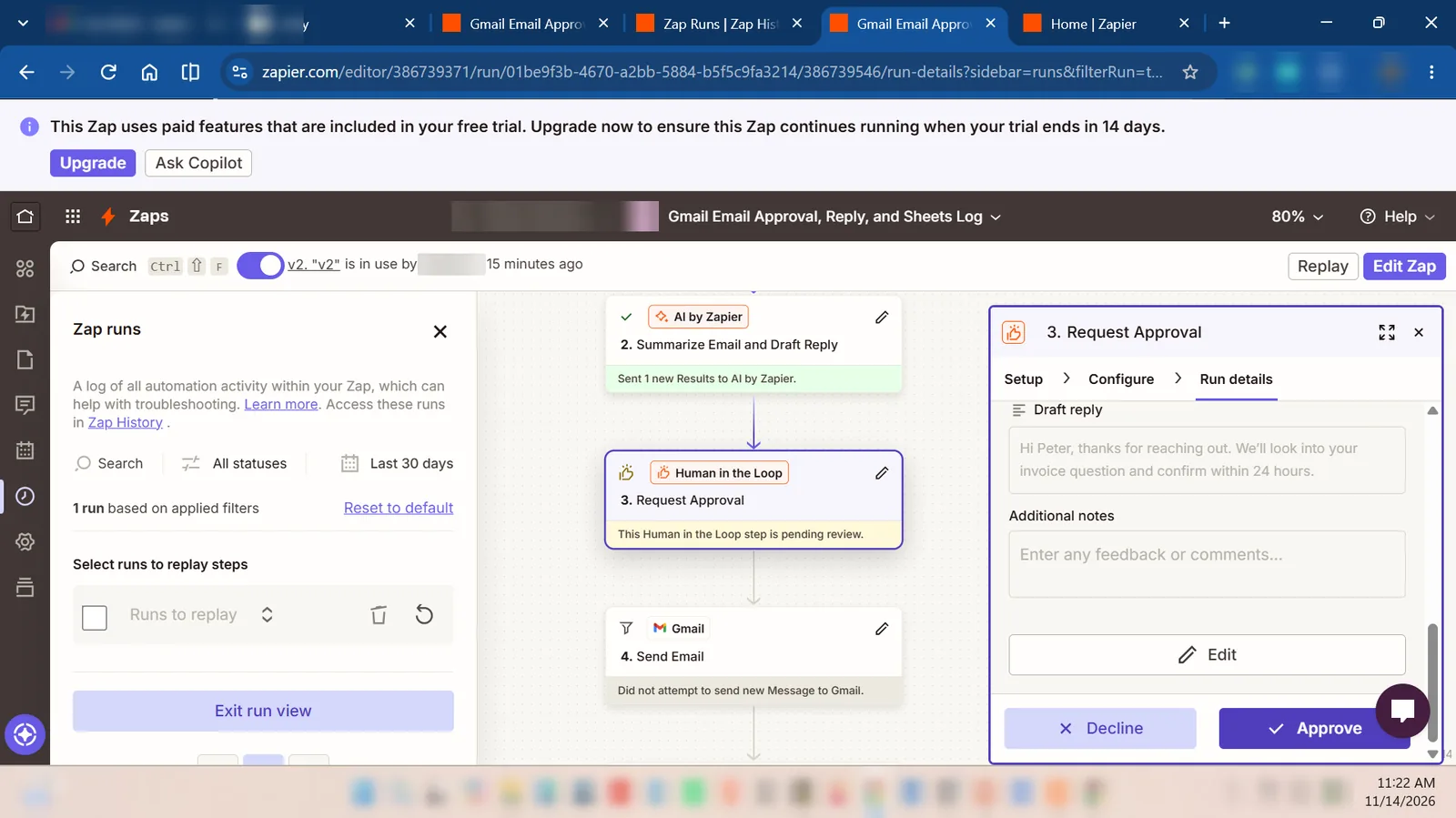
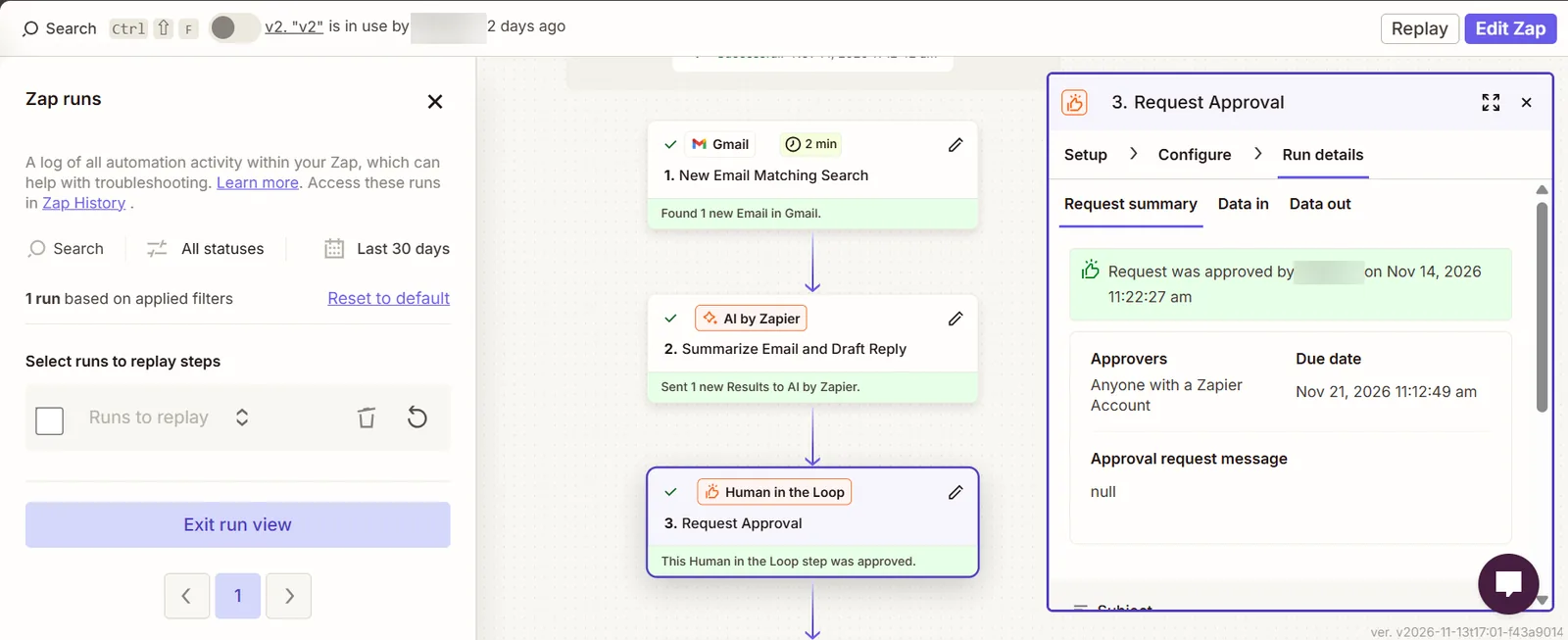
Free vs paid. The Free plan includes 100 tasks a month but only two-step Zaps, so an approval workflow won’t run on it. The 14-day trial needs no card. Professional starts at $29.99 a month, or $19.99 billed yearly. Team starts at $103.50 a month, or $69 billed yearly, for up to 25 users. Prices rise with the number of tasks you run.
When to upgrade. Any multi-step or approval workflow needs Professional. If approvals need to go to teammates rather than to you, you need Team.
Drawbacks.
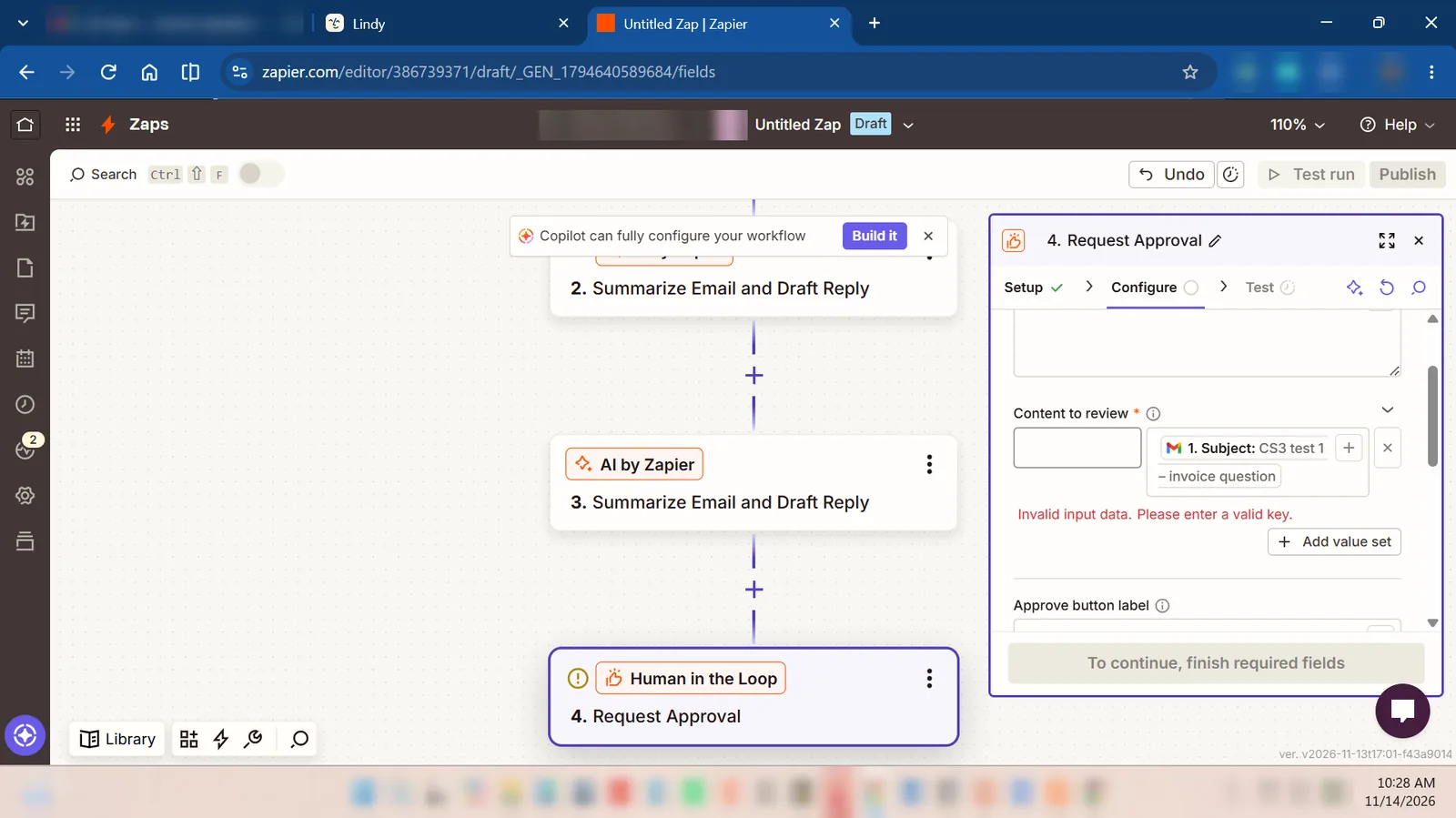
- Slower to build. Our workflow took about an hour. We hit an unclear error on the approval step (“Content to review” needs key and value pairs), two look-alike Google Sheets actions, a sheet that needed headers in row 1, and an email confirmation before we could publish.
- Approvals cost a plan upgrade, and on Professional they only go to you.
- Polling trigger. Zapier checks for new emails on a schedule (every 2 minutes on our plan), so replies don’t start instantly.
Verdict. Zapier takes longer to learn, but once your Zap is built it runs on its own and stops only at the Human in the Loop step for your approval, on Professional or higher.
Which One Should You Pick?
- Do approvals need to go to teammates, not just you? Yes: Lindy (any plan) or Zapier Team.
- Do you want to describe the job, or place every step yourself? Describe it: Lindy. Place it: Zapier.
Moving off Relay
- What you can bring: Relay’s export, if you downloaded it before the cut-off.
- → Your workflows, as JSON and as plain-English prompts
- → Run history
- → Tables, as CSVs
- How to use it: neither Lindy nor Zapier imports it, so it’s your guide for the rebuild.
- → Start with the plain-English build prompt Relay made for each workflow.
- → Paste it into Lindy’s chat, or into Zapier’s Copilot.
- What you must reconnect: every app. Relay deleted its stored connections, so sign in to Gmail, Google Sheets, and the rest again.
- Where your approval step goes:
- Zapier: one Human in the Loop step (Professional and up). You approve once, and Zapier runs the rest.
- Lindy: no extra step. Lindy asks before each outside action, so we approved 3 times: the draft, the send, and the log row. “Always allow” stops the prompts for that whole app.
- How long it takes: on 14 November, our five-step workflow took about 12 minutes in Lindy and about an hour in Zapier.
Also Consider: Make and n8n
We didn’t test these two, but Relay users often shortlist them.
Make suits visual builders on a budget. The Free plan includes 1,000 credits a month, 3,500+ apps, and a 15-minute minimum between runs. Paid plans start at $10.59 a month (Core), or $9 billed yearly, at the 10,000-credit tier. The drawback: Make’s built-in approval step is Enterprise-only and still in closed beta, so on other plans you build the pause yourself.
n8n suits technical teams who want to pay per workflow run, or self-host. Starter costs $24 a month, or $20 billed yearly, for 2,500 workflow executions with unlimited steps, and Pro costs $60 a month, or $50 billed yearly, for 10,000. Both start with a free trial and no card. The drawback: it’s the most technical of the four.
Make and n8n prices checked 16 November 2026 on Make’s and n8n’s pricing pages. We re-check these prices every month.
FAQ
Does Lindy Have a Free Plan?
Not a free-forever one. The Free plan is a 7-day trial with $50 in credits, and our sign-up asked for a card. After 7 days, Team costs $49.99 per user per month for 5,000 credits. On 24 November, some visitors were shown $29.99 for 3,000 credits instead.
Can Lindy Add an Approval Step Like Relay?
Yes, per action, and it’s on by default. Anything that sends, posts, or writes waits for your approval, on every plan. Our test asked 3 times: the draft, the send, and the log row. Choose “Always allow,” and Lindy stops asking before any action in that app, not just that one.
Do My Relay Workflows Import Into Lindy or Zapier?
No. Neither tool imports them, so you rebuild them from Relay’s export, starting with each workflow’s build prompt. Our five-step test workflow took about 12 minutes to rebuild in Lindy and about an hour in Zapier.
Which Is Cheaper for a Team of 5?
On seats, Zapier. Zapier Team starts at $103.50 a month, or $69 billed yearly, for up to 25 users. Lindy bills every active user at $49.99, so about $250 a month for 5, with 5,000 credits each. At the $29.99 tier, if you’re offered it, that’s about $150 a month for 15,000 credits.
However, Zapier’s price rises with the tasks you run, and approvals that go to teammates need Team. In Lindy, credits pool across the team, so 5 seats give you 25,000 credits a month. At 73 credits a run, that’s about 340 runs. Teammates you add directly are billed right away.
Ready to rebuild your Relay workflows? Describe one in plain English and approve every step before it runs.
Start free with $50 in credits →
Last tested 16 Nov 2026 · Prices checked 14–16 Nov 2026, Lindy’s again on 24 Nov 2026 · Re-checked monthly